PRU-101 - DUI Advisement of Rights, Waiver, and Plea Form (Vehicle Code23152) 2026

Get Form
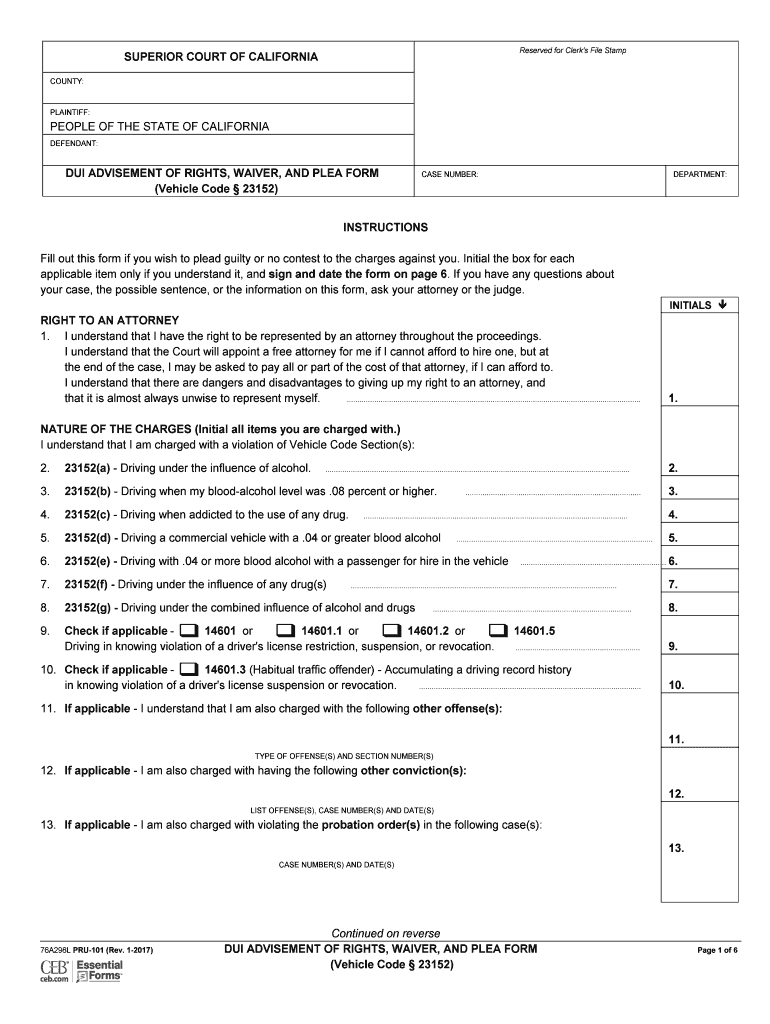
PRU-101 - DUI Advisement of Rights, Waiver, and Plea Form (Vehicle Code23152) Preview on Page 1

Here's how it works

01. Edit your form online
Type text, add images, blackout confidential details, add comments, highlights and more.
02. Sign it in a few clicks
Draw your signature, type it, upload its image, or use your mobile device as a signature pad.
03. Share your form with others
Send it via email, link, or fax. You can also download it, export it or print it out.

How to use or fill out PRU-101 - DUI Advisement of Rights, Waiver, and Plea Form (Vehicle Code23152) with DocHub

Form edit decoration
9.5
Ease of Setup
DocHub User Ratings on G2
9.0
Ease of Use
DocHub User Ratings on G2
  1. Click ‘Get Form’ to open it in the editor.
  2. Begin by entering your case number and department at the top of the form. This ensures that your document is properly filed.
  3. In the 'Defendant' section, fill in your name as it appears on legal documents. This is crucial for identification purposes.
  4. Read through each right listed under 'Right to an Attorney' and initial next to each statement only if you understand it. This confirms your comprehension of your rights.
  5. Proceed to the 'Nature of the Charges' section. Initial next to each charge that applies to you, ensuring accuracy in your acknowledgment of charges.
  6. In the 'Waiver of Rights' section, carefully read each right you are waiving and initial accordingly. This step is vital as it indicates your informed consent.
  7. Finally, sign and date the form at the bottom. Ensure all fields are completed before submitting.

Start using our platform today for free to complete your PRU-101 form efficiently!

See more PRU-101 - DUI Advisement of Rights, Waiver, and Plea Form (Vehicle Code23152) versions

We've got more versions of the PRU-101 - DUI Advisement of Rights, Waiver, and Plea Form (Vehicle Code23152) form. Select the right PRU-101 - DUI Advisement of Rights, Waiver, and Plea Form (Vehicle Code23152) version from the list and start editing it straight away!
Versions Form popularity Fillable & printable
2017 4.7 Satisfied (20 Votes)
be ready to get more

Complete this form in 5 minutes or less

Get form

Got questions?

We have answers to the most popular questions from our customers. If you can't find an answer to your question, please contact us.
Contact us

You need to use only reliable software solutions with strong data protection compliance to sign your paperwork electronically. DocHub is just the type of service you need! It stores data on Amazon Web Servers and complies with all essential security requirements and eSignature regulations, so it’s a trusted way to electronically sign your PRU-101 - DUI Advisement of Rights, Waiver, and Plea Form (Vehicle Code23152) or other documents using this tool.

If you want to edit your PRU-101 - DUI Advisement of Rights, Waiver, and Plea Form (Vehicle Code23152) on the internet swiftly, it does not matter what browser you employ. DocHub’s straightforward editing tools are accessible using any internet browser. Just open the appropriate tab within our editor, add your file, and fill it out without stress.

California DUI Probation Violations Typically, people are placed on probation for a period of three to five years and are expected to complete a drunk driving program(s), pay court fines and fees, not commit any criminal offenses, and not to drive with any measurable amount of alcohol in their system.
Under Vehicle Code 23152(b), a persons measured blood alcohol content is presumed to be the same BAC as when the individual was driving if the blood or breath sample is obtained within three hours of when the individual last drove.
be ready to get more

Complete this form in 5 minutes or less

Get form