Boe 400 spa 2026

Get Form
boe 400 spa Preview on Page 1

Here's how it works

01. Edit your form online
Type text, add images, blackout confidential details, add comments, highlights and more.
02. Sign it in a few clicks
Draw your signature, type it, upload its image, or use your mobile device as a signature pad.
03. Share your form with others
Send it via email, link, or fax. You can also download it, export it or print it out.

How to use or fill out boe 400 spa with our platform

Form edit decoration
9.5
Ease of Setup
DocHub User Ratings on G2
9.0
Ease of Use
DocHub User Ratings on G2
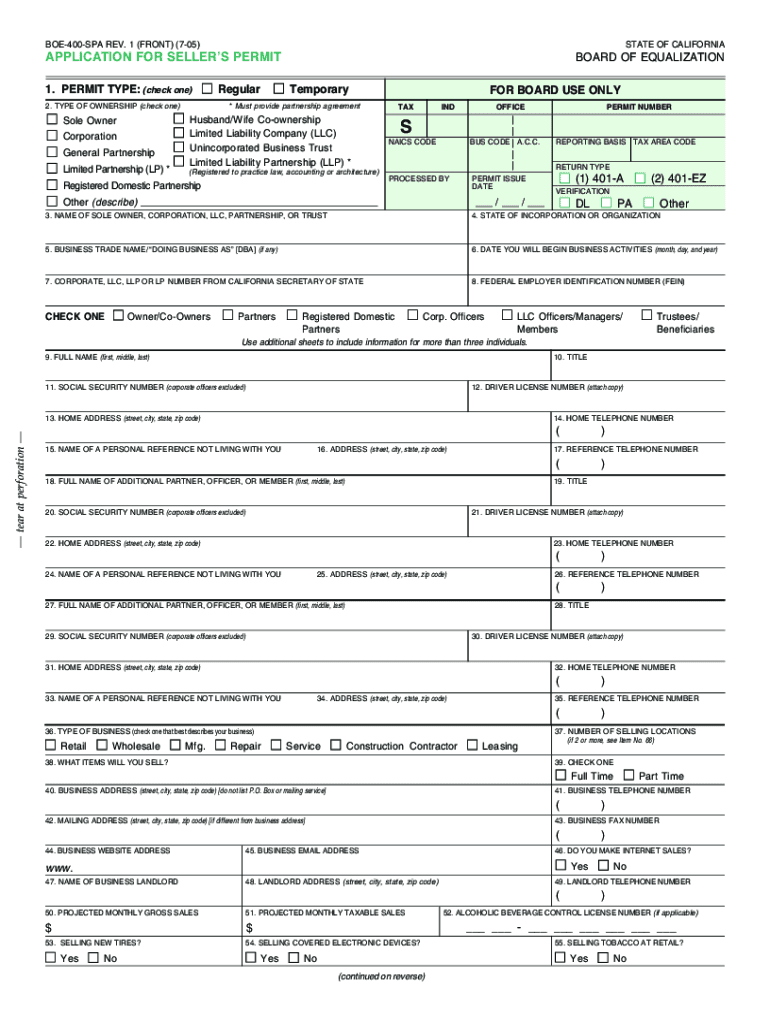
  1. Click ‘Get Form’ to open the BOE-400-SPA application in the editor.
  2. Begin by selecting the type of permit you need: Regular for ongoing sales or Temporary for sales lasting 90 days or less. Ensure you check the appropriate box.
  3. Fill in your business identification information, including ownership type and business name. If applicable, attach any required partnership agreements.
  4. Provide detailed ownership information for all partners or corporate officers, including their names, titles, and identification numbers. Remember to attach copies of driver licenses as needed.
  5. Indicate your business type (retail, wholesale, etc.) and describe the specific items you will sell. Avoid vague terms; be precise about your merchandise.
  6. Complete projected monthly sales figures to help determine your filing frequency. This is crucial for tax reporting purposes.
  7. Review all entries for accuracy before submitting your application through our platform for processing.

Start filling out your BOE-400-SPA form online for free today!

See more boe 400 spa versions

We've got more versions of the boe 400 spa form. Select the right boe 400 spa version from the list and start editing it straight away!
Versions Form popularity Fillable & printable
2010 4.9 Satisfied (56 Votes)
2005 4 Satisfied (50 Votes)
be ready to get more

Complete this form in 5 minutes or less

Get form

Got questions?

We have answers to the most popular questions from our customers. If you can't find an answer to your question, please contact us.
Contact us

You should use only reliable software solutions with strong data protection compliance to approve your paperwork electronically. DocHub is just the type of editor you need! It stores data on Amazon Web Servers and complies with all essential security requirements and eSignature regulations, so it’s a trustworthy way to eSign your boe 400 spa or other forms with this tool.

It is a no-brainer on a computer or via a mobile device to complete a boe 400 spa with DocHub. All you need to do is open any installed internet browser on your smartphone and proceed to the DocHub website. Once authenticated, add your file and open it in editing mode. Use our toolbar to make your edits and save changes. Optionally, keep your file in your files or send it to a recipient on the spot.

Generally, if you make three or more sales in a 12-month period, you are required to hold a seller's permit. This applies even if your sales are made through Internet auction houses or websites that offer online classified advertisements (online advertisers).
Typically, a Temporary Seller's Permit is valid for up to 90 days. To obtain a permit, you'll need to submit an application to the California Department of Tax and Fee Administration. Once your application is approved, you'll be issued a permit number that must be displayed at your place of business.
A seller's permit provides a business with authority to make sales inside California. In contrast a resale certificate is a form that is provided from a buyer to a seller to support the exempt nature of a sale for resale that would otherwise be taxable.

Security and compliance

At DocHub, your data security is our priority. We follow HIPAA, SOC2, GDPR, and other standards, so you can work on your documents with confidence.

Learn more
ccpa2
pci-dss
gdpr-compliance
hipaa
soc-compliance
be ready to get more

Complete this form in 5 minutes or less

Get form

People also ask

A business permit is not the same thing as a seller's permit. A business license permits you to conduct business. A seller's permit allows you to sell goods or other property. If you start a business that sells goods, you will most likely need both documents.
There is no charge for a seller's permit, but security deposits are sometimes required. You can apply online using online registration or you may apply at a nearby CDTFA location.
No. Your permit is valid only so long as you are actively engaged in business as a seller. If you are no longer conducting business as a seller, you should contact us immediately to cancel your permit.
California Seller's Permit: If you are doing business in California and intend to sell or lease tangible personal property subject to sales tax sold at retail, you are required to have a seller's permit and prominently display it at your place of business.
A business permit is not the same thing as a seller's permit. A business license permits you to conduct business. A seller's permit allows you to sell goods or other property. If you start a business that sells goods, you will most likely need both documents.

Related links