01. Edit your paperwork for medicaid to cover pump online
Type text, add images, blackout confidential details, add comments, highlights and more.
02. Sign it in a few clicks
Draw your signature, type it, upload its image, or use your mobile device as a signature pad.
03. Share your form with others
Send it via email, link, or fax. You can also download it, export it or print it out.
How to Use or Fill Out the Certificate of Medical Necessity: Insulin Pumps Form Online
Ease of Setup
DocHub User Ratings on G2
Ease of Use
DocHub User Ratings on G2
Click ‘Get Form’ to open it in the editor.
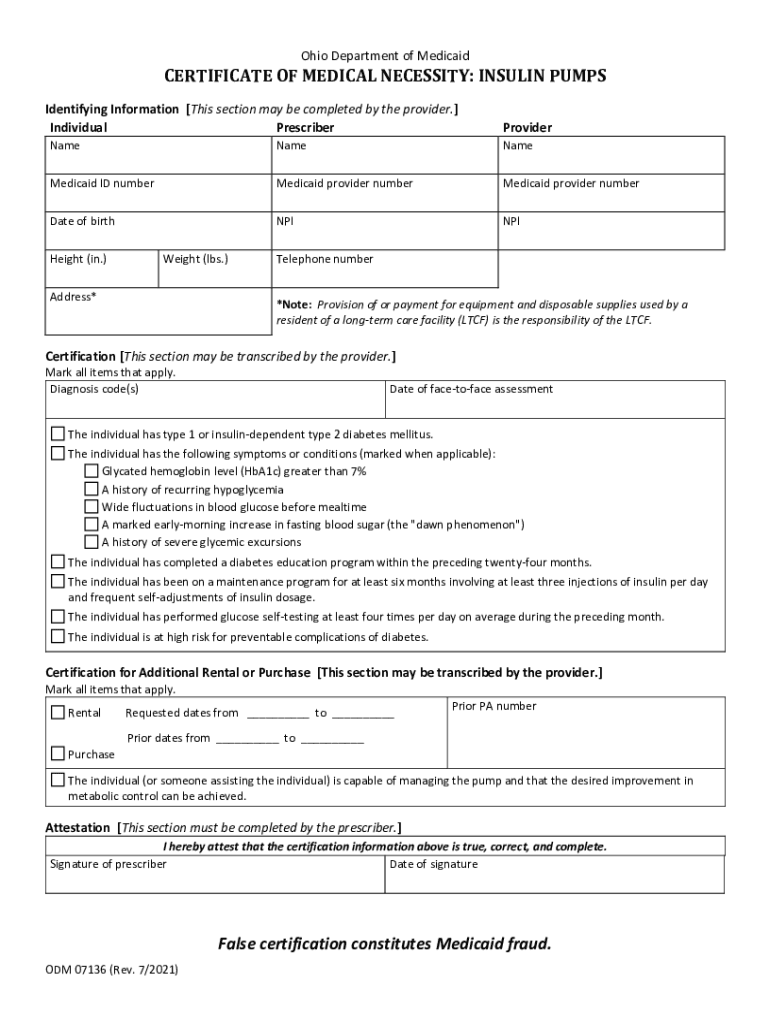
Begin by filling out the Identifying Information section. Enter the individual's name, date of birth, height, weight, and contact details. Ensure that you include the Medicaid ID and provider numbers accurately.
Move to the Certification section. Mark all applicable diagnosis codes and symptoms related to diabetes. This includes checking boxes for conditions like high glycated hemoglobin levels or a history of severe glycemic excursions.
In the Certification for Additional Rental or Purchase section, indicate whether you are requesting a rental or purchase. Fill in the requested dates and any prior authorization numbers if applicable.
Finally, complete the Attestation section by having the prescriber sign and date it, confirming that all information provided is accurate.
Start filling out your form online for free today!
Fill out Ohio Medicaid Insulin Pump Certificate online It's free
See more Ohio Medicaid Insulin Pump Certificate versions
We've got more versions of the Ohio Medicaid Insulin Pump Certificate form. Select the right Ohio Medicaid Insulin Pump Certificate version from the list and start editing it straight away!
List of durable medical equipment covered by medicaidOhio medicaid incontinence suppliesOhio medicaid provider agreementDurable Medical equipment List pdfOhio medicaid rulesOhio medicaid provider typesDoorbell Health DME phone numberMedical supplies through Medicaid
Security and compliance
At DocHub, your data security is our priority. We follow HIPAA, SOC2, GDPR, and other standards, so you can work on your documents with confidence.
Cookie consent notice
This site uses cookies to enhance site navigation and personalize your experience.
By using this site you agree to our use of cookies as described in our Privacy Notice.
You can modify your selections by visiting our Cookie and Advertising Notice.