Type text, add images, blackout confidential details, add comments, highlights and more.
02. Sign it in a few clicks
Draw your signature, type it, upload its image, or use your mobile device as a signature pad.
03. Share your form with others
Send meritain vision claim form via email, link, or fax. You can also download it, export it or print it out.
How to use or fill out meritain vision claim form with our platform
Ease of Setup
DocHub User Ratings on G2
Ease of Use
DocHub User Ratings on G2
Click ‘Get Form’ to open the meritain vision claim form in the editor.
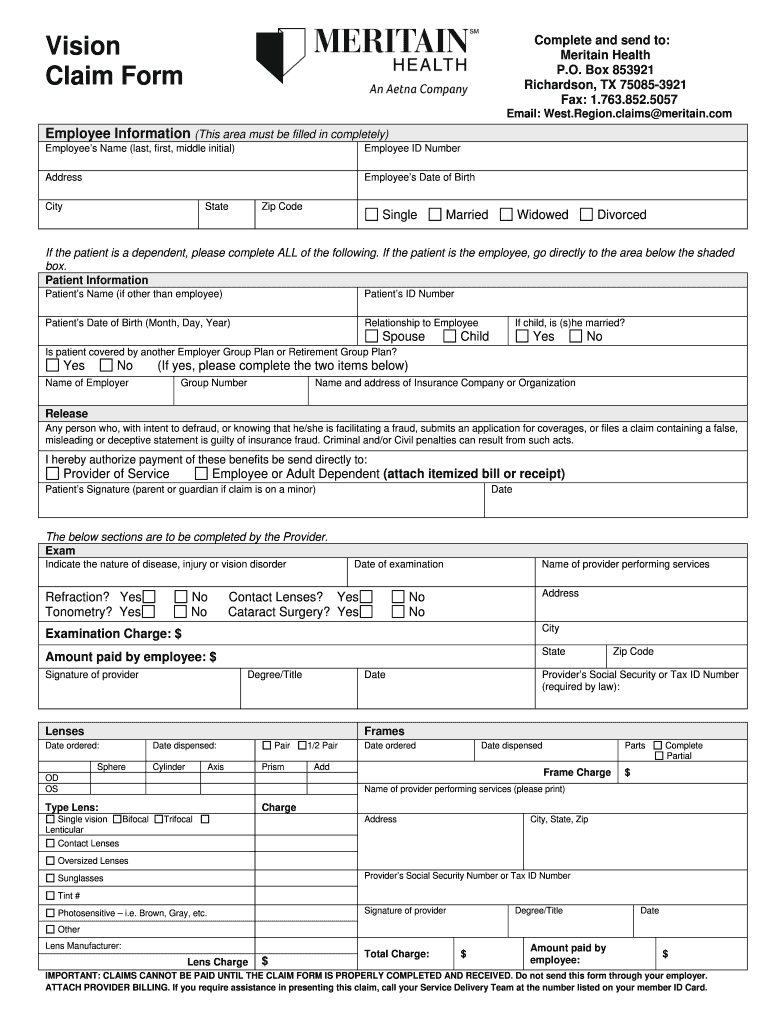
Begin by filling out the Employee Information section completely. Enter your name, employee ID number, address, date of birth, city, state, and zip code. Select your marital status from the options provided.
If the patient is a dependent, complete the Patient Information section. Provide their name, ID number, date of birth, and relationship to you. Indicate if they are married if they are a child.
Answer whether the patient is covered by another Employer Group Plan or Retirement Group Plan. If yes, fill in the employer's name and group number along with the insurance company's details.
In the Release section, authorize payment of benefits directly to the provider or yourself by providing necessary signatures and dates.
The Provider must complete their section detailing examination charges and services rendered. Ensure all fields are filled accurately.
Start using our platform today for free to streamline your meritain vision claim process!
Fill out meritain vision claim form online It's free
We've got more versions of the meritain vision claim form form. Select the right meritain vision claim form version from the list and start editing it straight away!
Meritain vision claim form pdfMeritain vision claim form onlineAetna Vision reimbursement form pdfMeritain Coordination of Benefits formMeritain Health Vision providersAetna Vision out-of-network claim form onlineMeritain Health timely filing limit for claimsMeritain Health provider phone number
Security and compliance
At DocHub, your data security is our priority. We follow HIPAA, SOC2, GDPR, and other standards, so you can work on your documents with confidence.
You can now submit your form online or by mail: 1. Online. Click below to complete an electronic claim form. Complete and return the paperwork attached below.
NOTE: Completion of this form is mandatory. To obtain a review, submit this form with any necessary information needed to support your appeal.Read more
Cookie consent notice
This site uses cookies to enhance site navigation and personalize your experience.
By using this site you agree to our use of cookies as described in our Privacy Notice.
You can modify your selections by visiting our Cookie and Advertising Notice.