DCH-0848-CHGBX, Application to Add a Father on Michigan Birth Record Application to Add a Father on -2026

Get Form
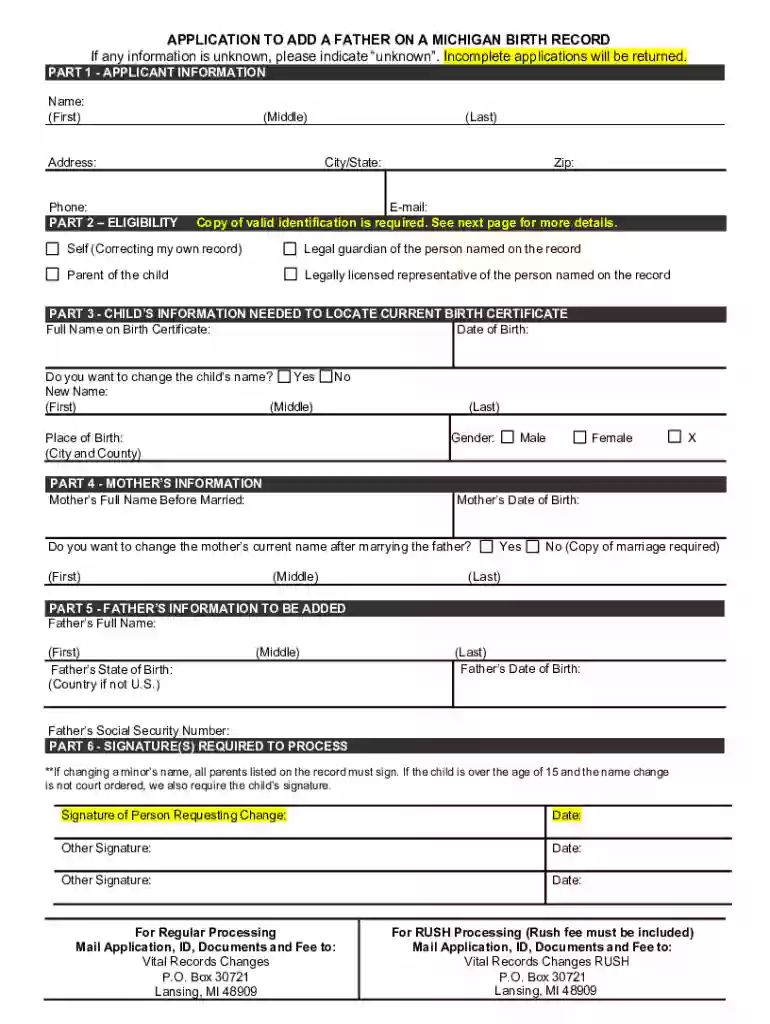
DCH-0848-CHGBX, Application to Add a Father on Michigan Birth Record Application to Add a Father on  Preview on Page 1

Here's how it works

01. Edit your form online
Type text, add images, blackout confidential details, add comments, highlights and more.

02. Sign it in a few clicks
Draw your signature, type it, upload its image, or use your mobile device as a signature pad.

03. Share your form with others
Send it via email, link, or fax. You can also download it, export it or print it out.

How to use or fill out DCH-0848-CHGBX, Application to Add a Father on Michigan Birth Record with our platform

Form edit decoration
9.5
Ease of Setup
DocHub User Ratings on G2
9.0
Ease of Use
DocHub User Ratings on G2
  1. Click ‘Get Form’ to open it in the editor.
  2. Begin with Part 1: Applicant Information. Fill in your first, middle, and last name, along with your address, phone number, and email. Ensure all fields are completed accurately.
  3. Move to Part 2: Eligibility. Indicate your relationship to the child by selecting one of the options provided. Remember to attach a copy of valid identification as required.
  4. In Part 3: Child’s Information, provide the full name on the birth certificate and date of birth. If applicable, indicate if you wish to change the child's name and provide the new name details.
  5. Proceed to Part 4: Mother’s Information. Enter the mother’s full name before marriage and her date of birth. If changing her name post-marriage, select 'Yes' or 'No' accordingly.
  6. In Part 5: Father’s Information To Be Added, fill in the father’s full name, state of birth, date of birth, and social security number.
  7. Finally, complete Part 6 by signing where indicated. Ensure all necessary signatures are obtained if changing a minor's name.

Start using our platform today for free to streamline your document editing and form completion!

See more DCH-0848-CHGBX, Application to Add a Father on Michigan Birth Record Application to Add a Father on versions

We've got more versions of the DCH-0848-CHGBX, Application to Add a Father on Michigan Birth Record Application to Add a Father on form. Select the right DCH-0848-CHGBX, Application to Add a Father on Michigan Birth Record Application to Add a Father on version from the list and start editing it straight away!
Versions Form popularity Fillable & printable
2023 4.1 Satisfied (21 Votes)
2021 4.8 Satisfied (101 Votes)
2020 4.4 Satisfied (262 Votes)
2013 4 Satisfied (50 Votes)
2013 4.2 Satisfied (123 Votes)
be ready to get more

Complete this form in 5 minutes or less

Get form

Got questions?

We have answers to the most popular questions from our customers. If you can't find an answer to your question, please contact us.
Contact us
For additional assistance on how to make a correction to a Michigan birth record please call the Changes Unit directly at 517-335-8660. You can also e-mail MDHHS-VR-Changes@Michigan.gov you will receive a response within 1-3 business days.
When a baby is born to parents who are not married to each other, the law does not accept the biological father as a legal parent. In other words, a biological father who is not married to the mother of his child does not have legal rights to his child until he becomes a legal parent.
If the mother was not married at any time between conception and birth and there is no father listed on the birth certificate, the addition can be made with an Acknowledge of Paternity. The form can be downloaded at this website, or you can obtain one by calling our Amendments Department at 601‑206‑8200.
The information on the father may be added to the birth record based upon a certified court determination of paternity, an Order of Filiation, a properly filed Affidavit of Parentage or Acknowledgment of Paternity.
Complete the relevant forms: Generally, this involves filling out an application for a new birth certificate based on parentage. Provide supporting documents: These could include an Acknowledgment of Paternity (AOP), marriage license, or court order.

Security and compliance

At DocHub, your data security is our priority. We follow HIPAA, SOC2, GDPR, and other standards, so you can work on your documents with confidence.

Learn more
ccpa2
pci-dss
gdpr-compliance
hipaa
soc-compliance

People also ask

To add the fathers name to the birth certificate, the parents can complete The Affirmation of Common Child(ren) Born in Florida form (DH-743A) or provide a written statement under oath to the Clerk of Court when they apply for their marriage license.