01. Edit your curtin international admission online
Type text, add images, blackout confidential details, add comments, highlights and more.

02. Sign it in a few clicks
Draw your signature, type it, upload its image, or use your mobile device as a signature pad.

03. Share your form with others
Send it via email, link, or fax. You can also download it, export it or print it out.

How to use or fill out Application process - International - Study with our platform
Ease of Setup
DocHub User Ratings on G2
Ease of Use
DocHub User Ratings on G2
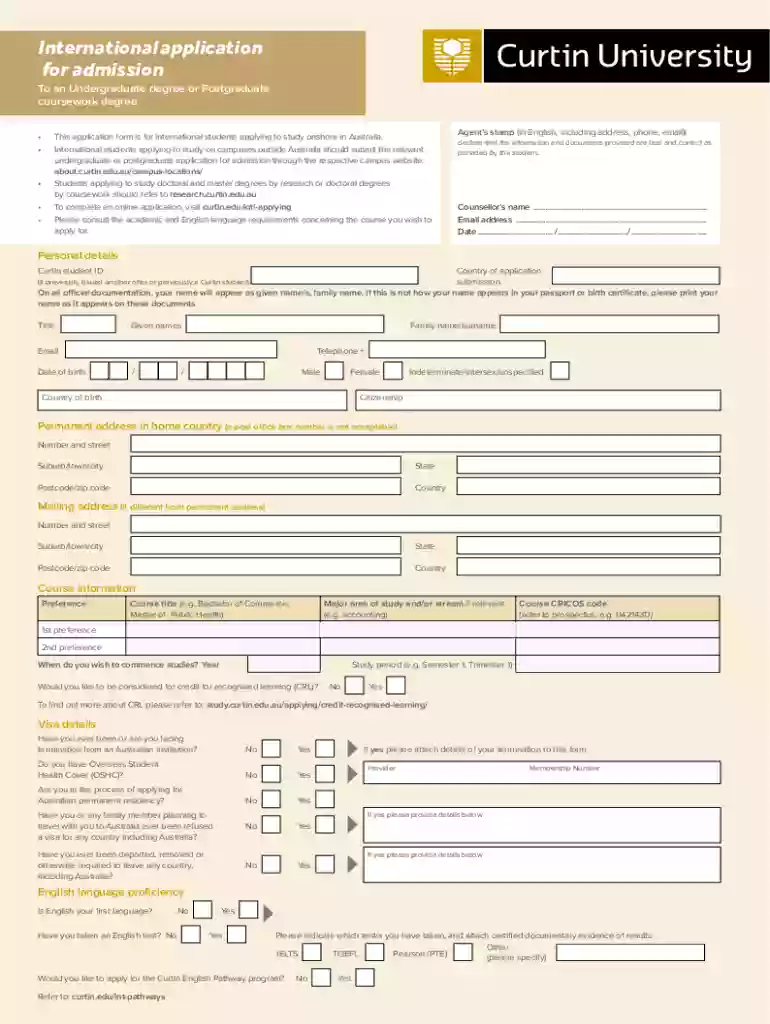
Click ‘Get Form’ to open the Application process - International - Study in the editor.
Begin by filling out your personal details. Ensure your name matches exactly as it appears on your passport or birth certificate. Include your email, date of birth, and contact number.
In the Course Information section, indicate your course preferences and desired commencement date. Make sure to include the CRICOS code for each course you are applying for.
Complete the Visa Details section honestly, indicating any previous visa issues or health cover status.
Provide information about your educational qualifications, including institutions attended and completion dates. Attach certified copies of relevant documents as required.
Fill out the Background and Future Plans section to explain how this course aligns with your career goals.
Review all sections carefully before signing the declaration at the end of the form to confirm that all information is accurate.
Start using our platform today to streamline your application process for free!
Fill out Application process - International - Study online It's free
See more Application process - International - Study versions
We've got more versions of the Application process - International - Study form. Select the right Application process - International - Study version from the list and start editing it straight away!
Is it harder to apply as an international student?
For international students, the college admissions process can be more intensive and challenging than it is for American students. If youre an international student looking to attend college in the U.S., you need to take extra steps to maximize your chance of admission and stand out from other applicants.
How long does it take to apply for study abroad?
Typical processing is 10-12 weeks. How long does a visa for study abroad take and when should a student apply? Visa processing can take as little as a few days for some countries to months.
What is the process for international students?
Student Acceptance at a SEVP Approved School The SEVP-approved school will issue you a Form I-20. After you receive the Form I-20 and register in SEVIS, you may apply at a U.S. Embassy or Consulate for a student (F or M) visa. You must present the Form I-20 to the consular officer when you attend your visa interview.
What is the application process for UK universities?
Heres how it works: Register with UCAS. First, go to the UCAS website where you can fill in your application form. Then write your personal statement. Receiving an offer. UCAS will contact you with any offers from your chosen universities or colleges.
Related Searches
Application process international study pdfCharles Sturt University application Deadline for international studentsIRCC study permit updateUCAS international students deadlineHow to apply for universities abroad with scholarshipIRCC study permit processing timeUCAS applicationWhat is an international student visa
Security and compliance
At DocHub, your data security is our priority. We follow HIPAA, SOC2, GDPR, and other standards, so you can work on your documents with confidence.
Jul 2, 2020 In this guide we will explain the basics of how to study abroad as a Pitt CS student. You can learn more about specific programs at abroad.pitt.edu/.
For visiting schools before or during the application process, and/or participating in short recreational, non-credit courses. Overview How to Apply Fees
Cookie consent notice
This site uses cookies to enhance site navigation and personalize your experience.
By using this site you agree to our use of cookies as described in our Privacy Notice.
You can modify your selections by visiting our Cookie and Advertising Notice.