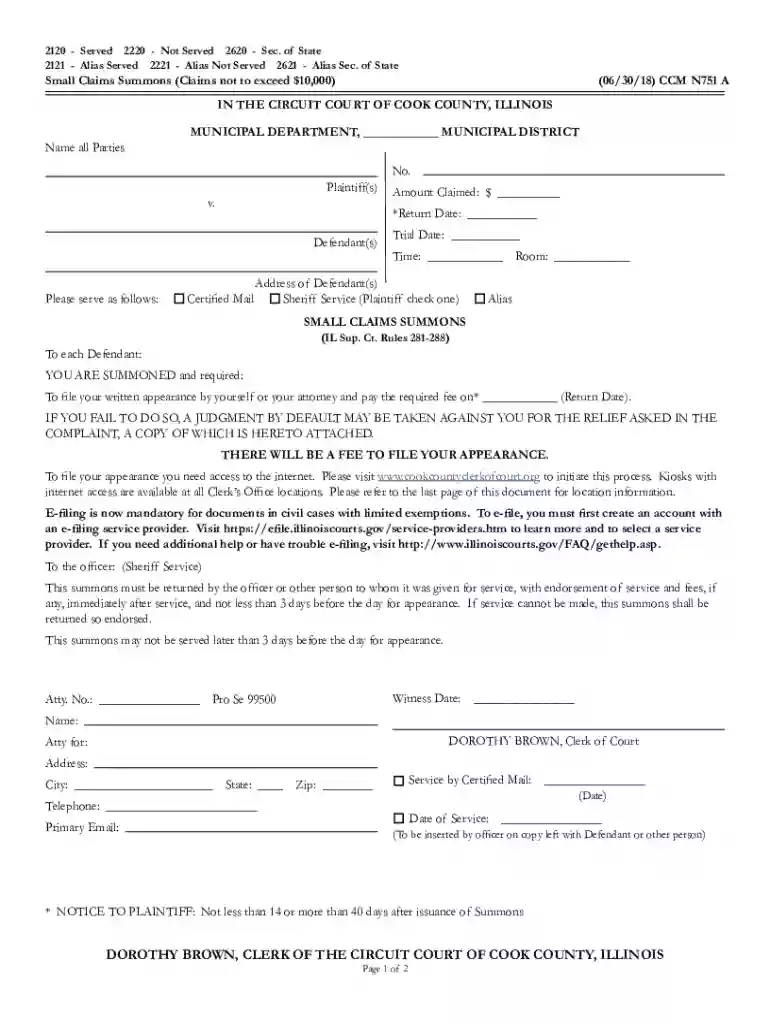
cook county small claims complaint formDocumentine Preview on Page 1

Cook county small claims complaint formDocumentine 2026

Here's how it works

  • 01. Edit your form online

    Type text, add images, blackout confidential details, add comments, highlights and more.

  • 02. Sign it in a few clicks

    Draw your signature, type it, upload its image, or use your mobile device as a signature pad.

  • 03. Share your form with others

    Send it via email, link, or fax. You can also download it, export it or print it out.

How to use or fill out cook county small claims complaint formDocumentine with our platform

Form edit decoration
9.5
Ease of Setup
DocHub User Ratings on G2
9.0
Ease of Use
DocHub User Ratings on G2
  1. Click ‘Get Form’ to open the cook county small claims complaint form in the editor.
  2. Begin by filling in the 'Name all Parties' section. Include the names of both the plaintiff(s) and defendant(s) as required.
  3. In the 'Amount Claimed' field, enter the total amount you are claiming, ensuring it does not exceed $10,000.
  4. Specify the 'Return Date' and 'Trial Date' along with the time for each. This is crucial for scheduling your court appearance.
  5. Indicate how you would like to serve the defendant by checking either 'Certified Mail' or 'Sheriff Service'.
  6. Complete your contact information including your name, address, telephone number, and email in the designated fields.
  7. Review all entries for accuracy before saving or printing your completed form for submission.

Start using our platform today to easily fill out your Cook County Small Claims Complaint Form for free!

See more cook county small claims complaint formDocumentine versions

We've got more versions of the cook county small claims complaint formDocumentine form. Select the right cook county small claims complaint formDocumentine version from the list and start editing it straight away!

VersionsForm popularityFillable & printable
20184.6 Satisfied (58 Votes)
20094 Satisfied (30 Votes)

be ready to get more

Complete this form in 5 minutes or less

Security and compliance

At DocHub, your data security is our priority. We follow HIPAA, SOC2, GDPR, and other standards, so you can work on your documents with confidence.

Related links

Microsoft Forms - Free tool to create online surveys, forms

Use Microsoft Forms to easily create online surveys, forms, quizzes and questionnaires. AI powered, free survey tool from Microsoft.

Learn more
FAA Form 8710-1, Airman Certificate and/or Rating

For faster processing, the FAA encourages applicants to apply online using the FAA. Integrated Airman Certification and Rating Application (IACRA). IACRA is

Learn more
DS-160: Online Nonimmigrant Visa Application

The DS-160, Online Nonimmigrant Visa Application form, is for temporary travel to the United States, and for K (fianc(e)) visas. Form DS-160 is submitted

Learn more
If you believe that this page should be taken down, please follow our DMCA take down process here