Custom Personalized Sunscreen Bulk, Promotional Sunscreen GiveawaysCustom Sunscreen and Bulk Sunscre 2026

Get Form
Custom Personalized Sunscreen Bulk, Promotional Sunscreen GiveawaysCustom Sunscreen and Bulk Sunscre Preview on Page 1

Here's how it works

01. Edit your form online
Type text, add images, blackout confidential details, add comments, highlights and more.
02. Sign it in a few clicks
Draw your signature, type it, upload its image, or use your mobile device as a signature pad.
03. Share your form with others
Send it via email, link, or fax. You can also download it, export it or print it out.

How to use or fill out Custom Personalized Sunscreen Bulk, Promotional Sunscreen Giveaways with our platform

Form edit decoration
9.5
Ease of Setup
DocHub User Ratings on G2
9.0
Ease of Use
DocHub User Ratings on G2
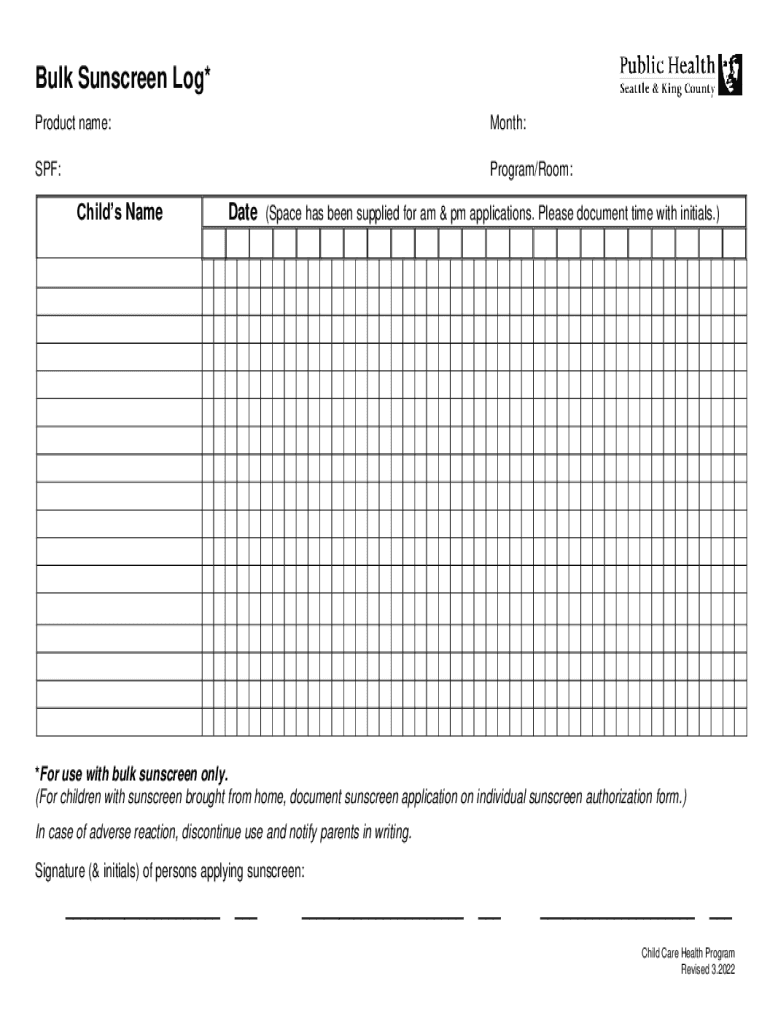
  1. Click ‘Get Form’ to open it in the editor.
  2. Begin by entering the product name in the designated field. This helps identify the specific sunscreen being used.
  3. Next, input the month for which you are documenting sunscreen applications. This is crucial for tracking purposes.
  4. Fill in the SPF level of the sunscreen. This information is important for ensuring adequate sun protection.
  5. Indicate the program or room where the sunscreen will be applied. This helps maintain organization within your facility.
  6. Document each child’s name who will receive sunscreen application. Ensure accuracy to avoid any mix-ups.
  7. In the date section, provide spaces for both AM and PM applications. Remember to document the time along with initials for accountability.
  8. Finally, have all individuals applying sunscreen sign and initial in the provided spaces to confirm their actions.

Start using our platform today to streamline your sunscreen documentation process for free!

See more Custom Personalized Sunscreen Bulk, Promotional Sunscreen GiveawaysCustom Sunscreen and Bulk Sunscre versions

We've got more versions of the Custom Personalized Sunscreen Bulk, Promotional Sunscreen GiveawaysCustom Sunscreen and Bulk Sunscre form. Select the right Custom Personalized Sunscreen Bulk, Promotional Sunscreen GiveawaysCustom Sunscreen and Bulk Sunscre version from the list and start editing it straight away!
Versions Form popularity Fillable & printable
2022 4.6 Satisfied (39 Votes)
2018 4.7 Satisfied (48 Votes)
be ready to get more

Complete this form in 5 minutes or less

Get form

Got questions?

We have answers to the most popular questions from our customers. If you can't find an answer to your question, please contact us.
Contact us

Sign in to your DocHub account and import your Custom Personalized Sunscreen Bulk, Promotional Sunscreen GiveawaysCustom Sunscreen and Bulk Sunscre to our editor using one of its upload options - from your device, cloud storage, secure URL, or your DocHub folders if you have already managed your document before. Open our editor, click the Sign button in the upper toolbar, and decide on your signing method. You can upload an image of your handwritten signature, draw it, type in your name, or use a QR code as an alternative.

If you edit your Custom Personalized Sunscreen Bulk, Promotional Sunscreen GiveawaysCustom Sunscreen and Bulk Sunscre with DocHub, you simply will not need to look for other software or services to sign it. An electronic signature is a component of DocHub’s comprehensive editing toolset, which allows you to apply changes in your form without switching between platforms. Just complete your form, double-check the correctness of your information and place your electronic signature at the end to make it submission-ready in minutes.

Security and compliance

At DocHub, your data security is our priority. We follow HIPAA, SOC2, GDPR, and other standards, so you can work on your documents with confidence.

Learn more
ccpa2
pci-dss
gdpr-compliance
hipaa
soc-compliance
be ready to get more

Complete this form in 5 minutes or less

Get form