




Here's how it works



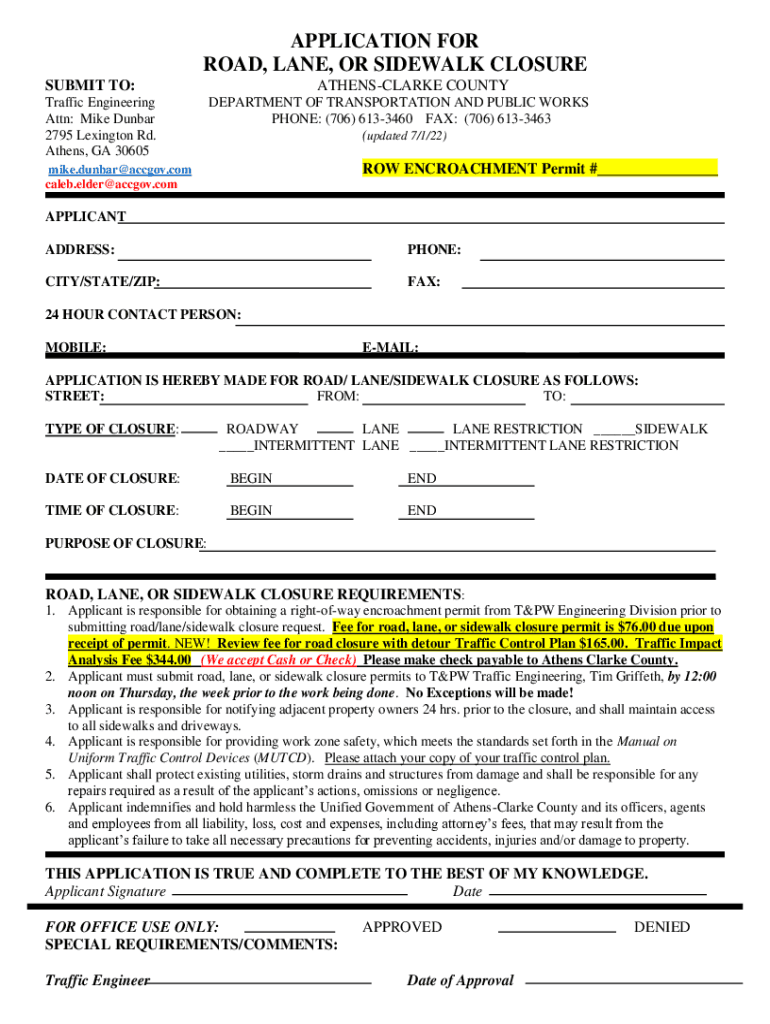
How to use or fill out APPLICATION FOR ROAD, LANE, OR SIDEWALK

- Click ‘Get Form’ to open it in the editor.
- Begin by filling out the 'APPLICANT' section with your name, address, phone number, and email. Ensure all contact information is accurate for any follow-up.
- In the 'APPLICATION IS HEREBY MADE FOR ROAD/ LANE /SIDEWALK CLOSURE AS FOLLOWS' section, specify the street name and the exact locations of the closure by filling in 'FROM' and 'TO'.
- Select the type of closure you are applying for by checking the appropriate box under 'TYPE OF CLOSURE'. Include details about whether it’s a roadway, lane restriction, or sidewalk closure.
- Fill in the dates and times for both the beginning and end of the closure in their respective fields.
- Clearly state the purpose of your closure in the designated area to provide context for your application.
- Review all entries for accuracy before signing at the bottom. Your signature confirms that all information is true and complete.
Start using our platform today to streamline your application process for free!
It's free
See more APPLICATION FOR ROAD, LANE, OR SIDEWALK versions
Got questions?
How can I sign my APPLICATION FOR ROAD, LANE, OR SIDEWALK on iOS?
With DocHub, you can easily approve your APPLICATION FOR ROAD, LANE, OR SIDEWALK or any other paperwork on iOS, even without installing extra applications. You can access your DocHub account from any internet-connected browser and fill out and sign your form in any way you like with just a couple of clicks.
Do I need to install software to modify my APPLICATION FOR ROAD, LANE, OR SIDEWALK?
When you edit your APPLICATION FOR ROAD, LANE, OR SIDEWALK with DocHub, you only require a steady web connection and virtually any web browser installed on your device. No need to set up any third-party applications or research guides. Simply open a tab with DocHub, drag and drop your file, and edit it immediately.
How do you close a street in Portland?
How do I get a sidewalk permit in NYC?
How long can a car be parked on the street in Portland?
Security and compliance
At DocHub, your data security is our priority. We follow HIPAA, SOC2, GDPR, and other standards, so you can work on your documents with confidence.
Learn more




