Borang KWSP: Senarai Download & Cara Isi 2026

Get Form
borang a1 Preview on Page 1

Here's how it works

01. Edit your borang a1 online
Type text, add images, blackout confidential details, add comments, highlights and more.
02. Sign it in a few clicks
Draw your signature, type it, upload its image, or use your mobile device as a signature pad.
03. Share your form with others
Send contoh isi borang st via email, link, or fax. You can also download it, export it or print it out.

How to use or fill out Borang KWSP: Senarai Download & Cara Isi with DocHub

Form edit decoration
9.5
Ease of Setup
DocHub User Ratings on G2
9.0
Ease of Use
DocHub User Ratings on G2
  1. Click ‘Get Form’ to open it in the editor.
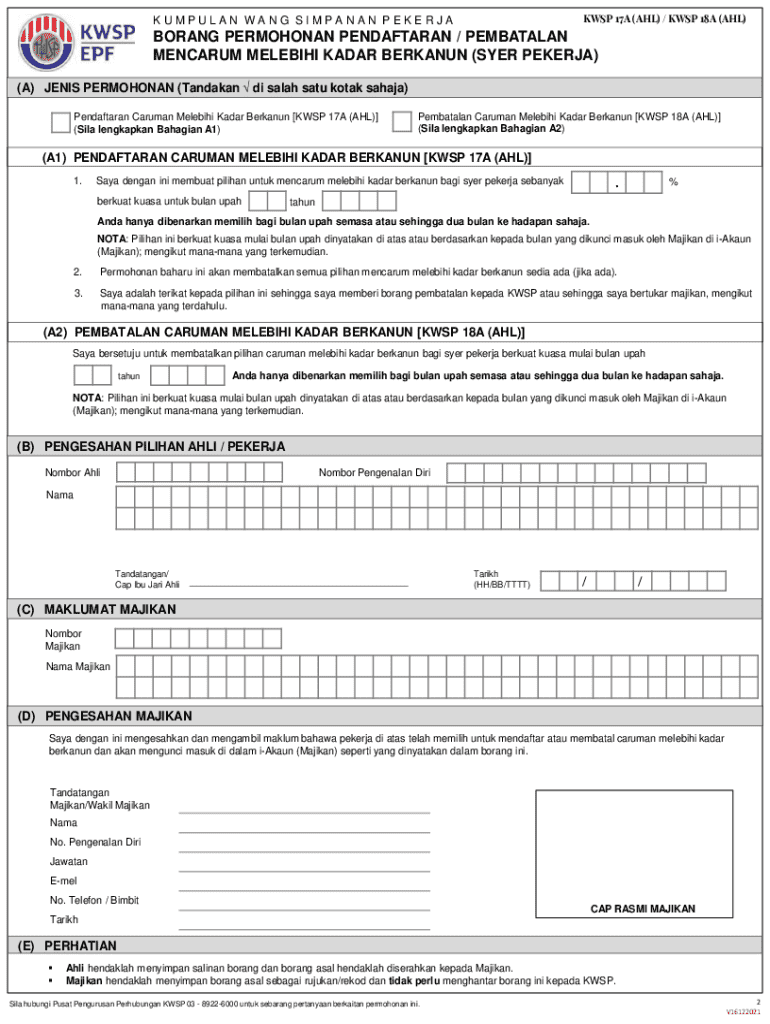
  2. Begin by selecting the type of application in Section (A). Mark √ in either 'Pendaftaran Caruman Melebihi Kadar Berkanun' or 'Pembatalan Caruman Melebihi Kadar Berkanun'.
  3. If you choose Pendaftaran, complete Section (A1) by entering the desired contribution percentage and the effective month. Remember, you can only select for the current month or up to two months ahead.
  4. For Pembatalan, fill out Section (A2) with the cancellation details, including the effective month and year.
  5. In Section (B), provide your identification number, name, and sign clearly in the designated area.
  6. Complete employer information in Section (C) by entering your Employer Number and Name.
  7. Finally, ensure that Section (D) is filled out with employer verification details including signature, name, ID number, position, email, phone number, date, and official stamp.

Start using our platform today to easily fill out your Borang KWSP for free!

See more Borang KWSP: Senarai Download & Cara Isi versions

We've got more versions of the Borang KWSP: Senarai Download & Cara Isi form. Select the right Borang KWSP: Senarai Download & Cara Isi version from the list and start editing it straight away!
Versions Form popularity Fillable & printable
2021 4.9 Satisfied (46 Votes)
2016 4.5 Satisfied (41 Votes)
be ready to get more

Complete this form in 5 minutes or less

Get form

Got questions?

We have answers to the most popular questions from our customers. If you can't find an answer to your question, please contact us.
Contact us

Sure, electronically drawing your signature is acceptable, but only if you use a tool that complies with industry regulations and policies. Try DocHub, which guarantees eSignature validity under ESIGN and UETA requirements. All you need to approve your Borang KWSP: Senarai Download & Cara Isi electronically is an account with DocHub and an internet connection. Once you open your paperwork in our editor, click Sign and select the Draw tool.

If you are using Chrome, there are two simple ways to edit your Borang KWSP: Senarai Download & Cara Isi online. First, visit the DocHub website, add your document, and edit it using our toolbar. You can also install our Chrome extension and edit any document by dragging and dropping it in your browser tab.

Employees Provident Fund (EPF; Malay: Kumpulan Simpanan Pekerja, KWSP) is a federal statutory body under the purview of the Ministry of Finance. It manages the compulsory savings plan and retirement planning for private sector workers in Malaysia.
You can find your PF account number on your salary slip or by logging into the UAN Member Portal. It is also available in your EPFO passbook. For assistance, you may contact EPFOs toll-free number 14470 between 9:15 AM to 5:45 PM.
Can I use the mobile app and AVRS to check my EPF number? Download the KWSP i-Akaun app from the Google Play Store or Apple App Store. Log in with your registered details. Navigate to Account Details to find your EPF number.

Security and compliance

At DocHub, your data security is our priority. We follow HIPAA, SOC2, GDPR, and other standards, so you can work on your documents with confidence.

Learn more
ccpa2
pci-dss
gdpr-compliance
hipaa
soc-compliance

People also ask

Download your EPF statement via the i‑Akaun Web Portal (Member) Enter your i-Akaun user ID and password, then click Log In Now On the homepage, click the download icon in the account summary section. Select the statement year and click Download The statement will be displayed.
Yes, KWSP (Kumpulan Simpanan Pekerja) and EPF (Employees Provident Fund) are the same.
The PF Number, also known as the EPF account number, is a unique identification number. The Employees Provident Fund Organisation (EPFO) allots it to each EPF account holder. You can use it to check your PF account balance and make withdrawals.
If you need to check your EPF number using your employees IC, follow these steps: Visit the KWSP official website. Navigate to the i-Akaun login page. Enter your employee IC number and proceed with the instructions. If your account is registered, you will gain access to your EPF details, including your EPF number.

Related links