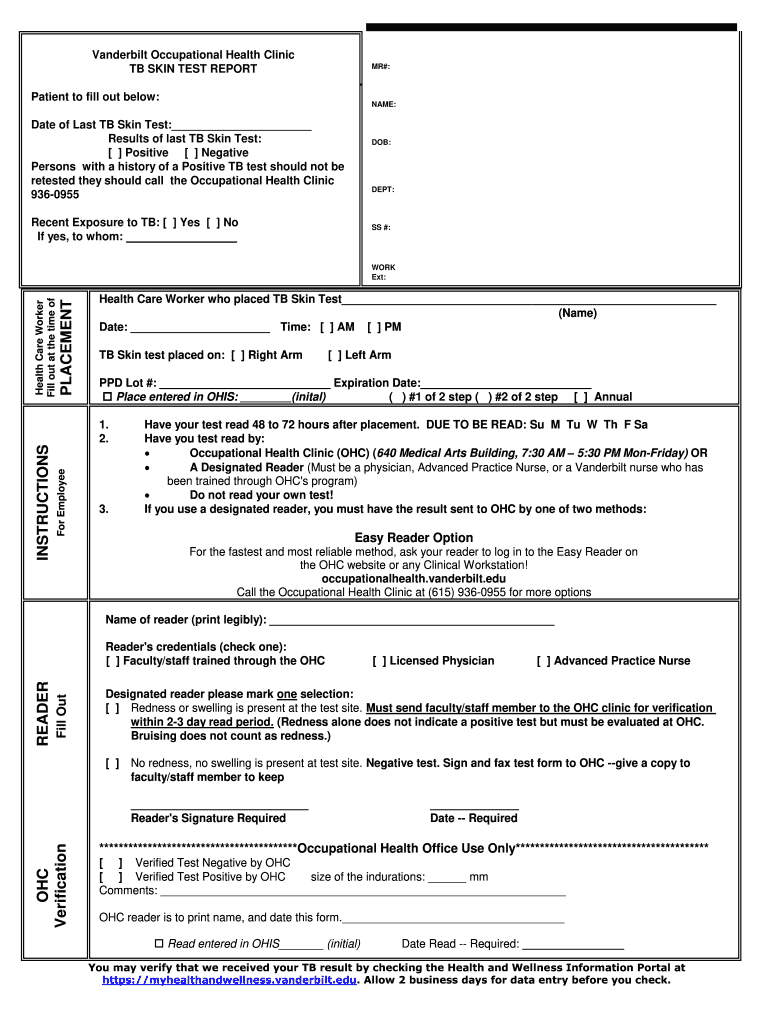
Vanderbilt Occupational Health Clinic TB SKIN TEST REPORT MR - healthandwellness vanderbilt 2026

Get Form
mantoux test report Preview on Page 1

Here's how it works

01. Edit your mantoux test report online
Type text, add images, blackout confidential details, add comments, highlights and more.
02. Sign it in a few clicks
Draw your signature, type it, upload its image, or use your mobile device as a signature pad.
03. Share your form with others
Send mantoux test report format via email, link, or fax. You can also download it, export it or print it out.

How to use or fill out Vanderbilt Occupational Health Clinic TB SKIN TEST REPORT MR - healthandwellness vanderbilt with our platform

Form edit decoration
9.5
Ease of Setup
DocHub User Ratings on G2
9.0
Ease of Use
DocHub User Ratings on G2
  1. Click ‘Get Form’ to open it in the editor.
  2. Begin by entering your NAME and DOB in the designated fields. This information is crucial for identifying your test results.
  3. Fill in the Date of Last TB Skin Test and select the Results of last TB Skin Test by checking either Positive or Negative.
  4. Indicate if you have had Recent Exposure to TB by selecting Yes or No, and provide details if applicable.
  5. The Health Care Worker who placed the TB Skin Test should fill in their name, date, time, and arm used for placement.
  6. Complete the PPD Lot # and Expiration Date fields. Ensure all entries are accurate for proper documentation.
  7. After 48 to 72 hours, have your test read by a qualified reader. Fill in their name and credentials as required.
  8. Finally, ensure that all necessary signatures are obtained before submitting the form back to OHC through our platform.

Start using our platform today to easily complete your TB Skin Test Report!

See more Vanderbilt Occupational Health Clinic TB SKIN TEST REPORT MR - healthandwellness vanderbilt versions

We've got more versions of the Vanderbilt Occupational Health Clinic TB SKIN TEST REPORT MR - healthandwellness vanderbilt form. Select the right Vanderbilt Occupational Health Clinic TB SKIN TEST REPORT MR - healthandwellness vanderbilt version from the list and start editing it straight away!
Versions Form popularity Fillable & printable
2014 4 Satisfied (45 Votes)
be ready to get more

Complete this form in 5 minutes or less

Get form

Got questions?

We have answers to the most popular questions from our customers. If you can't find an answer to your question, please contact us.
Contact us

Electronic document approval requires a software solution that works in compliance with data protection and eSignature standards. DocHub is an excellent tool for that, because it fulfills all the aforementioned requirements. Whatever method you prefer to sign your tb test report in DocHub, your eSignature will be legally binding and court-admissible.

If you are using Chrome, there are two simple ways to edit your mantoux negative report online. First, visit the DocHub site, add your document, and edit it using our toolbar. You may also install our Chrome extension and edit any document by dragging and dropping it in your web browser tab.

Security and compliance

At DocHub, your data security is our priority. We follow HIPAA, SOC2, GDPR, and other standards, so you can work on your documents with confidence.

Learn more
ccpa2
pci-dss
gdpr-compliance
hipaa
soc-compliance