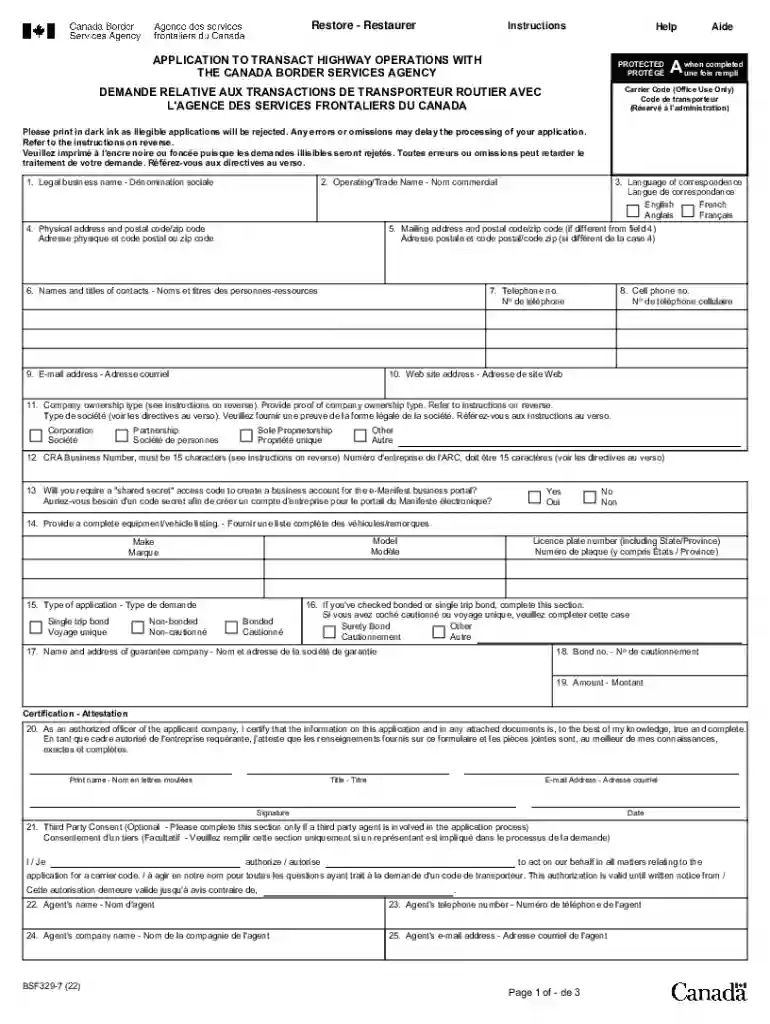
bsf329 7 Preview on Page 1

BSF329-4: Application to Transact Marine Operations with 2026

Here's how it works

  • 01. Edit your bsf329 7 online

    Type text, add images, blackout confidential details, add comments, highlights and more.

  • 02. Sign it in a few clicks

    Draw your signature, type it, upload its image, or use your mobile device as a signature pad.

  • 03. Share your form with others

    Send it via email, link, or fax. You can also download it, export it or print it out.

How to use or fill out BSF329-4: Application to Transact Marine Operations

Form edit decoration
9.5
Ease of Setup
DocHub User Ratings on G2
9.0
Ease of Use
DocHub User Ratings on G2
  1. Click ‘Get Form’ to open it in the editor.
  2. Begin with Field 1, entering your Legal Business Name. Ensure it matches your registered company name.
  3. In Field 2, provide your Operating/Trade Name if applicable. This should not be a separate legal entity.
  4. Fill in Field 4 with your Physical Address, including all necessary details like street number and postal code.
  5. If different from the physical address, complete Field 5 with your Mailing Address.
  6. In Fields 6 through 10, list the Names and Titles of Contacts, along with their contact information including phone numbers and email addresses.
  7. For Field 11, select your Company Ownership Type and ensure you have the required proof ready for submission.
  8. Complete Fields 12 through 19 as applicable, providing necessary identifiers and bond information if required.
  9. Finally, certify the application by signing in Field 20 and include any third-party consent if needed in Field 21.

Start using our platform today to streamline your form completion process for free!

See more bsf329 7 versions

We've got more versions of the bsf329 7 form. Select the right bsf329 7 version from the list and start editing it straight away!

VersionsForm popularityFillable & printable
20224.5 Satisfied (59 Votes)
20134.6 Satisfied (67 Votes)
20104.9 Satisfied (52 Votes)

be ready to get more

Complete this form in 5 minutes or less

Got questions?

We have answers to the most popular questions from our customers. If you can't find an answer to your question, please contact us.

Signing documents on a mobile device is fast, straightforward, and doesn’t require software installation when you have an account with DocHub. Log in from any browser, fill in your empty fields with your data, and click on Sign → Create your signature. You can draw your electronic signature the same way you usually do on paper, add its picture to your BSF329-4: Application to Transact Marine Operations with, or type in your name and stylize its look. No matter what option you choose, your form will be valid.

You can easily edit fill out your BSF329-4: Application to Transact Marine Operations with on any iOS gadget. Open an internet browser of your liking, visit the DocHub website, authorize or create a new account, add your file for editing, and make your desired changes. Our service is mobile-friendly, so using its functions on your smartphone will be a no-brainer, even on the first try.

A PARS barcode label with the first four characters being the highway carrier code.
The CBSA plays a key role in immigration to Canada, as it has assumed the port-of-entry and enforcement mandates formerly held by Citizenship and Immigration Canada. CBSA officers work on the front lines, screening persons entering the country and removing those who are unlawfully in Canada.
Description. The CBSA contributes to Canadas security by supporting the immigration and refugee system when determining a persons admissibility to Canada, taking the appropriate immigration enforcement actions when necessary, and supporting the prosecution of persons who violate our laws.

Security and compliance

At DocHub, your data security is our priority. We follow HIPAA, SOC2, GDPR, and other standards, so you can work on your documents with confidence.

People also ask

The Canada Border Services Agency ( CBSA ) facilitates the flow of legitimate travellers and trade. The agency also enforces more than 100 acts and regulations that keep our country and Canadians safe.
abbreviation for central business district: Its a short stroll to the central business district (CBD).
If you are returning to Canada by commercial aircraft, you will receive a Canada Border Services Agency (CBSA) Declaration Card to complete before you land. These cards are also used at some locations for travellers arriving by train, boat or bus.

Related links

IDAHOS GUIDE FOR EXPORTING

This document is intended to provide general guidance for businesses to gain a better understanding in the basic concepts of international trade.

Learn more
If you believe that this page should be taken down, please follow our DMCA take down process here