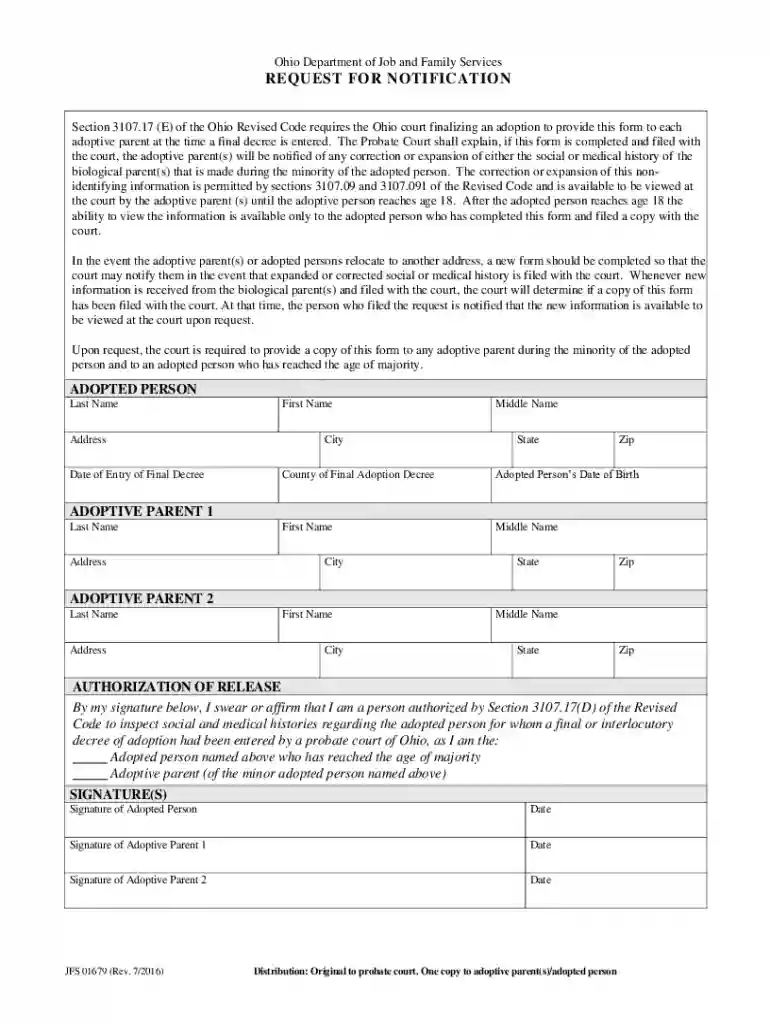
FCASPL 94 (Adoption Forms) Preview on Page 1

FCASPL 94 (Adoption Forms) 2026

Here's how it works

  • 01. Edit your form online

    Type text, add images, blackout confidential details, add comments, highlights and more.

  • 02. Sign it in a few clicks

    Draw your signature, type it, upload its image, or use your mobile device as a signature pad.

  • 03. Share your form with others

    Send it via email, link, or fax. You can also download it, export it or print it out.

How to use or fill out FCASPL 94 (Adoption Forms) with our platform

Form edit decoration
9.5
Ease of Setup
DocHub User Ratings on G2
9.0
Ease of Use
DocHub User Ratings on G2
  1. Click ‘Get Form’ to open the FCASPL 94 in the editor.
  2. Begin by filling out the 'Adopted Person' section. Enter the last name, first name, middle name, address, city, state, zip code, and county of final adoption decree. Don't forget to include the adopted person's date of birth.
  3. Next, complete the 'Adoptive Parent 1' section with their last name, first name, middle name, address, city, state, and zip code.
  4. Proceed to fill out the 'Adoptive Parent 2' section similarly as you did for Adoptive Parent 1.
  5. In the 'Authorization of Release' section, select your status as either the adopted person or adoptive parent. Ensure you sign and date where indicated for both adoptive parents and the adopted person if applicable.
  6. Review all entries for accuracy before saving your completed form. Once satisfied, download or share it directly from our platform.

Start using our platform today to easily fill out your FCASPL 94 (Adoption Forms) for free!

See more FCASPL 94 (Adoption Forms) versions

We've got more versions of the FCASPL 94 (Adoption Forms) form. Select the right FCASPL 94 (Adoption Forms) version from the list and start editing it straight away!

VersionsForm popularityFillable & printable
20164.3 Satisfied (35 Votes)
20064 Satisfied (25 Votes)

be ready to get more

Complete this form in 5 minutes or less

Got questions?

We have answers to the most popular questions from our customers. If you can't find an answer to your question, please contact us.

Adoption records are typically sealed and the general public will not have access to this highly private information. If the birth parents have not consented to the release of identifiable information, the information wont be unsealed without a court order and a reasonable cause.
Adoption Status Hover over any jurisdiction on the map to preview the adoption status. Scroll to the table below to preview all adoption statuses by jurisdiction. Select a standard from the drop-down menu below the map to change the map view and see a global picture of the status of adoption for each specific standard.
The five stages (steps) in the adoption process are: knowledge, persuasion, decision, implementation and confirmation.
After obtaining your original birth certificate and receiving confirmation that you were adopted you can also seek other records like: Court decisions. Adoption agency records. Medical records from the hospital where you were born.
To claim the adoption credit or exclusion: Complete Form 8839, Qualified Adoption Expenses, and attach the form to your tax return. Report the required information about the eligible child on Form 8839, Part I.

Security and compliance

At DocHub, your data security is our priority. We follow HIPAA, SOC2, GDPR, and other standards, so you can work on your documents with confidence.

People also ask

You may be able to obtain a copy of the adoption record that is maintained by the superior court by filing a petition, under California Family Code 9200, in the clerks office of the county superior court where the adoption was finalized.

Related links

July 18, 2019 Family, Children and Adult Services Manual

Jul 18, 2019 (28) A copy of the interstate compact and adoption medical assistance forms. (C) For applications received from an adoptive parent(s) who

Learn more
If you believe that this page should be taken down, please follow our DMCA take down process here