PFS6A Daily Pesticide App Rec Form doc 2026

Get Form
PFS6A Daily Pesticide App Rec Form doc Preview on Page 1

Here's how it works

01. Edit your form online
Type text, add images, blackout confidential details, add comments, highlights and more.
02. Sign it in a few clicks
Draw your signature, type it, upload its image, or use your mobile device as a signature pad.
03. Share your form with others
Send it via email, link, or fax. You can also download it, export it or print it out.

How to use or fill out PFS6A Daily Pesticide App Rec Form doc with our platform

Form edit decoration
9.5
Ease of Setup
DocHub User Ratings on G2
9.0
Ease of Use
DocHub User Ratings on G2
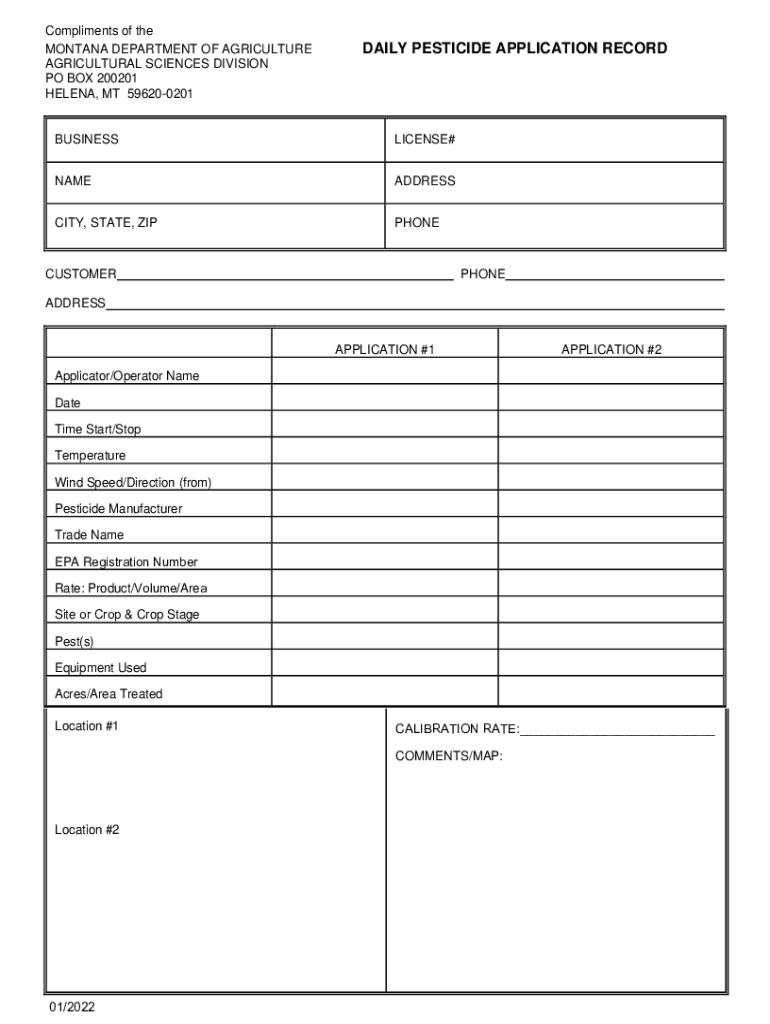
  1. Click ‘Get Form’ to open the PFS6A Daily Pesticide Application Record in the editor.
  2. Begin by entering your business name and license number at the top of the form. This information is crucial for identification and compliance.
  3. Fill in your contact details, including name, address, city, state, zip code, and phone number. Ensure accuracy for effective communication.
  4. For each application (Application #1 and Application #2), provide detailed information such as applicator/operator name, date, start/stop time, temperature, wind speed/direction, pesticide manufacturer, trade name, EPA registration number, rate of product used per volume/area, site or crop details including crop stage, pests targeted, equipment used, acres/area treated, and location.
  5. Utilize the comments/map section to add any additional notes or observations related to the applications. This can be helpful for future reference.
  6. Review all entered information for accuracy before saving or exporting your completed form.

Start using our platform today to streamline your document editing and form completion process for free!

See more PFS6A Daily Pesticide App Rec Form doc versions

We've got more versions of the PFS6A Daily Pesticide App Rec Form doc form. Select the right PFS6A Daily Pesticide App Rec Form doc version from the list and start editing it straight away!
Versions Form popularity Fillable & printable
2022 4.9 Satisfied (38 Votes)
be ready to get more

Complete this form in 5 minutes or less

Get form

Got questions?

We have answers to the most popular questions from our customers. If you can't find an answer to your question, please contact us.
Contact us
After Spraying Record Putting up warning signs (as/if required). Retain all records for three years.
In ance with the 1990 Farm Bill, all private applicators are required by law to keep record(s) of their federally restricted use pesticide (RUP) applications for a period of 2 years.
AMS administers the Federal Pesticide Recordkeeping Program, which requires all certified private pesticide applicators to keep records of their use of federally restricted use pesticides (RUP) for a period of 2 years.
Croptrackers Spray module is an all in one solution for digitizing your spray record keeping. Keep detailed records of all spray applications, including date, time, location, and weather conditions. Easily record and update fertilizer and pesticide applications as you go using the mobile app.
Saves money: Accurate pesticide records will enable you to know and buy the correct amount of pesticides for each growing season. Tracks success: Good records will help you determine if a pesticide application achieved the best results or why a pesticide may have performed poorly. Good records prevent future failures.

Security and compliance

At DocHub, your data security is our priority. We follow HIPAA, SOC2, GDPR, and other standards, so you can work on your documents with confidence.

Learn more
ccpa2
pci-dss
gdpr-compliance
hipaa
soc-compliance