Type text, add images, blackout confidential details, add comments, highlights and more.

02. Sign it in a few clicks
Draw your signature, type it, upload its image, or use your mobile device as a signature pad.

03. Share your form with others
Send it via email, link, or fax. You can also download it, export it or print it out.

How to use or fill out RTDRS Audio Recording Request Applicants who wish to order a transcript of their hearing must comple
Ease of Setup
DocHub User Ratings on G2
Ease of Use
DocHub User Ratings on G2
Click ‘Get Form’ to open it in the editor.
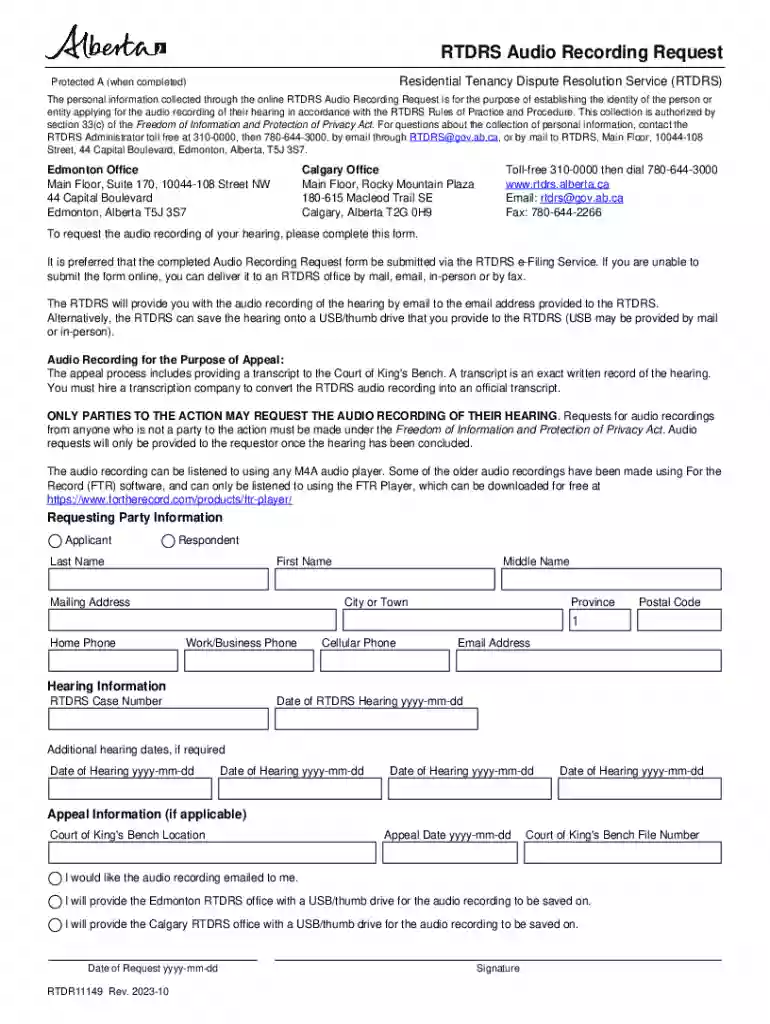
Begin by filling out the 'Requesting Party Information' section. Enter your last name, first name, and middle name if applicable. Provide your mailing address, including city, province, and postal code.
Next, input your contact information. Fill in your home phone, work/business phone, cellular phone, and email address to ensure RTDRS can reach you regarding your request.
In the 'Hearing Information' section, enter the RTDRS case number and the date of your hearing in the format yyyy-mm-dd. If there are additional hearing dates, include those as well.
If applicable, complete the 'Appeal Information' section with details such as Court of King's Bench location and appeal date.
Indicate how you would like to receive the audio recording by selecting either email delivery or providing a USB/thumb drive at one of the RTDRS offices.
Finally, enter the date of your request and provide your signature before submitting the form via our platform for processing.
Start using our platform today to easily complete your RTDRS Audio Recording Request!
Fill out RTDRS Audio Recording Request Applicants who wish to order a transcript of their hearing must comple online It's free
See more RTDRS Audio Recording Request Applicants who wish to order a transcript of their hearing must comple versions
We've got more versions of the RTDRS Audio Recording Request Applicants who wish to order a transcript of their hearing must comple form. Select the right RTDRS Audio Recording Request Applicants who wish to order a transcript of their hearing must comple version from the list and start editing it straight away!
Many times, the judge will issue a ruling at the end of the hearing and ask one of the attorneys to draft an order that encompasses the ruling. But sometimes, the judge will take the issues under advisement. That means that the judge wants more time to consider their ruling.
What happens after RTDRs hearing?
After the hearing, the Tenancy Dispute Officer will render their decision. They typically give verbal reasons for their decision to both parties plus a written order. If the matter is more complicated, the Tenancy Dispute Officer may decide to reserve their decision and provide it in writing within 30 days.
How to apply RTDRs?
You can submit your application and evidence either in person or online. In-person filing. Take your completed application form and evidence to the RTDRS office. Online filing. Create an account and apply online using the RTDRS eFiling Service. Other methods of submitting your application.
How long does RTDRS take?
The RTDRS Administrator typically completes the review and responds in writing within 30 days.
What usually happens after a hearing?
The judge will normally tell you what decision has been docHubed when all the evidence has been given. A written copy of the decision (an order) will be sent to you after the hearing.
Security and compliance
At DocHub, your data security is our priority. We follow HIPAA, SOC2, GDPR, and other standards, so you can work on your documents with confidence.
The Order is binding on the Applicant and Respondent unless it is set aside or varied through an appeal to the Court of Queens Bench or through a set-aside/vary application to the RTDRS.
Related links
Untitled
must die prodigy remix 2015, Mutongoi mp3 songs, Wilo el meneito youtube mp3, If only audio songs, Dd hokuto no ken streaming music, Tutoriel netvibes pdf
Cookie consent notice
This site uses cookies to enhance site navigation and personalize your experience.
By using this site you agree to our use of cookies as described in our Privacy Notice.
You can modify your selections by visiting our Cookie and Advertising Notice.