PDF Diploma Certificate Replacement Form - Mohawk College 2026

Get Form
PDF Diploma Certificate Replacement Form - Mohawk College Preview on Page 1

Here's how it works

01. Edit your form online
Type text, add images, blackout confidential details, add comments, highlights and more.

02. Sign it in a few clicks
Draw your signature, type it, upload its image, or use your mobile device as a signature pad.

03. Share your form with others
Send it via email, link, or fax. You can also download it, export it or print it out.

How to use or fill out PDF Diploma Certificate Replacement Form - Mohawk College with our platform

Form edit decoration
9.5
Ease of Setup
DocHub User Ratings on G2
9.0
Ease of Use
DocHub User Ratings on G2
  1. Click ‘Get Form’ to open the PDF Diploma Certificate Replacement Form in the editor.
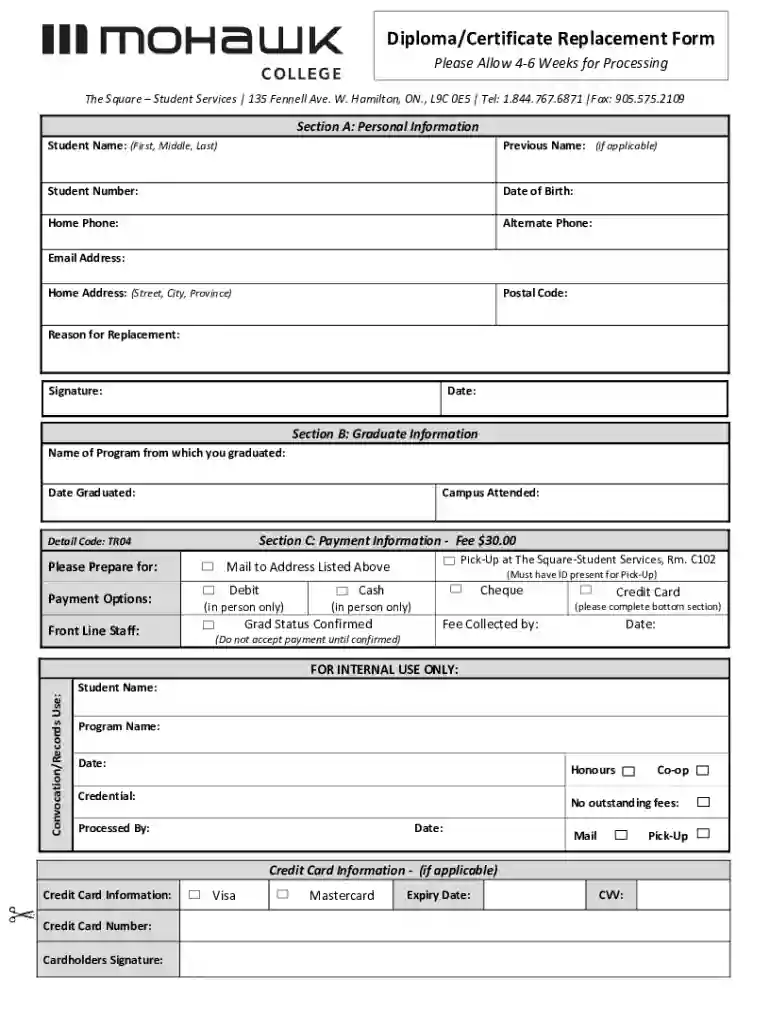
  2. Begin by filling out Section A: Personal Information. Enter your full name, previous name (if applicable), student number, date of birth, and contact details including home and alternate phone numbers, email address, and home address.
  3. In Section A, specify the reason for replacement and provide your signature along with the date.
  4. Proceed to Section B: Graduate Information. Fill in the name of the program you graduated from and the date of graduation, as well as the campus you attended.
  5. Next, move to Section C: Payment Information. Indicate your payment method for the $30 fee. Choose from options like debit (in person), cash (in person), cheque, or credit card. If using a credit card, complete the required fields at the bottom.
  6. Finally, review all sections for accuracy before submitting your form through our platform.

Start using our platform today to easily fill out your Diploma Certificate Replacement Form for free!

See more PDF Diploma Certificate Replacement Form - Mohawk College versions

We've got more versions of the PDF Diploma Certificate Replacement Form - Mohawk College form. Select the right PDF Diploma Certificate Replacement Form - Mohawk College version from the list and start editing it straight away!
Versions Form popularity Fillable & printable
2023 4.9 Satisfied (40 Votes)
2021 4.5 Satisfied (25 Votes)
2020 4.4 Satisfied (51 Votes)
2018 4.3 Satisfied (42 Votes)
2011 4.7 Satisfied (51 Votes)
be ready to get more

Complete this form in 5 minutes or less

Get form

Got questions?

We have answers to the most popular questions from our customers. If you can't find an answer to your question, please contact us.
Contact us
Current Mohawk College students will retain access to their email accounts and MyMohawk for one year after the date of their last class. If a student re-enrols at a later date their original email account will be restored and again remain accessible until one year after the date of their last class.
Processing time is approximately 6 8 weeks, upon receipt of a complete refund package. Please submit the following information to proceed with the withdrawal request: Online Request Form (this form) Upload Mohawk College Letter of Acceptance.
Your MohawkID is your 9-digit student number. It is NOT your email address. MohawkID Example: 000101060@mohawkcollege.ca. Its used to access all services at Mohawk College, including MyCanvas, email, wifi, MyMohawk, Office365, MohawkAPPS, and more.
To add your Mohawk Email to your Outlook Desktop App, see Add an email account to Outlook. the Microsoft Outlook app from Google Play Store and open it. Tap ADD ACCOUNT. Enter your MohawkID@mohawkcollege.ca, then tap Continue. Enter your password and tap Sign in.
Contact Mohawk College For General Information or to docHub the main Mohawk College phone line, call 905-575-1212. For Admissions: 1-844-767-6871. For Registration: 1-844-767-6871. For Financial Assistance: 1-844-767-6871.

Security and compliance

At DocHub, your data security is our priority. We follow HIPAA, SOC2, GDPR, and other standards, so you can work on your documents with confidence.

Learn more
ccpa2
pci-dss
gdpr-compliance
hipaa
soc-compliance
be ready to get more

Complete this form in 5 minutes or less

Get form

People also ask

The best email apps at a glance PlatformBest for Outlook iOS An alternative to Apple Mail for iOS Gmail Android The best Android email app Spark Mail Android A Gmail alternative for Android Shortwave AI Best AI email app5 more rows Jun 2, 2025
The most common Mohawk College email format is [first]. [last] (ex. jane.doe@mohawkcollege.ca), which is being used by 95.0% of Mohawk College work email addresses.
Access your email using the Outlook Web App (OWA) or Outlook desktop/mobile apps. When corresponding with other members of the college community, use your Mohawk email account.

Related links