




Here's how it works



How to use or fill out form SSA 7008 with our platform

- Click ‘Get Form’ to open the SSA 7008 in the editor.
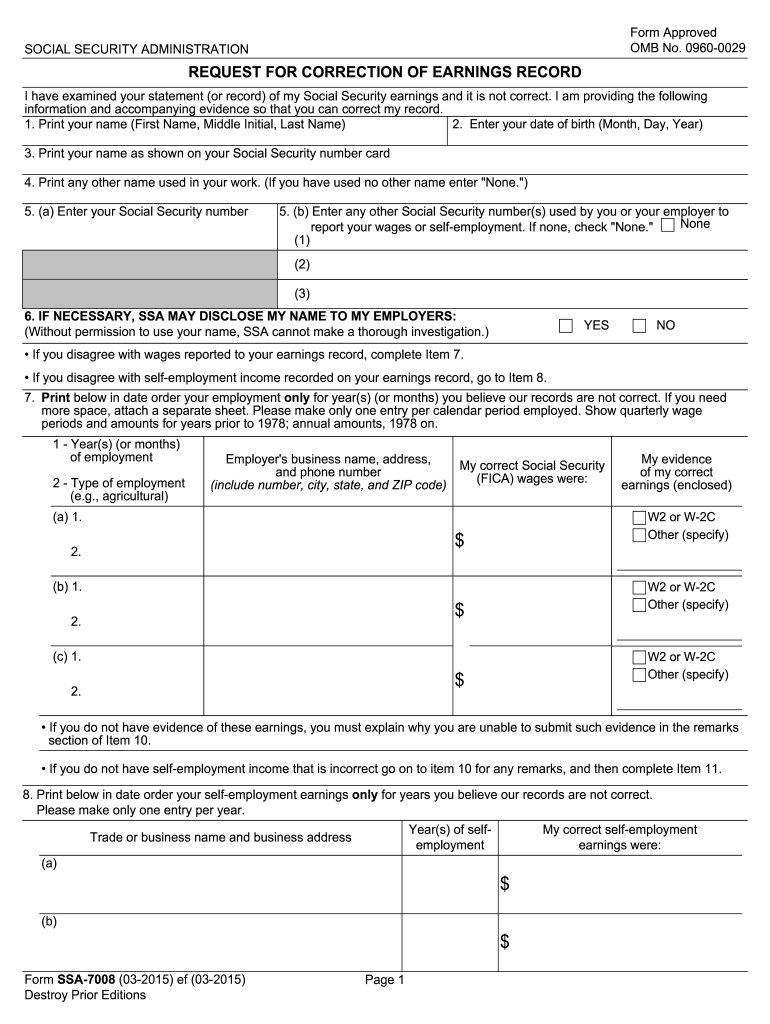
- Begin by entering your full name in the first field, followed by your date of birth. Ensure accuracy as this information is crucial for identification.
- In the next fields, provide your Social Security number and any other numbers used for reporting wages. If you have not used any other names, simply enter 'None'.
- If you disagree with reported wages, proceed to Item 7. List your employment history in chronological order, including employer details and correct wage amounts.
- For self-employment discrepancies, complete Item 8 with relevant earnings and business information. Attach evidence if available.
- Use Item 10 for any additional remarks or explanations regarding missing evidence or discrepancies.
- Finally, sign the form in Item 11 and provide your mailing address and contact numbers before submitting it to the Social Security Administration.
Start filling out your SSA 7008 form online for free today!
It's free
See more form ssa 7008 versions
Got questions?
What do I need to sign my form ssa 7008 electronically?
Electronic document signing requires a software solution that complies with data security and eSignature standards. DocHub is a perfect tool for that, because it fulfills all the aforementioned requirements. Whatever method you like to sign your form ssa 7008 in DocHub, your eSignature will be legally binding and court-admissible.
Do I need to install software to edit my form ssa 7008?
If you edit your form ssa 7008 with DocHub, you merely require a steady internet connection and virtually any web browser installed on your device. No need to set up any third-party software or study tutorials. Simply open a tab with DocHub, drag and drop your file, and modify it immediately.
What is SSA 789 form used for?
What is the most approved disability?
How long do you have to report address change to Social Security?
Security and compliance
At DocHub, your data security is our priority. We follow HIPAA, SOC2, GDPR, and other standards, so you can work on your documents with confidence.
Learn more




