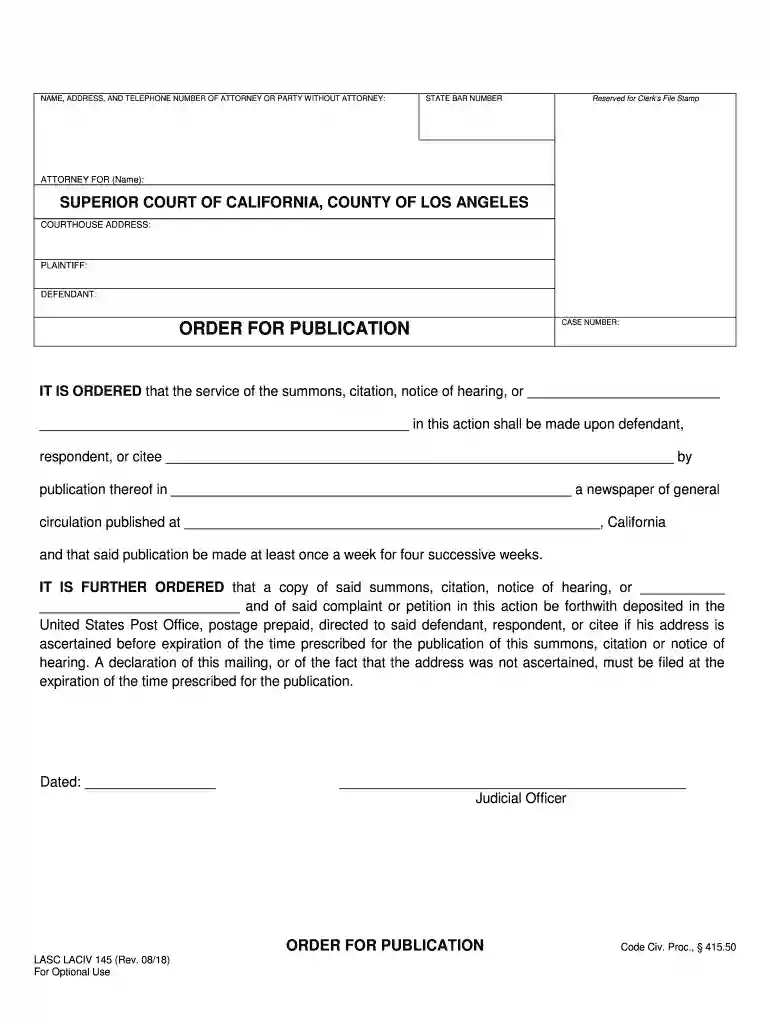
sub fee agreement sample Preview on Page 1

Laciv 145 2026

Here's how it works

  • 01. Edit your sub fee agreement sample online

    Type text, add images, blackout confidential details, add comments, highlights and more.

  • 02. Sign it in a few clicks

    Draw your signature, type it, upload its image, or use your mobile device as a signature pad.

  • 03. Share your form with others

    Send laciv 108 via email, link, or fax. You can also download it, export it or print it out.

How to use or fill out laciv 145 with our platform

Form edit decoration
9.5
Ease of Setup
DocHub User Ratings on G2
9.0
Ease of Use
DocHub User Ratings on G2
  1. Click ‘Get Form’ to open the laciv 145 document in the editor.
  2. Begin by entering the NAME, ADDRESS, and TELEPHONE NUMBER of the attorney or party without an attorney in the designated fields at the top of the form.
  3. Input the STATE BAR NUMBER if applicable, ensuring accuracy for proper identification.
  4. Fill in the ATTORNEY FOR (Name) section with the relevant party's name to clarify representation.
  5. Complete the COURTHOUSE ADDRESS field with the location of the Superior Court of California, County of Los Angeles.
  6. In the PLAINTIFF and DEFENDANT sections, provide names as required for your case.
  7. For ORDER FOR PUBLICATION, specify details regarding service of summons and publication requirements clearly in the provided spaces.
  8. Finally, ensure you date and sign where indicated by a Judicial Officer before submitting your completed form.

Start using our platform today to fill out your laciv 145 form online for free!

See more sub fee agreement sample versions

We've got more versions of the sub fee agreement sample form. Select the right sub fee agreement sample version from the list and start editing it straight away!

VersionsForm popularityFillable & printable
20184.8 Satisfied (148 Votes)
20074.3 Satisfied (120 Votes)

be ready to get more

Complete this form in 5 minutes or less

Got questions?

We have answers to the most popular questions from our customers. If you can't find an answer to your question, please contact us.

Most eSignature services require users to have a paid subscription. With DocHub, there are two options for you to create an electronic signature to your laciv 145 at no cost:

  • You can do it during a 7-day trial period;
  • You can subscribe to a free plan.

The second option, though, has restrictions on the number of signatures, sign requests, emails, and documents for editing available per month. You can check for full details here.

You may easily fill out, modify, and even eSign your laciv using DocHub. Create a new account and start your free trial. After that, you may add the file with the form and simply make all the necessary edits. No need to print on paper or use a third-party application to sign it, as you can put your electronic signature on your document faster via DocHub.

Security and compliance

At DocHub, your data security is our priority. We follow HIPAA, SOC2, GDPR, and other standards, so you can work on your documents with confidence.

Related links

National Core

General Opinions 145 AK-BILLTXT-OLD. Civil Rights Cases. LACIV-CS Louisiana Civil Rights Cases. Criminal Justice Cases. ENV Louisiana Environment Cases and

Learn more
Civil Forms

Find and download state-approved civil forms and locally-approved forms for the Superior Court of Los Angeles County.

Learn more
If you believe that this page should be taken down, please follow our DMCA take down process here