




Here's how it works



How to use or fill out NC-500 Petition for Recognition of Minor's Change of Gender and Sex Identifier and Issuance of New B

- Click ‘Get Form’ to open it in the editor.
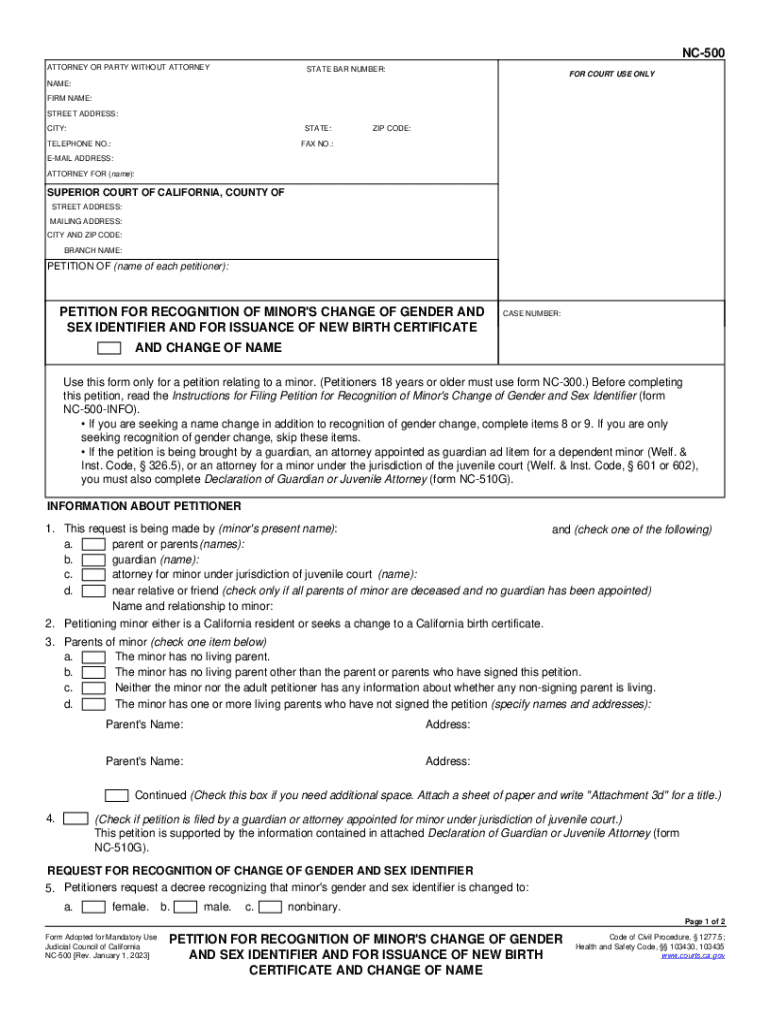
- Begin by filling in the petitioner’s information, including the minor's present name and the names of parents or guardians. Ensure all required fields are completed accurately.
- Indicate whether the petition is being filed by a parent, guardian, or attorney. This helps clarify who is making the request on behalf of the minor.
- In section 5, select the appropriate gender identity for the minor: female, male, or nonbinary. This is crucial for recognition purposes.
- If applicable, complete sections regarding any living parents who have not signed the petition. This may involve filing additional forms like NC-520.
- For a name change request, provide the proposed new name in section 9 and ensure you attach any necessary supporting documents.
- Finally, review all entries for accuracy before signing. Use our platform’s features to save your progress and print when ready.
Start using our platform today to easily fill out your NC-500 form online for free!
It's free
See more NC-500 Petition for Recognition of Minor's Change of Gender and Sex Identifier and Issuance of New B versions
Got questions?
Can I draw my electronic signature to approve my NC-500 Petition for Recognition of Minor's Change of Gender and Sex Identifier and Issuance of New B?
Yes, electronically drawing your signature is acceptable, but only if you utilize a tool that complies with industry regulations and policies. Consider DocHub, which guarantees eSignature validity under ESIGN and UETA requirements. All you need to eSign your NC-500 Petition for Recognition of Minor's Change of Gender and Sex Identifier and Issuance of New B is an account with DocHub and an internet connection. After you open your file in our editor, click Sign and choose the Draw tool.
How do you create an e-signature for the NC-500 Petition for Recognition of Minor's Change of Gender and Sex Identifier and Issuance of New B on iOS?
In addition to a comprehensive toolset for editing PDFs on mobile phones, DocHub allows you to sign your NC-500 Petition for Recognition of Minor's Change of Gender and Sex Identifier and Issuance of New B along the way. Open our editor in your internet browser, make modifications using DocHub’s toolset, and complete your editing by eSigning the finished form.
How do I change my name in Fresno County?
Do you have to publish name change in newspaper in California?
How do I get a certified copy of my name change in California?
Security and compliance
At DocHub, your data security is our priority. We follow HIPAA, SOC2, GDPR, and other standards, so you can work on your documents with confidence.
Learn more


