




01. Edit your nys elms online
Type text, add images, blackout confidential details, add comments, highlights and more.

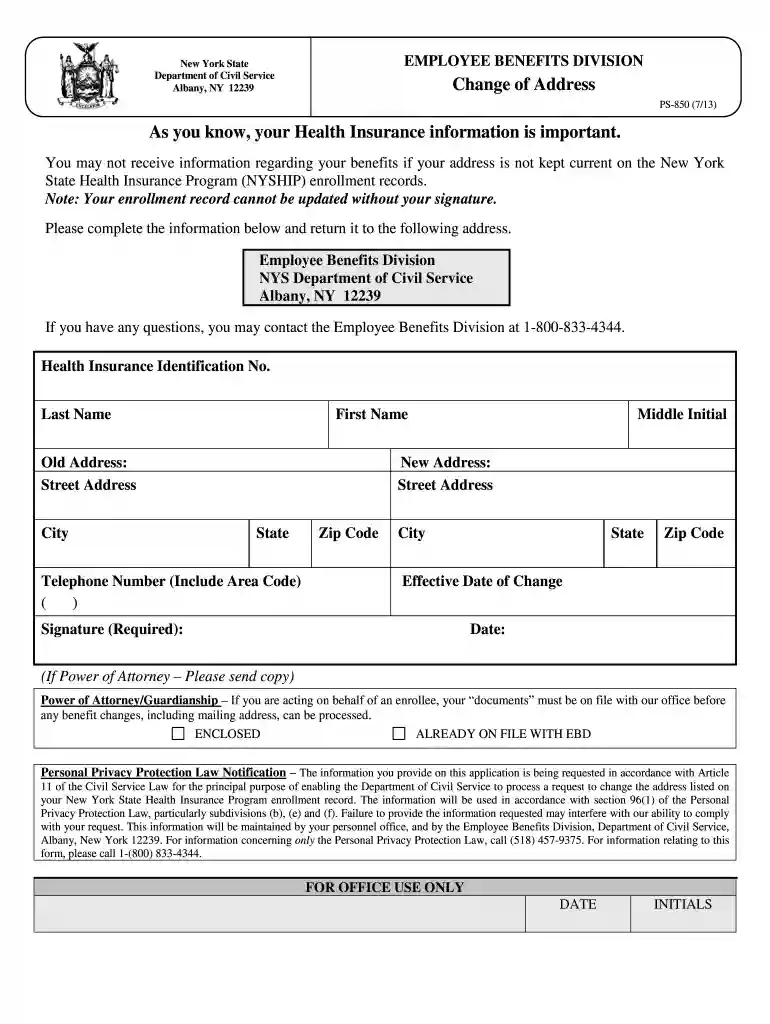
Type text, add images, blackout confidential details, add comments, highlights and more.

Draw your signature, type it, upload its image, or use your mobile device as a signature pad.

Send elms civil service via email, link, or fax. You can also download it, export it or print it out.

Start using our platform today to easily complete your NYS Civil Service forms online for free!
We've got more versions of the nys elms form. Select the right nys elms version from the list and start editing it straight away!
Electronic signatures are an excellent replacement for traditional signing, as they save time, effort, and money people spend on printing, scanning, and paper delivery. You can electronically sign your elms nys utilizing a reliable and powerful online document management tool like DocHub. It complies with primary eSignature regulations (ESIGN and UETA), so all documents approved there are legally binding and have the same validity as manually signed ones.
You need only a web connection and a web browser to fill out your nys civil service elms on an iOS phone. Open the DocHub website and authenticate. Then, add your document or choose it from the list in your dashboard. Then use our editing tools to fill out your form and save all your adjustments. You may also send it to a dedicated recipient right away.
At DocHub, your data security is our priority. We follow HIPAA, SOC2, GDPR, and other standards, so you can work on your documents with confidence.




This ETIN Application form is to be used only by persons who are self-employed or employed by a service bureau/billing agency and submit transactionsRead more
The State employs people of all ages, backgrounds, and education levels from first responders to engineers, nurses, research scientists, plow drivers, andRead more
Serve your fellow New Yorkers at one of our many public agencies. State service offers a fulfilling and impactful career with lasting opportunity.Read more


