Online PermitsLiberty Lake, WA - Official Website 2026

Get Form
Online PermitsLiberty Lake, WA - Official Website Preview on Page 1

Here's how it works

01. Edit your form online
Type text, add images, blackout confidential details, add comments, highlights and more.

02. Sign it in a few clicks
Draw your signature, type it, upload its image, or use your mobile device as a signature pad.

03. Share your form with others
Send it via email, link, or fax. You can also download it, export it or print it out.

How to use or fill out Online Permits Liberty Lake, WA - Official Website with DocHub

Form edit decoration
9.5
Ease of Setup
DocHub User Ratings on G2
9.0
Ease of Use
DocHub User Ratings on G2
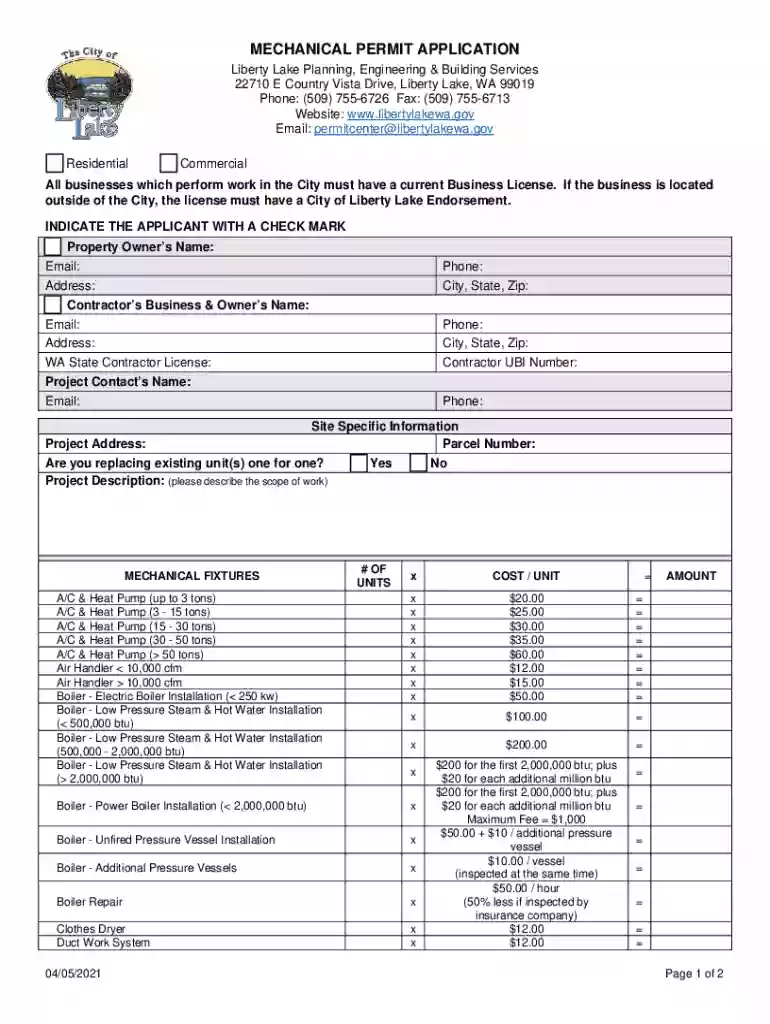
  1. Click ‘Get Form’ to open the Mechanical Permit Application in our editor.
  2. Begin by indicating the applicant's information. Fill in the Property Owner’s Name, Email, Phone, and Address. If applicable, provide the Contractor’s Business & Owner’s Name and their contact details.
  3. In the Site Specific Information section, enter the Project Address and Parcel Number. Indicate if you are replacing existing units by selecting 'Yes' or 'No'.
  4. Describe your project in detail in the Project Description field to ensure clarity on the scope of work.
  5. For Mechanical Fixtures, input the number of units for each type listed and calculate costs based on provided rates. Ensure all calculations are accurate before proceeding.
  6. Review all entered information for accuracy. Once confirmed, proceed to sign electronically at the bottom of the form.

Start filling out your permit application today using our platform for free!

See more Online PermitsLiberty Lake, WA - Official Website versions

We've got more versions of the Online PermitsLiberty Lake, WA - Official Website form. Select the right Online PermitsLiberty Lake, WA - Official Website version from the list and start editing it straight away!
Versions Form popularity Fillable & printable
2021 4.2 Satisfied (26 Votes)
2014 4 Satisfied (42 Votes)
be ready to get more

Complete this form in 5 minutes or less

Get form

Got questions?

We have answers to the most popular questions from our customers. If you can't find an answer to your question, please contact us.
Contact us
Give your WDL number to your driver training school. Your driver training school will notify us that youre enrolled. Complete your online application for a permit no earlier than 10 days before the course starts (including weekends and holidays). A permit costs $25.
Unless your property contains critical areas, you do not need a permit for: A storage shed with a floor area of 200 square feet or less, as an accessory to a residential house or for agricultural use. Fences 6 feet high or less. Most retaining walls 4 feet high or less.
Fees. Certified building application fees: Class 1 or Class 10 buildings - 0.19% of the estimated value of the building (minimum fee $110.00) Class 2 to 10 buildings - 0.09% of the estimated value of the building (minimum fee $110.00).

Security and compliance

At DocHub, your data security is our priority. We follow HIPAA, SOC2, GDPR, and other standards, so you can work on your documents with confidence.

Learn more
ccpa2
pci-dss
gdpr-compliance
hipaa
soc-compliance