WARRANTY CLAIM FORM - Sleepm Global Inc 2026

Get Form
WARRANTY CLAIM FORM - Sleepm Global Inc Preview on Page 1

Here's how it works

01. Edit your form online
Type text, add images, blackout confidential details, add comments, highlights and more.
02. Sign it in a few clicks
Draw your signature, type it, upload its image, or use your mobile device as a signature pad.
03. Share your form with others
Send it via email, link, or fax. You can also download it, export it or print it out.

How to use or fill out WARRANTY CLAIM FORM - Sleepm Global Inc

Form edit decoration
9.5
Ease of Setup
DocHub User Ratings on G2
9.0
Ease of Use
DocHub User Ratings on G2
  1. Begin by clicking ‘Get Form’ to open the WARRANTY CLAIM FORM in our editor.
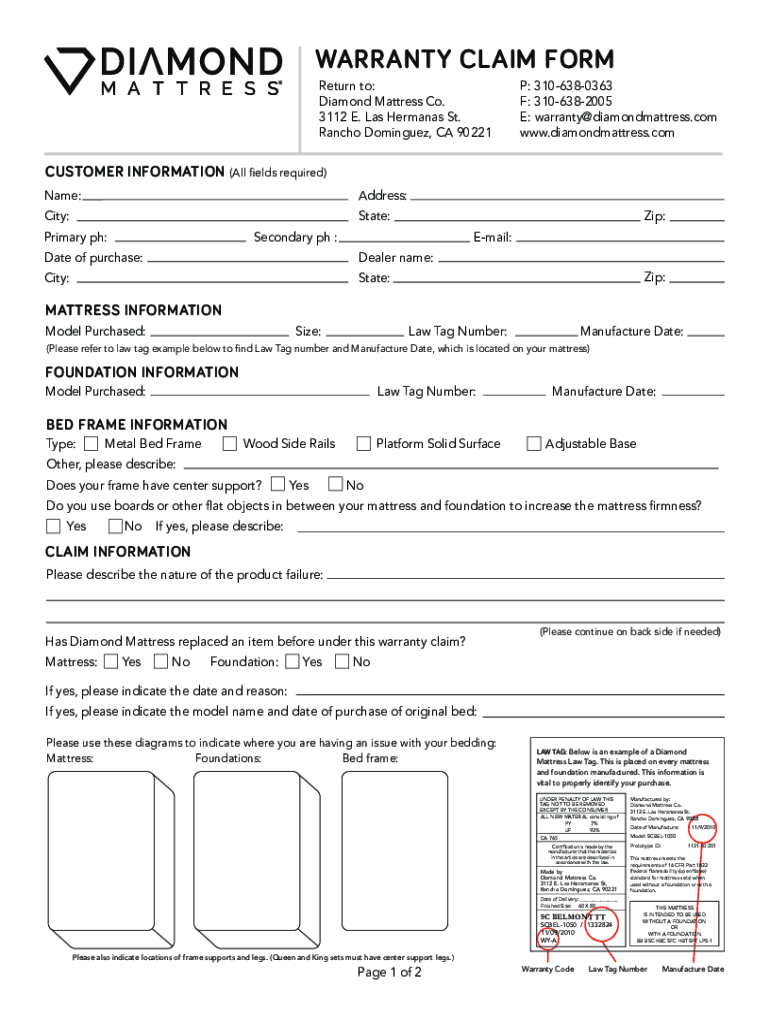
  2. Fill in the CUSTOMER INFORMATION section. Ensure all fields are completed, including your name, address, and contact details.
  3. In the MATTRESS INFORMATION section, provide details about the mattress you purchased, including the model, size, law tag number, and manufacture date. Refer to the law tag example for accurate information.
  4. Complete the FOUNDATION INFORMATION section with similar details as above for your foundation.
  5. In the BED FRAME INFORMATION section, select the type of frame you have and answer questions regarding center support and additional boards used.
  6. Describe any issues in the CLAIM INFORMATION section. If applicable, indicate if a replacement has been made under warranty before.
  7. Finally, ensure you sign at the bottom of the form to verify that there are no stains or soiling on your bedding.

Start filling out your WARRANTY CLAIM FORM today using our platform for free!

See more WARRANTY CLAIM FORM - Sleepm Global Inc versions

We've got more versions of the WARRANTY CLAIM FORM - Sleepm Global Inc form. Select the right WARRANTY CLAIM FORM - Sleepm Global Inc version from the list and start editing it straight away!
Versions Form popularity Fillable & printable
2021 4.4 Satisfied (27 Votes)
2010 4 Satisfied (47 Votes)
be ready to get more

Complete this form in 5 minutes or less

Get form

Got questions?

We have answers to the most popular questions from our customers. If you can't find an answer to your question, please contact us.
Contact us

Sign in to your DocHub account and add your WARRANTY CLAIM FORM - Sleepm Global Inc to our editor using one of its upload options - from your device, cloud storage, secure URL, or your DocHub folders if you have already processed your document before. Open our editor, click the Sign key in the upper toolbar, and choose your signing method. You can use a picture of your handwritten signature, draw it, enter your name, or use a QR code as an alternative.

With a swift editing platform like DocHub, you do not need anything but a web browser and connection to the internet to edit your WARRANTY CLAIM FORM - Sleepm Global Inc online easily. Upload your document or find the relevant form in DocHub’s catalog, open our editor with a single click, and complete it electronically. To edit your forms at any time, sign up a free account with DocHub.

Heres how to get started Click on your manufacturer and review your warranty. Not sure on the manufacturer? Just check the law tag at the head of the bed and its listed there. Remember, the mattress and boxspring each have their own law tag.
Guarantees and warranties are a contract between you and the manufacturer, and the manufacturer must do whatever it says it will do in them. Usually this will be to repair or replace a faulty item. Retailers will sometimes contact the manufacturer on your behalf, but they are not obliged to do so.
Warranty: Protects against manufacturing defects or faults. It covers issues like sagging, broken coils, and faulty seams. Sleep Trial: Ensures comfort satisfaction and allows you to return or exchange the mattress if it doesnt meet your personal preferences, even if there are no defects.

Security and compliance

At DocHub, your data security is our priority. We follow HIPAA, SOC2, GDPR, and other standards, so you can work on your documents with confidence.

Learn more

People also ask

Contact the manufacturer and explain your situation. You should find their contact details on the warranty or guarantee paperwork, in the instruction manual or on their website. If your guarantee or warranty is from the seller or trader, you should check if its insurance-backed.
When you make a claim, youll usually need: proof of purchase - usually a receipt showing where and when you bought the goods. details of what the problem is. a photocopy of the warranty or guarantee.
Documenting the defect with photos and medical complaints related to the mattress can support claims. Contact the retailer or manufacturer promptly to request repair, replacement, or refund options. Understanding warranty coverage and timelines is key to resolving mattress quality disputes effectively.

Related links