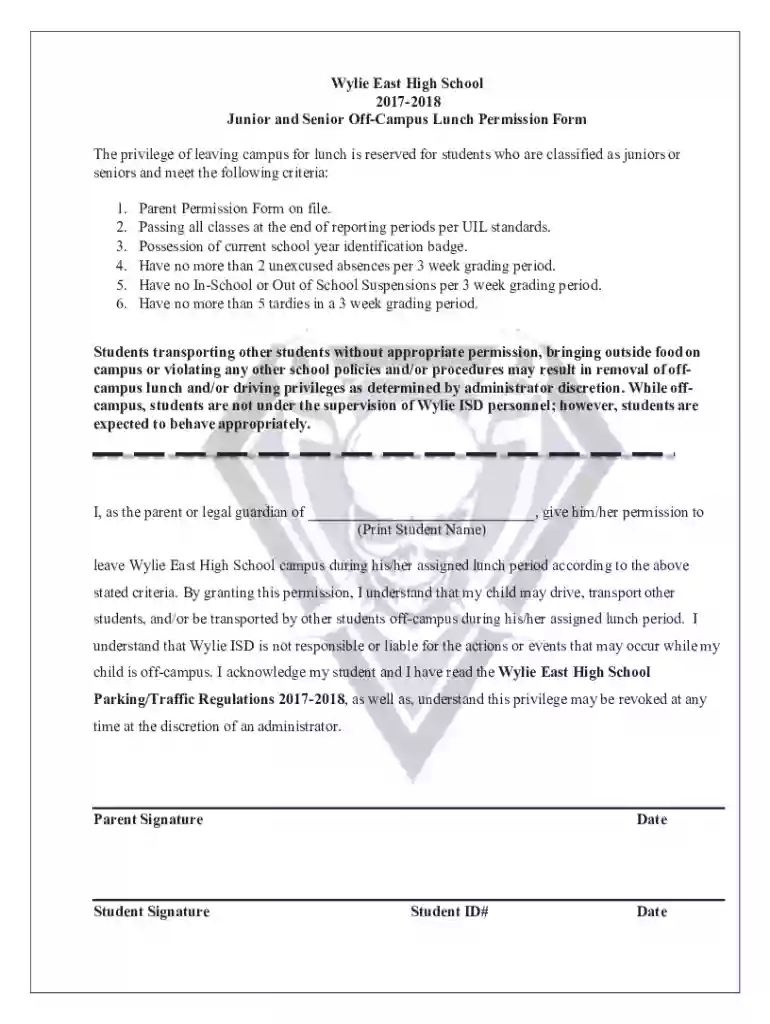
Wylie East High School Off-Campus Lunch Permission Form Preview on Page 1

Wylie East High School Off-Campus Lunch Permission Form 2026

Here's how it works

  • 01. Edit your form online

    Type text, add images, blackout confidential details, add comments, highlights and more.

  • 02. Sign it in a few clicks

    Draw your signature, type it, upload its image, or use your mobile device as a signature pad.

  • 03. Share your form with others

    Send it via email, link, or fax. You can also download it, export it or print it out.

How to Use or Fill Out the Off-Campus Lunch Permission Form Online

Form edit decoration
9.5
Ease of Setup
DocHub User Ratings on G2
9.0
Ease of Use
DocHub User Ratings on G2
  1. Click ‘Get Form’ to open the Off-Campus Lunch Permission Form in our editor.
  2. Begin by entering the student's name in the designated field where it states 'Print Student Name'. This ensures that the permission is specifically for your child.
  3. Review the criteria listed to ensure your student meets all requirements. This includes having a parent permission form on file and maintaining good academic standing.
  4. In the signature fields, provide both the parent and student signatures. Make sure to date these entries accurately to validate the permission.
  5. Finally, input the Student ID number in the specified field. This helps school officials verify your child's identity and eligibility for off-campus lunch privileges.

Start filling out your form online for free today and streamline your document process with our platform!

See more Wylie East High School Off-Campus Lunch Permission Form versions

We've got more versions of the Wylie East High School Off-Campus Lunch Permission Form form. Select the right Wylie East High School Off-Campus Lunch Permission Form version from the list and start editing it straight away!

VersionsForm popularityFillable & printable
20174.9 Satisfied (27 Votes)
20144.9 Satisfied (55 Votes)

be ready to get more

Complete this form in 5 minutes or less

Security and compliance

At DocHub, your data security is our priority. We follow HIPAA, SOC2, GDPR, and other standards, so you can work on your documents with confidence.

Related links

Dual Credit

Dual/Concurrent students must have written approval (permission form) from their high school or homeschool administrator for any course they plan to enroll inRead more

Learn more
Collin County JJAEP

Students who are expelled from their home campus to the JJAEP are not permitted to attend any School related events sponsored by their home campus. In doingRead more

Learn more
If you believe that this page should be taken down, please follow our DMCA take down process here