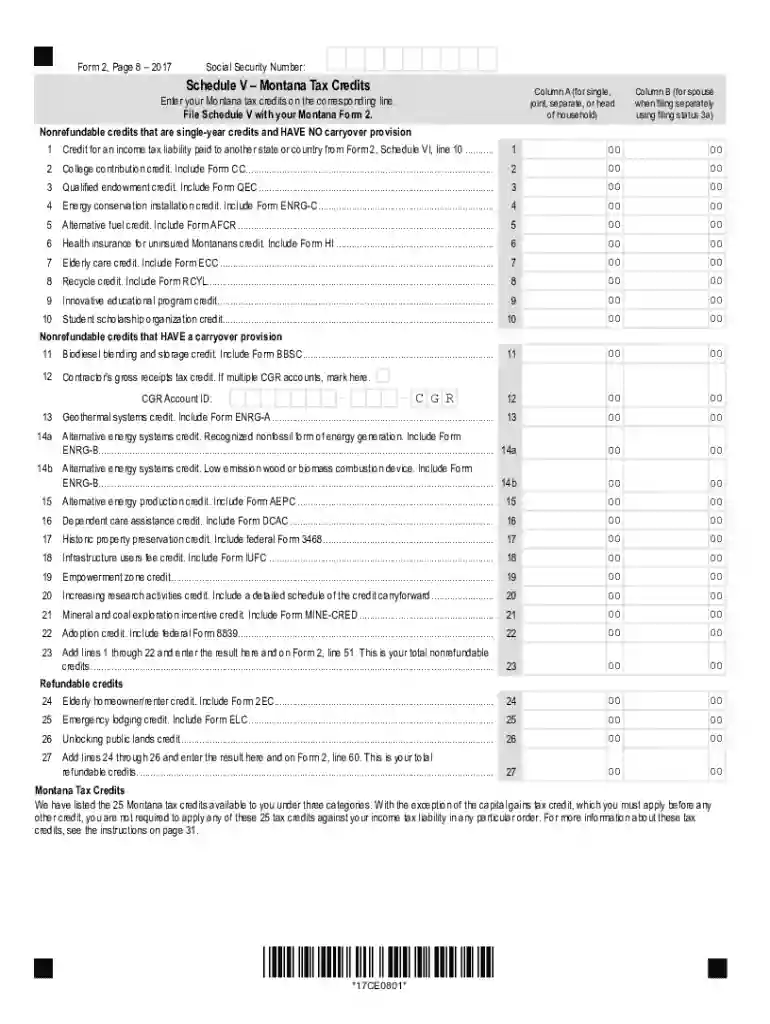
Printable 2020 Montana Form 2 Worksheet V (Tax Credits (DISCONTINUED))-2026

Get Form
Printable 2020 Montana Form 2 Worksheet V (Tax Credits (DISCONTINUED)) Preview on Page 1

Here's how it works

01. Edit your form online
Type text, add images, blackout confidential details, add comments, highlights and more.

02. Sign it in a few clicks
Draw your signature, type it, upload its image, or use your mobile device as a signature pad.

03. Share your form with others
Send it via email, link, or fax. You can also download it, export it or print it out.

How to use or fill out Printable 2020 Montana Form 2 Worksheet V (Tax Credits (DISCONTINUED)) with DocHub

Form edit decoration
9.5
Ease of Setup
DocHub User Ratings on G2
9.0
Ease of Use
DocHub User Ratings on G2
  1. Click ‘Get Form’ to open it in the editor.
  2. Begin by entering your Social Security Number at the top of the form. This is essential for identification purposes.
  3. In Column A, list your Montana tax credits according to the corresponding lines. Ensure you have the necessary forms ready to include as required.
  4. If filing separately, complete Column B for your spouse's credits. Make sure to accurately reflect any nonrefundable credits that apply.
  5. For each credit listed, refer to the specific forms mentioned (e.g., Form CC for college contribution credit) and attach them as needed.
  6. After filling in all applicable lines, sum up your total nonrefundable credits on line 23 and refundable credits on line 27, ensuring accuracy before submission.

Start using our platform today to easily fill out and manage your tax documents for free!

See more Printable 2020 Montana Form 2 Worksheet V (Tax Credits (DISCONTINUED)) versions

We've got more versions of the Printable 2020 Montana Form 2 Worksheet V (Tax Credits (DISCONTINUED)) form. Select the right Printable 2020 Montana Form 2 Worksheet V (Tax Credits (DISCONTINUED)) version from the list and start editing it straight away!
Versions Form popularity Fillable & printable
2017 4.8 Satisfied (47 Votes)
be ready to get more

Complete this form in 5 minutes or less

Get form

Got questions?

We have answers to the most popular questions from our customers. If you can't find an answer to your question, please contact us.
Contact us
Get federal tax forms for current and prior years Download them from IRS.gov. Order online and have them delivered by U.S. mail. Order by phone at 1-800-TAX-FORM (1-800-829-3676)
This is your elderly homeowner/renter credit. Attach Form 2EC to Form 2M. If you are not required to file Montana Form 2 or 2M, see instructions on the back of this form. Mail Form 2EC to the MT Dept. of Revenue. Name, address and telephone number of paid preparer May the DOR discuss this return with your tax preparer?
Get tax records from IRS Online Account The fastest and easiest way for taxpayers to view their tax records is by logging on to their IRS Online Account. There, they can: View, print or download their tax transcripts.
Prior year tax returns are available from the IRS for a fee. Taxpayers can request a copy of a tax return by completing and mailing Form 4506, Request for Copy of Tax Return, to the IRS address listed on the form. Theres a $30 fee for each copy. These are available for the current tax year and up to seven years prior.
Make sure youre using the same TurboTax account (same user ID) as in previous years. There are two ways to get your prior-year returns: Select Documents from the menu, use the dropdown menu to choose the tax year you want, and select Download tax PDF. On Tax home, scroll down and select Your tax returns documents.

Security and compliance

At DocHub, your data security is our priority. We follow HIPAA, SOC2, GDPR, and other standards, so you can work on your documents with confidence.

Learn more
ccpa2
pci-dss
gdpr-compliance
hipaa
soc-compliance

People also ask

In the left menu, select Tax Tools then Print Center. On the TurboTax Print Center screen, select Print, save or preview this years return. On the next TurboTax Print Center screen, select 2020 federal returns and Include Government and TurboTax Worksheets (optional), then select View or Print Forms.
If your past returns are not shown there, then you likely have multiple accounts and signed into the wrong one. Ill tell you below how to troubleshoot. If you have already started a 2024 return: Log in, and if youve already started a 2024 return in that account, then it may already open at the Tax Home.
TurboTax Desktop Open the return you want to print. From the File menu (or TurboTax menu if youre on a Mac), choose Print. In the pop-up window, select the form set you want to print (tax return, specific forms, etc.) and then select Preview Print Copy (on Mac, select your print options and then select Continue).

Related links