Hawaii disabled form 2026

Get Form
n 172 Preview on Page 1

Here's how it works

01. Edit your n 172 online
Type text, add images, blackout confidential details, add comments, highlights and more.

02. Sign it in a few clicks
Draw your signature, type it, upload its image, or use your mobile device as a signature pad.

03. Share your form with others
Send hawaii n 172 form via email, link, or fax. You can also download it, export it or print it out.

How to use or fill out hawaii disabled form with our platform

Form edit decoration
9.5
Ease of Setup
DocHub User Ratings on G2
9.0
Ease of Use
DocHub User Ratings on G2
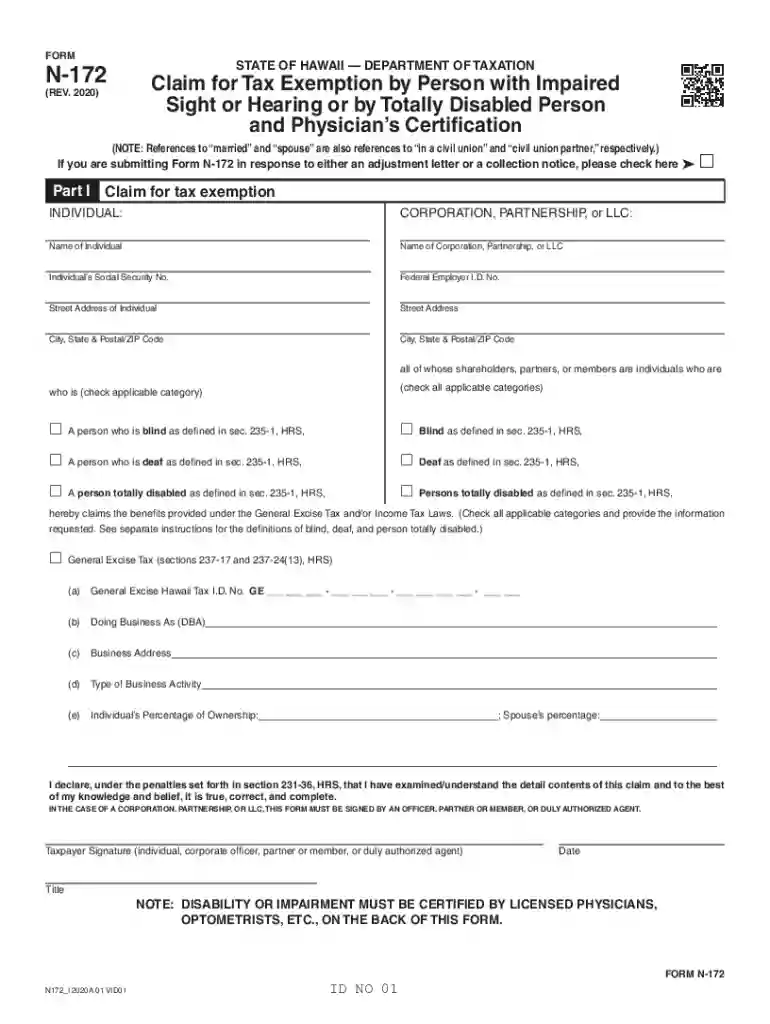
  1. Click ‘Get Form’ to open the Hawaii Disabled Form N-172 in the editor.
  2. Begin with Part I, where you will select whether you are an individual or a corporation. Fill in your name, Social Security Number, and address details accurately.
  3. Indicate your eligibility by checking the applicable categories for blindness, deafness, or total disability as defined in section 235-1, HRS.
  4. If claiming General Excise Tax benefits, provide your General Excise Hawaii Tax I.D. No., Doing Business As (DBA) name, business address, and type of business activity.
  5. In Part II, have a licensed physician or optometrist complete the certification section relevant to your condition—either eye examination or hearing examination—ensuring all fields are filled out completely.
  6. Finally, sign and date the form at the bottom. If applicable, ensure that any required witnesses also sign.

Start using our platform today to fill out your Hawaii Disabled Form easily and for free!

See more hawaii disabled form versions

We've got more versions of the hawaii disabled form form. Select the right hawaii disabled form version from the list and start editing it straight away!
Versions Form popularity Fillable & printable
2020 4.8 Satisfied (70 Votes)
be ready to get more

Complete this form in 5 minutes or less

Get form

Got questions?

We have answers to the most popular questions from our customers. If you can't find an answer to your question, please contact us.
Contact us

Microsoft Word doesn’t have signing tools to generate legitimate eSignatures and enforceable forms. Fortunately, DocHub is an online eSignature-compliant editor that supports different document formats, including .doc files. Sign in to your account and add the Word version of your hawaii n 172 from your device and cloud, or URL - our editor will automatically turn it into an editable PDF. Make all essential modifications in your form and click Sign to generate your own legally-binding electronic signature. There are four signing methods from which to choose.

As a comprehensive document editing platform, DocHub is accessible on smart phones. Open DocHub in your choice of mobile browser and employ our intelligent mobile-friendly toolset to complete your hawaii n172.

Hawaiʻi Tax Online is the convenient and secure way to get a State Tax Identification Number (BB-1), file tax returns, make payments, manage your accounts, and conduct other common transactions online with the Hawaiʻi Department of Taxation.
The Assistance to the Aged, Blind and Disabled (AABD) program provides cash benefits for food, clothing, shelter, and other essentials to a gap group of Hawaii residents. They are elderly adults (65 years of age or older) or individuals who meet the Social Security Administration (SSA) definition of disabled or blind. Aid to the Aged, Blind, and Disabled (AABD) hawaii.gov bessd aabd hawaii.gov bessd aabd
Purpose of Form N-172 Use Part I of Form N-172 to notify the Department of Taxation that you qualify to claim the special exemptions for persons with impaired sight or hearing or persons who are totally disabled. Part II of Form N-172 is used to docHub blindness, deafness, or disability for tax purposes.

Security and compliance

At DocHub, your data security is our priority. We follow HIPAA, SOC2, GDPR, and other standards, so you can work on your documents with confidence.

Learn more
ccpa2
pci-dss
gdpr-compliance
hipaa
soc-compliance

People also ask

How You Apply Complete your application online. Call our toll-free telephone number 1-800-772-1213. If you are deaf or hard of hearing, you can call us at TTY 1-800-325-0778. Call or visit your local Social Security office.
58% of your average weekly wages rounded to the next higher dollar, but not more than the maximum weekly benefit amount annually set by the Disability Compensation Division. Example: The maximum weekly benefit for 2021 is $640. Your weekly benefit amount will be based on your earnings and will not be more than $640. Frequently asked questions about Temporary Disability Insurance hawaii.gov frequently-asked-questions tdi hawaii.gov frequently-asked-questions tdi
To qualify for disabled parking in Hawaii, a person must have a disability that impairs their ability to walk and one or more of the following medical conditions: Cannot walk 200 feet without having to stop and rest due to an arthritic, neurological, orthopedic, oncological, renal, or vascular condition.
To qualify for disability you need to have a condition that prevents you from working for at least a year. Youll also need to meet certain work history requirements (for SSDI) or be within certain income limits (for SSI). Hawaii Disability Benefits: Qualify, Apply, and Get Approved atticus.com Disability help by state atticus.com Disability help by state
While some people are approved in as little as 30 days, others can wait a year or longer before they receive a final decision. How long does it take to get approved for SSDI? idlawcenter.com faqs how-long-it-can-ta idlawcenter.com faqs how-long-it-can-ta

hawaii disabled form