Businesslicenses LicensesUTSt George, UT Alarm Permit Application - businesslicenses 2026

Get Form
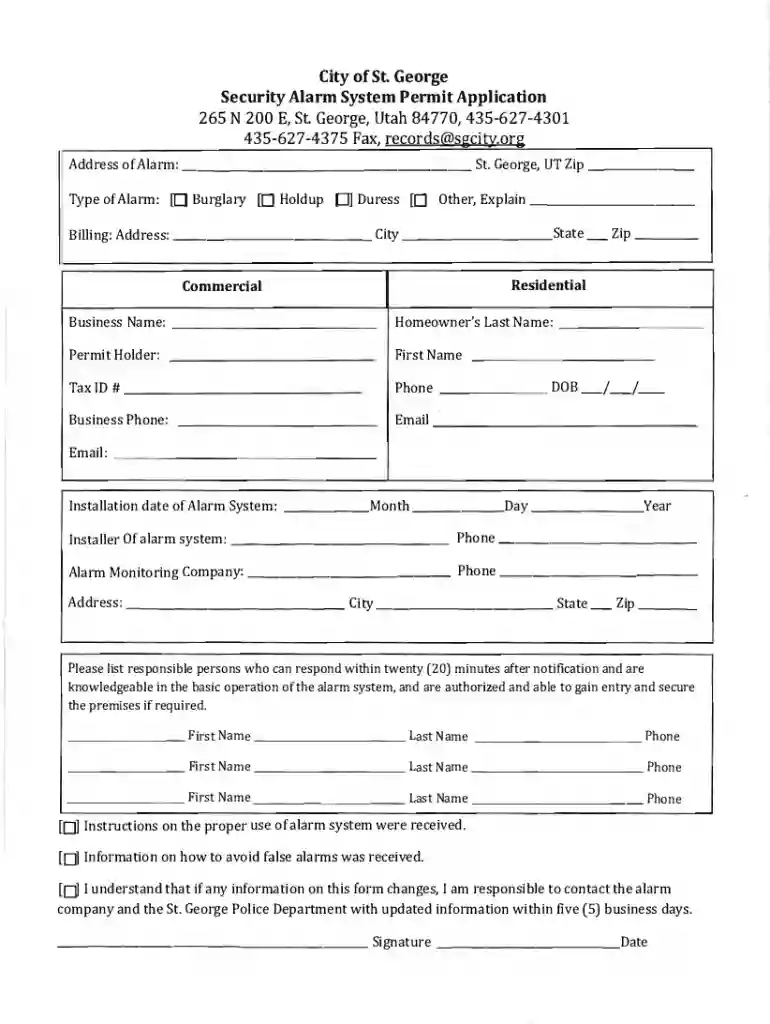
businesslicenses LicensesUTSt George, UT Alarm Permit Application - businesslicenses Preview on Page 1

Here's how it works

01. Edit your form online
Type text, add images, blackout confidential details, add comments, highlights and more.

02. Sign it in a few clicks
Draw your signature, type it, upload its image, or use your mobile device as a signature pad.

03. Share your form with others
Send it via email, link, or fax. You can also download it, export it or print it out.

How to use or fill out businesslicenses LicensesUT St George, UT Alarm Permit Application - businesslicenses with our platform

Form edit decoration
9.5
Ease of Setup
DocHub User Ratings on G2
9.0
Ease of Use
DocHub User Ratings on G2
  1. Click ‘Get Form’ to open the application in the editor.
  2. Begin by entering the address of the alarm system, including the zip code. Ensure accuracy for proper processing.
  3. Select the type of alarm from the options provided: Burglary, Holdup, Duress, or Other. If 'Other' is selected, provide a brief explanation.
  4. Fill in your billing address and indicate whether it is residential or commercial. Include your business name and contact details.
  5. Provide information about the installation date of your alarm system and details of the installer and monitoring company.
  6. List responsible persons who can respond within twenty minutes after notification. Include their names and phone numbers.
  7. Review the acknowledgment statements regarding instructions received and responsibilities for updating information. Sign and date the form.
  8. Finally, ensure you include payment details for the permit fee before submitting your application.

Start using our platform today to easily complete your Alarm Permit Application online for free!

See more businesslicenses LicensesUTSt George, UT Alarm Permit Application - businesslicenses versions

We've got more versions of the businesslicenses LicensesUTSt George, UT Alarm Permit Application - businesslicenses form. Select the right businesslicenses LicensesUTSt George, UT Alarm Permit Application - businesslicenses version from the list and start editing it straight away!
Versions Form popularity Fillable & printable
2021 4.7 Satisfied (53 Votes)
2014 4.3 Satisfied (34 Votes)
be ready to get more

Complete this form in 5 minutes or less

Get form

Got questions?

We have answers to the most popular questions from our customers. If you can't find an answer to your question, please contact us.
Contact us
All Utah businesses must be licensed with the city or county where they are doing business. Each Utah city and county has its own licensing requirements, forms and procedures. If youre conducting business within a citys limits, check with your city government to determine licensing requirements. Getting A Utah Business License: A Step-by-Step Guide - Collective Collective guides utah-business-lice Collective guides utah-business-lice
If you have recently applied for a Utah driver license or identification card, processing and mailing can take 6-8 weeks. If it has been more than four weeks since you completed your application, you can check the production status of your driver license or identification card using the button below.
Renew online Renew an application. Permits can be renewed up to 30 days in advance by paying the $25 renewal fee before the expiration date. Permit issuance. Once approved, the applicant is emailed a renewed copy of the alarm permit. Renew an alarm permit - City and County of Denver City and County of Denver Burglar-alarms Alarm-Pe City and County of Denver Burglar-alarms Alarm-Pe
Getting a license normally takes 5-10 business days, but can take up to 30 days, from the date the application is submitted until the approval process is completed. These County Code Sections apply to county licenses. You should familiarize yourself with the requirements before applying.
Application Process Completed the online application. Pay licensing fees and have required inspections completed. Registration with the Utah State Department of Commerce (Business Name, Corporation, LLC, Partnership) State Sales Tax Number (if applicable) Federal Tax ID Number (if applicable)

Security and compliance

At DocHub, your data security is our priority. We follow HIPAA, SOC2, GDPR, and other standards, so you can work on your documents with confidence.

Learn more
ccpa2
pci-dss
gdpr-compliance
hipaa
soc-compliance