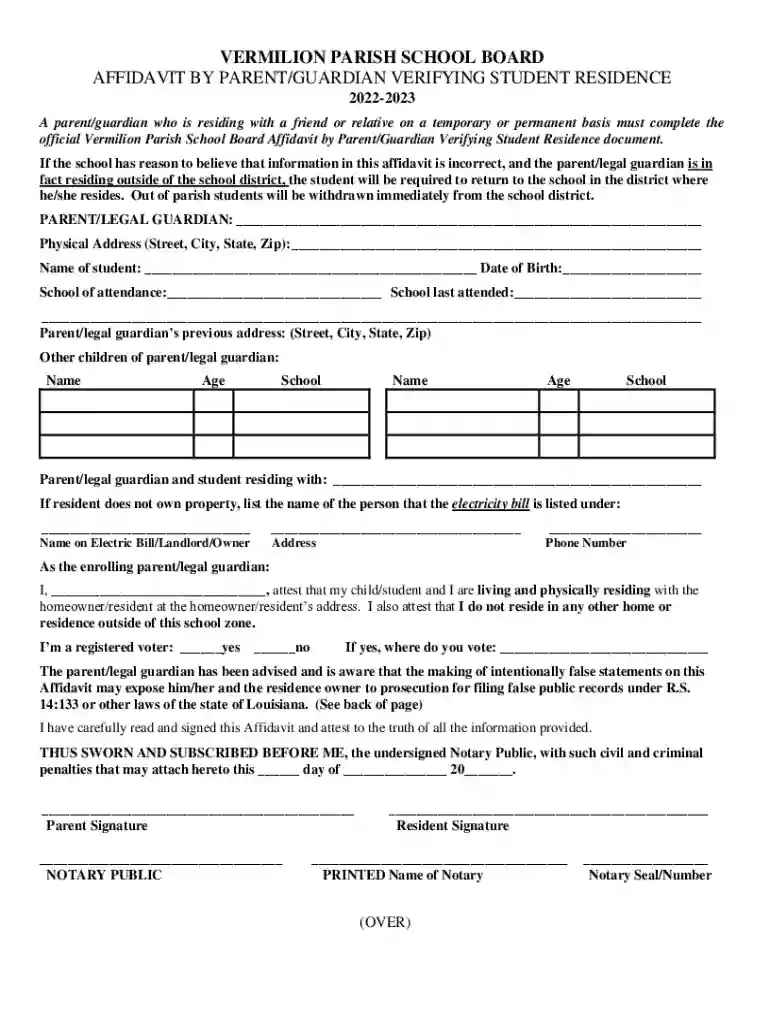
Affidavit Verifying Residence - Vermilion Parish Schools - Fill and 2026

Get Form
Affidavit Verifying Residence - Vermilion Parish Schools - Fill and Preview on Page 1

Here's how it works

01. Edit your form online
Type text, add images, blackout confidential details, add comments, highlights and more.

02. Sign it in a few clicks
Draw your signature, type it, upload its image, or use your mobile device as a signature pad.

03. Share your form with others
Send it via email, link, or fax. You can also download it, export it or print it out.

How to use or fill out Affidavit Verifying Residence - Vermilion Parish Schools - Fill and with our platform

Form edit decoration
9.5
Ease of Setup
DocHub User Ratings on G2
9.0
Ease of Use
DocHub User Ratings on G2
  1. Click ‘Get Form’ to open the Affidavit Verifying Residence in the editor.
  2. Begin by entering your name as the parent or legal guardian in the designated field at the top of the form.
  3. Fill in your physical address, including street, city, state, and zip code. Ensure accuracy for verification purposes.
  4. Provide your child's name and date of birth, along with their school of attendance and the last school they attended.
  5. List any other children under your guardianship, including their names, ages, and schools they attend.
  6. Indicate who you are residing with by filling in their details. If applicable, provide information about the electricity bill holder.
  7. Read through the attestation statement carefully before signing. Confirm that all information is truthful and accurate.
  8. Finally, sign and date the affidavit at the bottom. Ensure a notary public witnesses your signature for validation.

Start using our platform today to easily complete your Affidavit Verifying Residence for free!

See more Affidavit Verifying Residence - Vermilion Parish Schools - Fill and versions

We've got more versions of the Affidavit Verifying Residence - Vermilion Parish Schools - Fill and form. Select the right Affidavit Verifying Residence - Vermilion Parish Schools - Fill and version from the list and start editing it straight away!
Versions Form popularity Fillable & printable
2022 4.6 Satisfied (24 Votes)
be ready to get more

Complete this form in 5 minutes or less

Get form

Got questions?

We have answers to the most popular questions from our customers. If you can't find an answer to your question, please contact us.
Contact us

Signing documents on a mobile device is quick, simple, and doesn’t require software installation if you have an account with DocHub. Log in from any browser, fill in your blank fields with your data, and click on Sign → Create your signature. You can draw your electronic signature the same way you usually do on paper, add its picture to your Affidavit Verifying Residence - Vermilion Parish Schools - Fill and, or type in your name and stylize its look. No matter what option you choose, your documentation will be valid.

You need only an internet connection and a web browser to fill out your Affidavit Verifying Residence - Vermilion Parish Schools - Fill and on an iOS phone. Open the DocHub website and authenticate. Then, add your document or select it from the list in your dashboard. Then use our editing instruments to fill out your form and save all your changes. You may also send it to a specified recipient straight away.

Common documents include utility bills, lease agreements, property tax bills, and drivers licenses. Its important to check that these documents are current and match the address provided by the students family. 2. Home Visits: Conducting home visits can provide firsthand verification of residency.
School Residency Affidavit: A school residency affidavit is usually required to enrol a child in school. The parent or legal guardian of the child completes this affidavit to verify that the child lives within the school district.
To get a docHubd affidavit of residency, you need to complete the official form and have it signed by a notary. Notarization is practically the last step. You may fill in all the data and docHub your affidavit of residency form online at the docHub website.

Security and compliance

At DocHub, your data security is our priority. We follow HIPAA, SOC2, GDPR, and other standards, so you can work on your documents with confidence.

Learn more
ccpa2
pci-dss
gdpr-compliance
hipaa
soc-compliance

People also ask

A residency affidavit is a sworn, docHubd statement confirming your residence address. You might need one for a driver license or identification card renewal for various situations that need to meet residency requirements, such as: Enrolling your child in school. Getting a drivers license or identification card.
The Private School Affidavit, also referred to as the R-4 Form, is a registration document that is required to be filed annually by all California private schools.
A school proof of residency letter is a document required by some schools to prove that a student is a resident of a particular location. This is often required to verify eligibility for in-state tuition or to allow a minor to attend elementary, middle, or high school in a specific district.

Related links