01. Edit your dwd wisconsin gov dwd forms ui ucb 12 e htm online
Type text, add images, blackout confidential details, add comments, highlights and more.
02. Sign it in a few clicks
Draw your signature, type it, upload its image, or use your mobile device as a signature pad.
03. Share your form with others
Send ucb12 via email, link, or fax. You can also download it, export it or print it out.
How to use or fill out UCB-12, Work Search Action Log This form may be used to document your work search actions for a week with our platform
Ease of Setup
DocHub User Ratings on G2
Ease of Use
DocHub User Ratings on G2
Click ‘Get Form’ to open it in the editor.
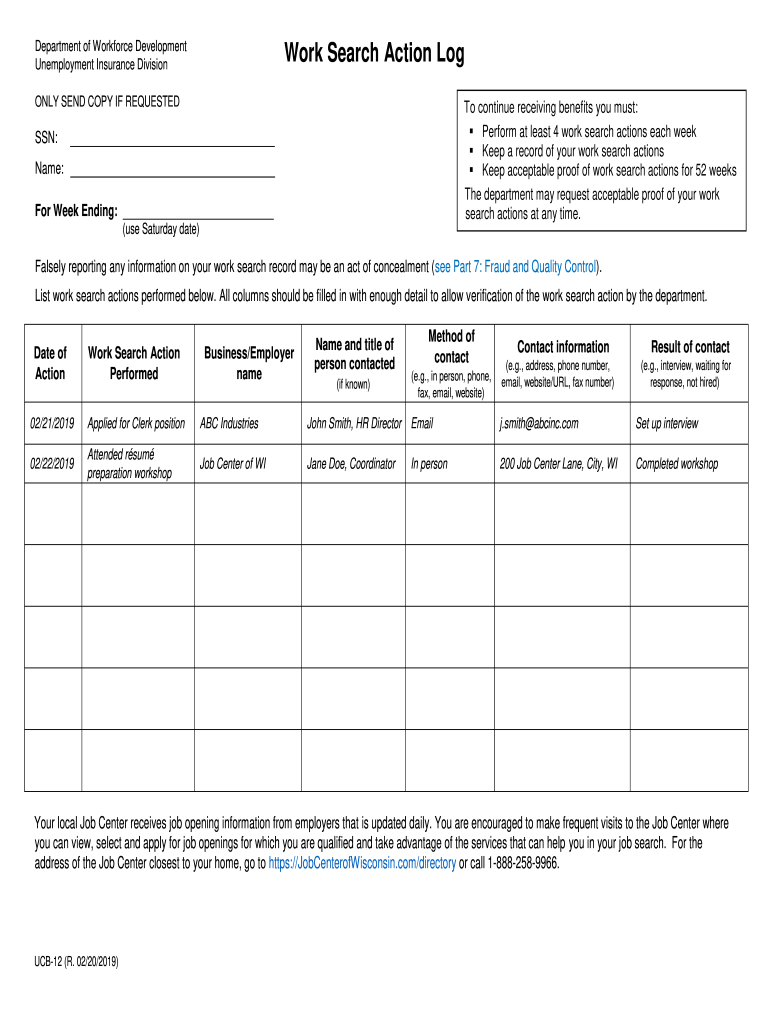
Begin by entering your Social Security Number (SSN) and name at the top of the form. This information is essential for identification purposes.
Fill in the 'For Week Ending' section with the Saturday date that corresponds to the week you are documenting your work search actions.
In the main section, list each work search action performed. Start with the 'Business/Employer name' column, providing the name of the company you contacted.
Next, fill in 'Name and title of person contacted' with details of your contact at that business.
Indicate the 'Method of contact' used (e.g., email, phone, in-person) and provide relevant 'Contact information' such as email addresses or phone numbers.
Document the 'Result of contact', summarizing what occurred during your interaction (e.g., interview set up, waiting for response).
Finally, enter the 'Date of Action' and describe the specific 'Work Search Action Performed'. Ensure all columns are filled out accurately for verification purposes.
Start using our platform today to easily complete your UCB-12 form online for free!
Fill out UCB-12, Work Search Action Log This form may be used to document your work search actions for a week online It's free
See more UCB-12, Work Search Action Log This form may be used to document your work search actions for a week versions
We've got more versions of the UCB-12, Work Search Action Log This form may be used to document your work search actions for a week form. Select the right UCB-12, Work Search Action Log This form may be used to document your work search actions for a week version from the list and start editing it straight away!
Work search waiver unemploymentWork search formHow to get around work search requirementsUnemployment work search logCompleted wi Job service mandatory Work registrationWeekly work search entry formWork search for unemploymentUI number lookup
Security and compliance
At DocHub, your data security is our priority. We follow HIPAA, SOC2, GDPR, and other standards, so you can work on your documents with confidence.
This form may be used to maintain a physical record of work search actions for your own reference and to prepare for filing weekly claims by phone.Read more
Optional Practical Training (OPT) is 12-month work authorization available to F-1 international students who have been full-time students for at least twoRead more
Cookie consent notice
This site uses cookies to enhance site navigation and personalize your experience.
By using this site you agree to our use of cookies as described in our Privacy Notice.
You can modify your selections by visiting our Cookie and Advertising Notice.