Labor parental 2026

Get Form
new hampshire parental form Preview on Page 1

Here's how it works

01. Edit your new hampshire parental form online
Type text, add images, blackout confidential details, add comments, highlights and more.

02. Sign it in a few clicks
Draw your signature, type it, upload its image, or use your mobile device as a signature pad.

03. Share your form with others
Send it via email, link, or fax. You can also download it, export it or print it out.

How to use or fill out labor parental with our platform

Form edit decoration
9.5
Ease of Setup
DocHub User Ratings on G2
9.0
Ease of Use
DocHub User Ratings on G2
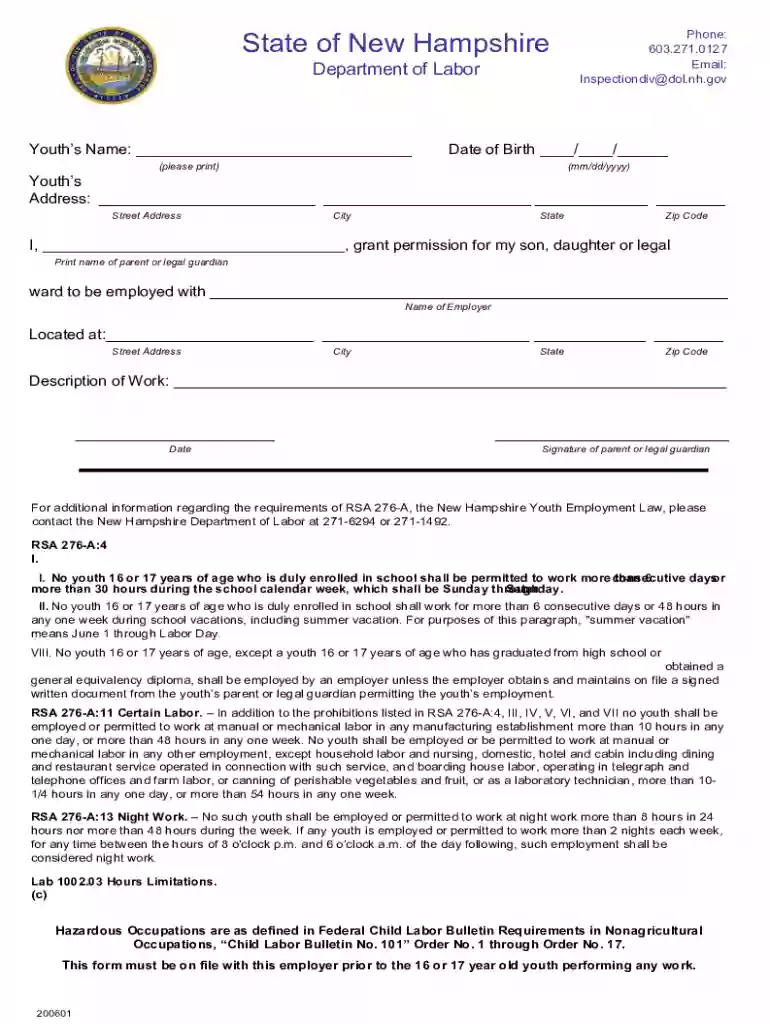
  1. Click ‘Get Form’ to open the labor parental form in the editor.
  2. Begin by entering the youth’s name in the designated field. Ensure that you print clearly for accuracy.
  3. Next, input the date of birth in the format mm/dd/yyyy. This is crucial for verifying age eligibility.
  4. Fill in the youth’s address, including street, city, state, and zip code. Double-check for any typos.
  5. In the section labeled 'Print name of parent or legal guardian', provide your full name as it appears on official documents.
  6. Specify the employer's name and their address in the respective fields to ensure proper identification.
  7. Describe the nature of work that the youth will be engaged in. Be specific to comply with labor regulations.
  8. Finally, sign and date the form as a parent or legal guardian to grant permission for employment.

Start filling out your labor parental form today for free using our platform!

See more labor parental versions

We've got more versions of the labor parental form. Select the right labor parental version from the list and start editing it straight away!
Versions Form popularity Fillable & printable
2020 4.8 Satisfied (172 Votes)
2017 4.1 Satisfied (26 Votes)
be ready to get more

Complete this form in 5 minutes or less

Get form

Got questions?

We have answers to the most popular questions from our customers. If you can't find an answer to your question, please contact us.
Contact us
Paid parental leave granted in connection with a qualifying birth or placement under FEPLA is substituted for unpaid FMLA leave and is available during the 12-month period following the birth or placement.
Parental leave is a gender-neutral program that allows any person in a parenting role, including non-birthing parents and adoptive parents, to take time off work after fulfilling one of these criteria. Maternity leave, on the other hand, is typically reserved for birthing parents.
Parental leave is a workplace benefit that allows employees to take time off from work to care for their newborn or newly adopted children. Parental leave typically includes maternity leave for mothers before and after childbirth, paternity leave for fathers, and adoption leave for parents adopting a child.
If you have questions about FMLA, contact the U.S. Department of Labor at 612-370-3341 or dol.gov/whd/ fmla. Does Minnesota offer paid family and medical leave? Minnesotas paid family and medical leave law, which provides paid time off during or following a pregnancy, goes into effect Jan. 1, 2026.
Paid Parental Leave: Minnesotas new paid family and medical leave law will take effect on January 1, 2026. However, starting on August 1, 2024, pregnant workers can take prenatal medical leave without it counting against their twelve weeks of parental leave.

Security and compliance

At DocHub, your data security is our priority. We follow HIPAA, SOC2, GDPR, and other standards, so you can work on your documents with confidence.

Learn more
ccpa2
pci-dss
gdpr-compliance
hipaa
soc-compliance

People also ask

Employees may take up to 12 weeks of unpaid leave upon the birth or adoption of their child. Employees are eligible for this leave regardless of the size of their employer and the amount of time for which they have worked for their employer.

Related links