




Here's how it works

01. Edit your form online
Type text, add images, blackout confidential details, add comments, highlights and more.

02. Sign it in a few clicks
Draw your signature, type it, upload its image, or use your mobile device as a signature pad.

03. Share your form with others
Send it via email, link, or fax. You can also download it, export it or print it out.
How to use or fill out Pre-employment Application - westminstervfd with our platform

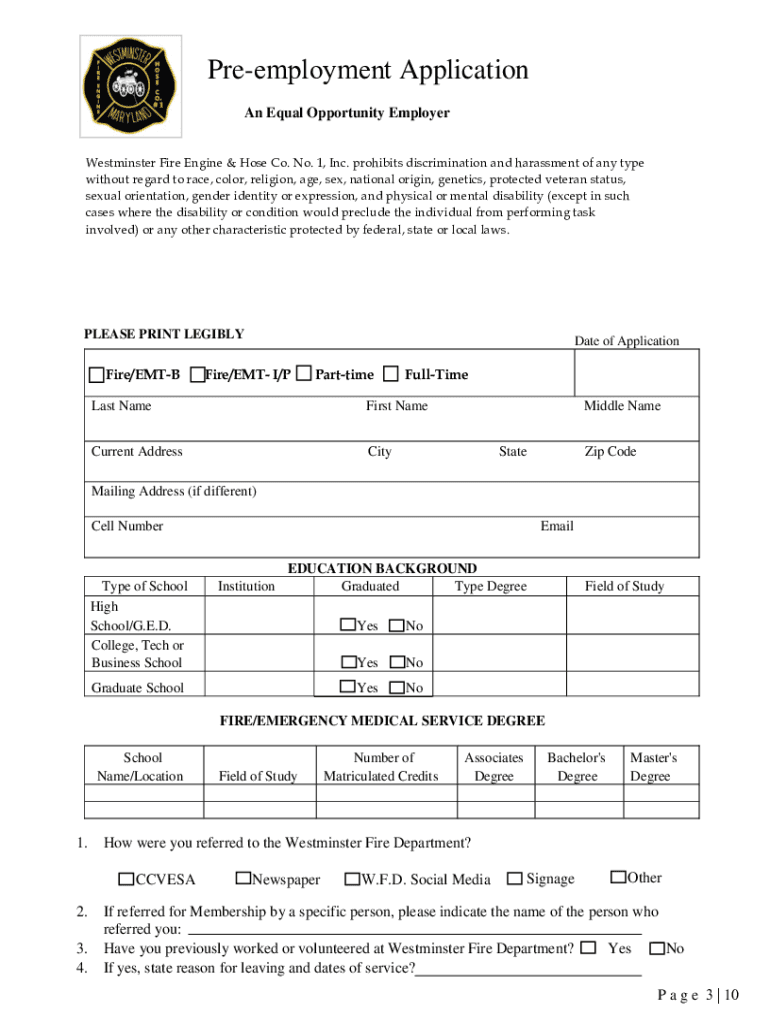
- Click ‘Get Form’ to open the Pre-employment Application in the editor.
- Begin by entering the 'Date of Application' at the top of the form. Ensure that you select your desired position: Fire/EMT-B, Fire/EMT-I/P, Part-time, or Full-Time.
- Fill in your personal information including Last Name, First Name, Middle Name, Current Address, City, State, and Zip Code. If your mailing address differs, provide that as well.
- Complete the 'Education Background' section by listing your educational institutions and degrees obtained. Indicate whether you graduated from each institution.
- In the 'Employment History' section, list all relevant work experience over the past five years. Include company names, job titles, responsibilities, and supervisor contact information.
- Provide three professional references who can vouch for your qualifications. Include their full names, companies, relationships to you, addresses, and phone numbers.
- Review all entered information for accuracy before signing at the bottom of the application. Ensure you understand all conditions outlined in the document.
Start filling out your Pre-employment Application today using our platform for a seamless experience!
Fill out Pre-employment Application - westminstervfd online
It's free
It's free
See more Pre-employment Application - westminstervfd versions
We've got more versions of the Pre-employment Application - westminstervfd form. Select the right Pre-employment Application - westminstervfd version from the list and start editing it straight away!
Got questions?
We have answers to the most popular questions from our customers. If you can't find an answer to your question, please contact us.
Contact us
Does pre-employment mean?
Pre-employment screening involves gathering all the information required to make a good hire. This includes identifying candidates that meet predetermined job qualifications and verifying the information they provide. The pre-employment screening process spans from application review to the final hiring decision.
What does pre-employment mean?
adjective. preemployment ˌprē-im-ˈplȯi-mənt. variants or pre-employment. : existing or occurring before employment.
What is a pre-employment requirement?
Pre-employment requirements refer to those a prospective employer requires from a job applicant prior to being hired or engaged to work.
Can I say no to a pre-employment drug test?
If you refuse a pre-employment drug test, the employer can refuse to hire you, even if you are the most qualified candidate. In other words, the employer has the right to implement a drug testing policy and, in most situations, has the final say regarding what happens when you dont take the test as requested.
How to pass a pre-employment assessment?
9 Top Tips to Pass Your Pre-Employment Assessment Research the Job Role. Check System Requirements Before the Test. Stay Calm to Improve Your Test Performance. Tailor Your Answers to the Job Context. Read All Questions Carefully to Avoid Mistakes. Be Authentic and Professional in Your Responses.
Security and compliance
At DocHub, your data security is our priority. We follow HIPAA, SOC2, GDPR, and other standards, so you can work on your documents with confidence.
Learn more




