Nbce national examiners transcript request 2026

Get Form
nbce login Preview on Page 1

Here's how it works

01. Edit your nbce login online
Type text, add images, blackout confidential details, add comments, highlights and more.
02. Sign it in a few clicks
Draw your signature, type it, upload its image, or use your mobile device as a signature pad.
03. Share your form with others
Send mynbce login via email, link, or fax. You can also download it, export it or print it out.

How to use or fill out nbce national examiners transcript request with our platform

Form edit decoration
9.5
Ease of Setup
DocHub User Ratings on G2
9.0
Ease of Use
DocHub User Ratings on G2
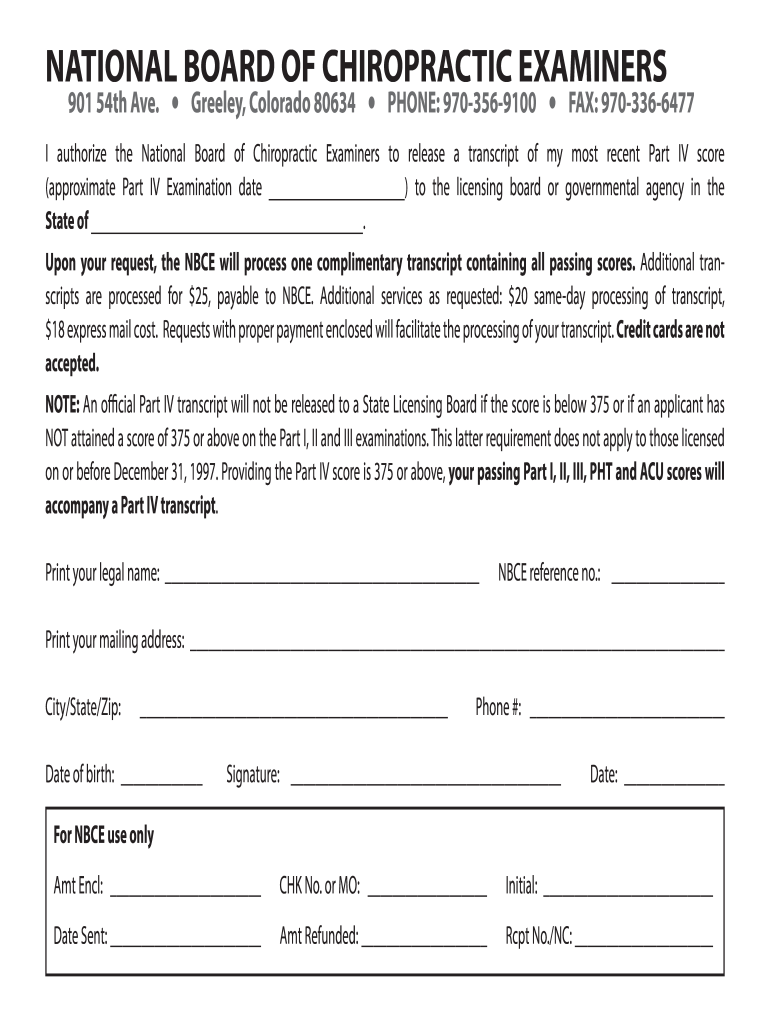
  1. Click ‘Get Form’ to open the nbce national examiners transcript request in the editor.
  2. Begin by entering your legal name in the designated field. This ensures that your transcript is accurately associated with your identity.
  3. Next, input your NBCE reference number. This unique identifier helps streamline the processing of your request.
  4. Fill in your complete mailing address, including city, state, and zip code. This information is crucial for delivering your transcript.
  5. Provide your date of birth and phone number. These details may be used for verification purposes.
  6. Sign and date the form at the bottom. Your signature authorizes the release of your transcript to the specified licensing board or agency.
  7. If applicable, include payment details for any additional services requested, such as same-day processing or express mail.

Start using our platform today to easily fill out and submit your nbce national examiners transcript request for free!

See more nbce national examiners transcript request versions

We've got more versions of the nbce national examiners transcript request form. Select the right nbce national examiners transcript request version from the list and start editing it straight away!
Versions Form popularity Fillable & printable
2016 4.2 Satisfied (28 Votes)
2013 4 Satisfied (51 Votes)
be ready to get more

Complete this form in 5 minutes or less

Get form

Got questions?

We have answers to the most popular questions from our customers. If you can't find an answer to your question, please contact us.
Contact us
NBCE SCORES AVAILABLE ONLINE The National Board of Chiropractic Examiners (NBCE) post scores online. To access your grades, login to your personal MyNBCE account at .
What is a passing score? A passing score for Part I of the NBCE is a scaled score of 375.
Yes, you can view your results interactively by logging into your MyNBME account and selecting the Registration ID for the Self-Assessment that you would like to view. Clicking on the View Your Results Interactively button will launch the interactive results for a completed exam outside of Self-Assessment Insights.
Requesting a Transcript of USMLE Scores To obtain your USMLE and/or NBME Parts transcript or have it sent to a third party, you must contact FSMB and pay the associated fee.
Processing Time USMLE, SPEX, FLEX transcripts are processed and sent to recipients very quickly usually within 24 hours from the time you submit the transcript order. Your transcripts may go out the same day the order is submitted. NBME Parts transcripts require additional time to process.
be ready to get more

Complete this form in 5 minutes or less

Get form

People also ask

Paying for the USMLE Transcript The NBME or ECFMG (for IMG residency) charges a fee of $80 (and tax where applicable) for sending USMLE transcripts to the programs you designated.
Please email support@nbce.org or call 800-964-6223 for assistance. We will need to update your email. Enter your NBCE ID or Email Address and Password below to log in.

nbce transcript request