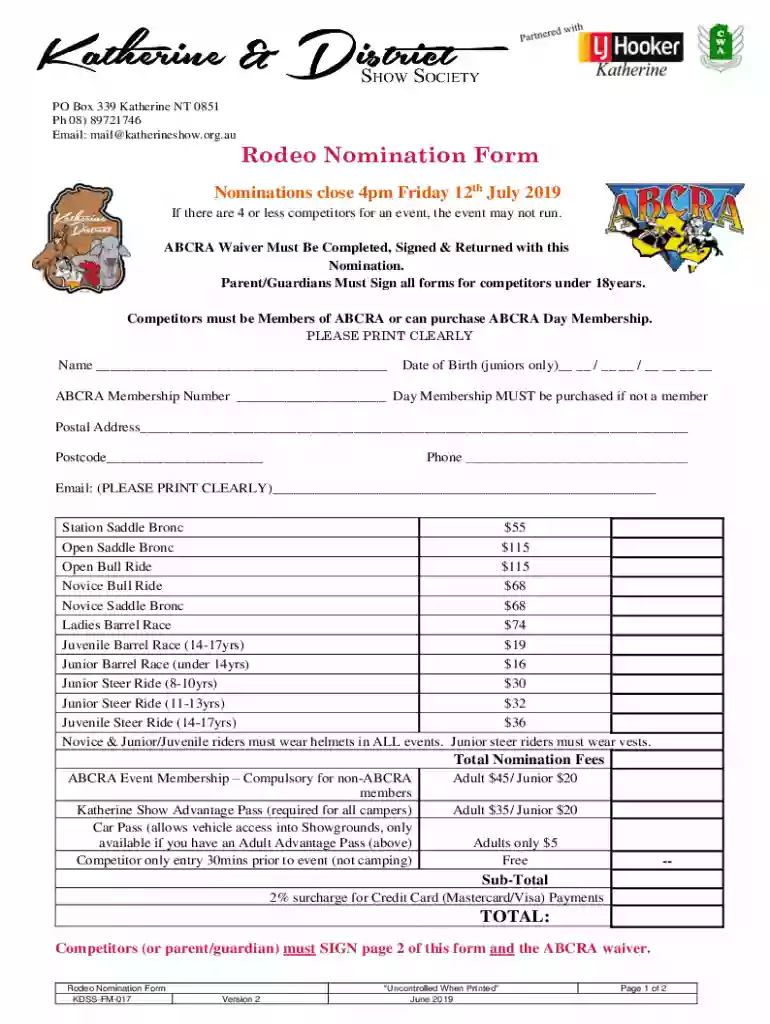
Nomination Form - Katherine Show Society - katherineshow org 2026

Get Form
Nomination Form - Katherine Show Society - katherineshow org Preview on Page 1

Here's how it works

01. Edit your form online
Type text, add images, blackout confidential details, add comments, highlights and more.

02. Sign it in a few clicks
Draw your signature, type it, upload its image, or use your mobile device as a signature pad.

03. Share your form with others
Send it via email, link, or fax. You can also download it, export it or print it out.

How to use or fill out Nomination Form - Katherine Show Society - katherineshow org

Form edit decoration
9.5
Ease of Setup
DocHub User Ratings on G2
9.0
Ease of Use
DocHub User Ratings on G2
  1. Click ‘Get Form’ to open it in the editor.
  2. Begin by filling in your name clearly in the designated field. Ensure that all information is legible.
  3. For junior competitors, enter your date of birth in the specified format. This is crucial for age verification.
  4. Input your ABCRA Membership Number. If you are not a member, remember to select and purchase a Day Membership.
  5. Complete your postal address and postcode accurately to ensure proper communication.
  6. Provide your phone number and email address, ensuring they are printed clearly for contact purposes.
  7. Select the events you wish to participate in by checking the appropriate boxes and entering the corresponding fees.
  8. Calculate your total nomination fees, including any additional charges like membership or car passes, and input this amount in the designated field.
  9. Sign page 2 of the form along with the ABCRA waiver. If under 18, ensure a parent or guardian signs as well.

Start using our platform today to fill out your nomination form quickly and efficiently!

See more Nomination Form - Katherine Show Society - katherineshow org versions

We've got more versions of the Nomination Form - Katherine Show Society - katherineshow org form. Select the right Nomination Form - Katherine Show Society - katherineshow org version from the list and start editing it straight away!
Versions Form popularity Fillable & printable
2019 4.5 Satisfied (42 Votes)
2016 4.2 Satisfied (52 Votes)
be ready to get more

Complete this form in 5 minutes or less

Get form

Got questions?

We have answers to the most popular questions from our customers. If you can't find an answer to your question, please contact us.
Contact us

Microsoft Word doesn’t have signing tools to create valid electronic signatures and enforceable forms. Luckily, DocHub is an online eSignature-compliant editor that works with various file formats, including .doc files. Sign in to your account and add the Word version of your Nomination Form - Katherine Show Society - katherineshow org from your device and cloud, or URL - our editor will automatically turn it into an editable PDF. Make all required alterations in your document and click Sign to create your own legally-binding eSignature. There are four signing methods from which to choose.

Having a swift editing system like DocHub, you do not need anything but a browser and internet connection to modify your Nomination Form - Katherine Show Society - katherineshow org online easily. Add your file or find the appropriate form in DocHub’s catalog, open our editor with a single click, and complete it digitally. To revise your forms at any time, sign up a free account with DocHub.

Weve got five awesome categories to spark your creativity Agriculture, Horticulture, Cattle, Poultry, and Craft.
The rodeo is both days and will commence from 5:30pm.
A $20 camping fee will apply to stay at the Showgrounds next year. Dont forgetyoull need to purchase both a Show ticket AND a camping ticket to secure your spot! Got questions? docHub out to us at 📧 mail@katherineshow.org.au.

Security and compliance

At DocHub, your data security is our priority. We follow HIPAA, SOC2, GDPR, and other standards, so you can work on your documents with confidence.

Learn more
ccpa2
pci-dss
gdpr-compliance
hipaa
soc-compliance