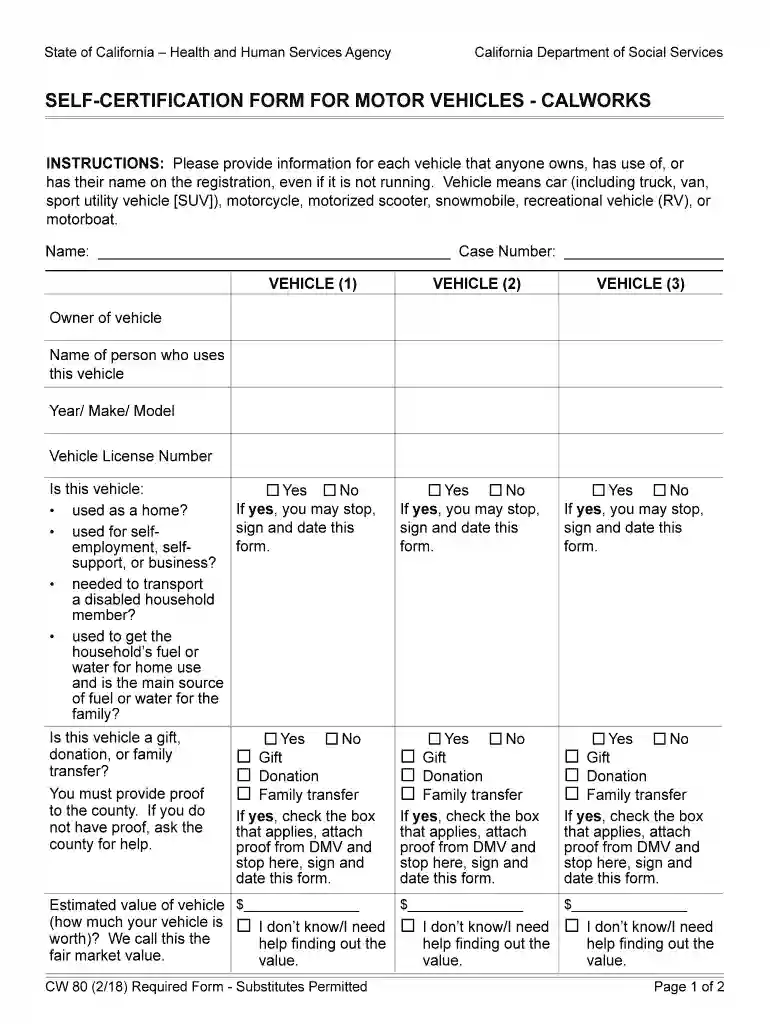
Cw 80 form 2026

Get Form
vehicle vehicles Preview on Page 1

Here's how it works

01. Edit your vehicle vehicles online
Type text, add images, blackout confidential details, add comments, highlights and more.

02. Sign it in a few clicks
Draw your signature, type it, upload its image, or use your mobile device as a signature pad.

03. Share your form with others
Send cw80 form via email, link, or fax. You can also download it, export it or print it out.

How to use or fill out cw 80 form with our platform

Form edit decoration
9.5
Ease of Setup
DocHub User Ratings on G2
9.0
Ease of Use
DocHub User Ratings on G2
  1. Click ‘Get Form’ to open the cw 80 form in the editor.
  2. Begin by entering your name and case number at the top of the form. This information is essential for identification.
  3. For each vehicle, fill in the owner’s name, the person who uses the vehicle, and details such as year, make, model, and license number.
  4. Answer the questions regarding the vehicle's usage by selecting 'Yes' or 'No'. If you answer 'Yes' to any question, you can stop there and sign the form.
  5. If applicable, indicate if the vehicle is a gift, donation, or family transfer. Attach proof from DMV if required.
  6. Estimate the fair market value of each vehicle and provide details on how you determined this value.
  7. Finally, declare that all information is true by signing and dating the form at the bottom.

Start filling out your cw 80 form online for free today!

See more cw 80 form versions

We've got more versions of the cw 80 form form. Select the right cw 80 form version from the list and start editing it straight away!
Versions Form popularity Fillable & printable
2018 4.8 Satisfied (175 Votes)
2015 4.2 Satisfied (58 Votes)
be ready to get more

Complete this form in 5 minutes or less

Get form

Got questions?

We have answers to the most popular questions from our customers. If you can't find an answer to your question, please contact us.
Contact us
The CW 61 is used by ECs to determine if a client has a medical condition that would exempt him/her from CWES activities or limit his/her participation. The EC will complete the county use section of the CW 61 and check the box indicating which type of provider must complete the form.
Self-certification is when an employee provides a personal note explaining their reasons for being off work sick. Employees wont need a private certificate or doctors note for this type of short-term absence. Instead, theyll need to say how they were ill and if theyre well enough to do their usual job.

Security and compliance

At DocHub, your data security is our priority. We follow HIPAA, SOC2, GDPR, and other standards, so you can work on your documents with confidence.

Learn more
ccpa2
pci-dss
gdpr-compliance
hipaa
soc-compliance
be ready to get more

Complete this form in 5 minutes or less

Get form