




Here's how it works



How to use or fill out sts participant contact form with our platform

- Click ‘Get Form’ to open the sts participant contact form in the editor.
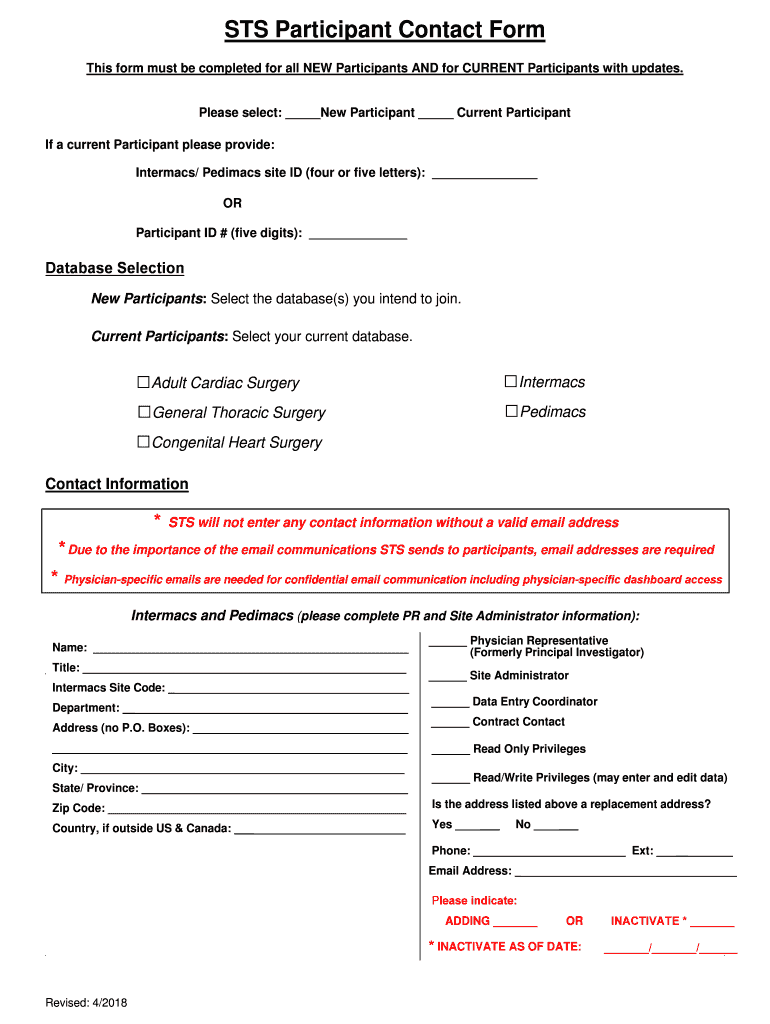
- Begin by selecting whether you are a New Participant or a Current Participant. This is crucial for processing your information correctly.
- If you are a Current Participant, provide your Intermacs/Pedimacs site ID or Participant ID number in the designated fields.
- Next, select the database(s) you intend to join if you are a New Participant, or confirm your current database as a Current Participant by checking the appropriate boxes.
- Fill out your contact information. Ensure that you enter a valid email address, as it is required for communication and access to dashboards.
- Complete the sections for name, title, and site code. Indicate your role by checking the relevant boxes such as Physician Representative or Site Administrator.
- Provide your complete address (no P.O. Boxes), including city, state/province, and zip code. If applicable, indicate if this is a replacement address.
- Finally, include your phone number and specify if you are adding or inactivating your participation status. If inactivating, provide the effective date.
Start using our platform today to easily fill out and manage your sts participant contact form for free!
It's free
See more sts participant contact form versions
| Versions | Form popularity | Fillable & printable |
|---|---|---|
| 2018 | 4.8 Satisfied (175 Votes) |
Got questions?
How can I send my sts participant contact form from Google Drive for signing?
If you regularly work with documents stored in your Google Drive, DocHub is a perfect solution for you to easily and quickly complete, adjust, and approve them. This editor integrates properly with Google apps, so you can export your sts participant contact form from your Google Drive to the editor without the need of downloading and re-uploading it. Right-click on your document, choose Open With → DocHub PDF Sign and Edit. In our editor, add and assign Signature Fields for all parties involved, then click on the Menu option above → Send → choose how you want to share your form.
How do you create an e-signature for the sts participant contact form on iOS?
Apart from an extensive toolset for editing PDFs on mobile devices, DocHub allows you to sign your sts participant contact form along the way. Open our editor in your web browser, make changes using DocHub’s toolset, and finish your editing by eSigning the completed form.
What is STS registry abstraction?
What does a cardiac data abstractor do?
Security and compliance
At DocHub, your data security is our priority. We follow HIPAA, SOC2, GDPR, and other standards, so you can work on your documents with confidence.
Learn more




