Type text, add images, blackout confidential details, add comments, highlights and more.
02. Sign it in a few clicks
Draw your signature, type it, upload its image, or use your mobile device as a signature pad.
03. Share your form with others
Send it via email, link, or fax. You can also download it, export it or print it out.
How to use or fill out the Academic Program Declaration or Change Form with our platform
Ease of Setup
DocHub User Ratings on G2
Ease of Use
DocHub User Ratings on G2
Click ‘Get Form’ to open it in the editor.
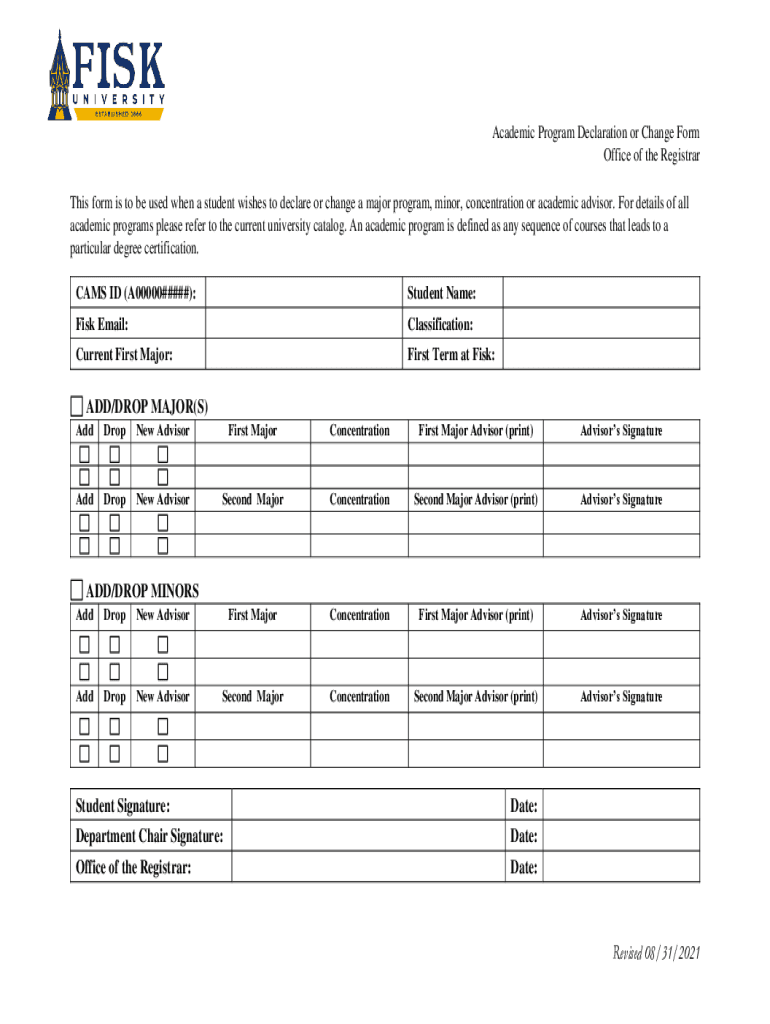
Begin by entering your CAMS ID, Student Name, and Fisk Email at the top of the form. This information is essential for identification purposes.
Indicate your Classification and Current First Major. This helps the registrar understand your academic standing.
Fill in your First Term at Fisk to provide context for your academic journey.
For adding or dropping majors, select the appropriate options under ADD/DROP MAJOR(S). Specify any new advisors and ensure you print their names where required.
Repeat the process for minors under ADD/DROP MINORS, following similar steps as above.
Finally, sign and date the form along with your department chair's signature before submission to the Office of the Registrar.
Start using our platform today to streamline your form completion process for free!
Fill out fisk wp-contentuploadsAcademic Program Declaration or Change Form Office of the online It's free
See more fisk wp-contentuploadsAcademic Program Declaration or Change Form Office of the versions
We've got more versions of the fisk wp-contentuploadsAcademic Program Declaration or Change Form Office of the form. Select the right fisk wp-contentuploadsAcademic Program Declaration or Change Form Office of the version from the list and start editing it straight away!
How can I change my major? Access the change on the Academic Program Declaration/Change Form on the Registrars Office. It is required that you meet with an advisor in your intended new major before submitting the form to ensure your major/minor selection meets your career goals as well as abides by University policy.
How to fill out EPA declaration form?
0:18 3:22 Name make and model are also required and can be found on the EPA. Sticker. If youre using anMoreName make and model are also required and can be found on the EPA. Sticker. If youre using an independent commercial importer ICI youll need to fill in the relevant. Information in box 8.
What is Fisk University known for academically?
All major changes for prospective and newly-admitted students must be submitted through the major change request form which can be found in the students application portal. *Currently enrolled MSU students must contact their academic department to change their major.
Can I change my major right after being accepted?
Its completely normal to be concerned about selecting the right major, and many students face this dilemma. The good news is that, yes, you can change your major after being accepted into college. In fact, its pretty common for students to change their major during their college years, sometimes even multiple times.
Do I have to start over if I change my major?
However, if you are changing to a major in a different field, you might have to start over as far as taking classes toward this new major. This might put you in a position where taking an extra semester is necessary to graduate. Not only will this require extra time, but this will also cost extra tuition money.
Related Searches
Fisk add drop formFisk handbookFisk bulletinFisk research symposiumStudy away form fisk universityJubilee Hall FiskFisk University DivisionFisk university application portal login
Security and compliance
At DocHub, your data security is our priority. We follow HIPAA, SOC2, GDPR, and other standards, so you can work on your documents with confidence.
Cookie consent notice
This site uses cookies to enhance site navigation and personalize your experience.
By using this site you agree to our use of cookies as described in our Privacy Notice.
You can modify your selections by visiting our Cookie and Advertising Notice.