Deakin study plan students 2026

Get Form
deakin study plan Preview on Page 1

Here's how it works

01. Edit your deakin study plan online
Type text, add images, blackout confidential details, add comments, highlights and more.
02. Sign it in a few clicks
Draw your signature, type it, upload its image, or use your mobile device as a signature pad.
03. Share your form with others
Send au deakin study plan via email, link, or fax. You can also download it, export it or print it out.

How to use or fill out deakin study plan students with our platform

Form edit decoration
9.5
Ease of Setup
DocHub User Ratings on G2
9.0
Ease of Use
DocHub User Ratings on G2
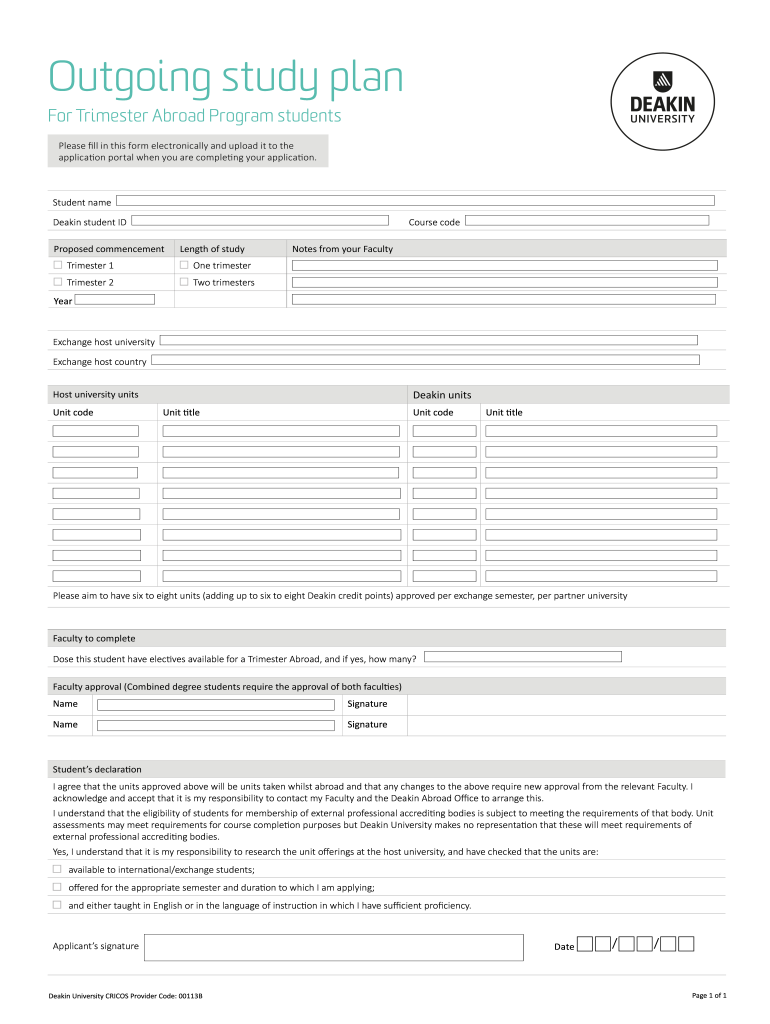
  1. Click ‘Get Form’ to open the deakin study plan students document in the editor.
  2. Begin by entering your Student Name and Deakin Student ID in the designated fields. This information is crucial for identifying your application.
  3. Fill in the Course Code and Proposed Commencement date. Select whether you are applying for Trimester 1 or Trimester 2, and indicate the Length of Study (one or two trimesters).
  4. In the 'Exchange Host University' and 'Exchange Host Country' sections, provide the relevant details about where you plan to study abroad.
  5. List the Deakin units you wish to take alongside their corresponding Host University units. Ensure that you aim for six to eight units totaling six to eight Deakin credit points per semester.
  6. The Faculty section requires input on whether you have electives available for a Trimester Abroad. Make sure both faculties approve if you're a combined degree student.
  7. Complete your declaration by acknowledging your responsibilities regarding unit approvals and research on host university offerings. Sign and date the form at the end.

Start using our platform today to streamline your deakin study plan submission process for free!

See more deakin study plan students versions

We've got more versions of the deakin study plan students form. Select the right deakin study plan students version from the list and start editing it straight away!
Versions Form popularity Fillable & printable
2019 4.8 Satisfied (43 Votes)
be ready to get more

Complete this form in 5 minutes or less

Get form

Got questions?

We have answers to the most popular questions from our customers. If you can't find an answer to your question, please contact us.
Contact us

Yes, and it’s really easy! DocHub is a web-based PDF editor with advanced document processing features that allow you promptly modify your forms, fill out blank fields and insert new ones for other people to fill out, and create eSignatures in several ways. Import your australia outgoing study plan, provide information as requested, and select how you want to eSign your document - by typing your name, drawing your signature, uploading its image, or using a QR code.

When you edit your australia outgoing study plan program with DocHub, you will not need to look for other software or solutions to sign it. An electronic signature is a component of DocHub’s extensive editing toolset, which enables you to apply changes in your form without jumping between websites. Simply complete your form, double-check the correctness of the information and place your electronic signature at the end to make it submission-ready within minutes.

The Weighted Average Mark (WAM) for a course is calculated as follows: Sum of (number of credit points for unit x mark for unit)/ total number of credit points. For the purposes of the calculation: Only units studied by a student at Deakin University will be included.
Discover how you can make online learning work for you at VU. 10 ways to make an effective study plan. Analyse your individual learning style. Evaluate your current commitments. Plan your study time for each class. Develop a schedule. Set realistic goals. Make study time part of your routine. Plan your breaks.
Deakin publishes a provisional timetable each trimester.

Security and compliance

At DocHub, your data security is our priority. We follow HIPAA, SOC2, GDPR, and other standards, so you can work on your documents with confidence.

Learn more
ccpa2
pci-dss
gdpr-compliance
hipaa
soc-compliance

People also ask

At Deakin, you build your timetable in STAR (which stands for Student Timetable Allocation and Registration). For both on-campus and online units, you will use STAR to enter your timetable preferences and confirm your timetable.
At Deakin, you build your timetable in STAR (which stands for Student Timetable Allocation and Registration). You will use STAR to enter your timetable preferences and confirm your timetable. You will receive an email when STAR is open and its time to select your timetable preferences.
Deakin 2030: Ideas to Impact is the Universitys plan for realising the best future for our communities. Through innovation and excellence in education and research, we generate ideas that enhance social, cultural, economic and environmental wellbeing.
Two trimesters are equal to one full academic year. Typically, students study in Trimester 1 and 2, but the third trimester can offer the opportunity to finish certain degrees sooner. Deakins trimesters run from: March to June (Trimester 1)
GAMSAT GPA Average Score Cutoffs University2021 Entry GAMSAT Average2021 Entry GPA Average Deakin 66.9 6.74 Griffith 67 6.77 Macquarie 65 6.5 UniMelb 69.35* 6.71*7 more rows Jan 13, 2025

cricos study plan abroad students