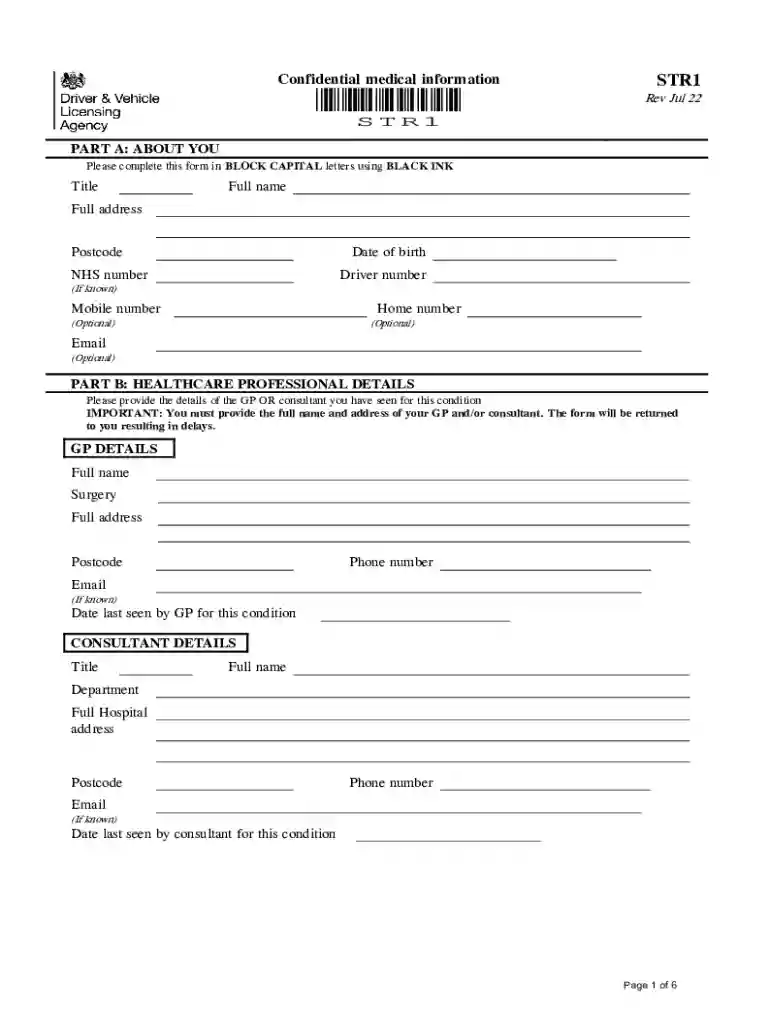
Dvla str1 form 2026

Get Form
str1 form Preview on Page 1

Here's how it works

01. Edit your str1 form online
Type text, add images, blackout confidential details, add comments, highlights and more.

02. Sign it in a few clicks
Draw your signature, type it, upload its image, or use your mobile device as a signature pad.

03. Share your form with others
Send str1 form online via email, link, or fax. You can also download it, export it or print it out.

How to use or fill out dvla str1 form with our platform

Form edit decoration
9.5
Ease of Setup
DocHub User Ratings on G2
9.0
Ease of Use
DocHub User Ratings on G2
  1. Click ‘Get Form’ to open the dvla str1 form in the editor.
  2. Begin with Part A: About You. Fill in your title, full name, address, postcode, date of birth, NHS number, and driver number if known. Ensure all entries are in BLOCK CAPITAL letters using BLACK INK.
  3. Proceed to Part B: Healthcare Professional Details. Provide the full name and address of your GP or consultant. This section is crucial; incomplete information may delay processing.
  4. Answer the medical fitness questions carefully. For each question regarding your health conditions, select 'Yes' or 'No' as applicable and provide additional details where prompted.
  5. Complete the consent section at the end of the form by signing and dating it. This authorizes your healthcare professional to share relevant medical information with DVLA.

Start filling out your dvla str1 form online for free today!

See more dvla str1 form versions

We've got more versions of the dvla str1 form form. Select the right dvla str1 form version from the list and start editing it straight away!
Versions Form popularity Fillable & printable
2022 4.8 Satisfied (120 Votes)
2014 4.1 Satisfied (53 Votes)
be ready to get more

Complete this form in 5 minutes or less

Get form

Got questions?

We have answers to the most popular questions from our customers. If you can't find an answer to your question, please contact us.
Contact us
You must tell DVLA and stop driving for at least one year. Fill in form STR1V and send it to DVLA . The address is on the form. DVLA will assess your case and tell you if you need any tests before you can reapply for your licence.
Inform your insurance company that you have had a TIA. If you do not inform your company, you may find that your insurance is invalid. LGV (Large Goods Vehicle) or PCV (Passenger Carrying Vehicle) holders: If you have had a TIA or a stroke and hold a LGV or PCV licence, tell DVLA immediately.
You do not need to tell us if you have had a TIA if you have a car or motorcycle licence. If you have had a stroke you need to tell us if you have suffered any complications. If you have had a stroke or TIA and hold a bus or lorry licence you must tell DVLA.
You will first need to get the forms D2 and D4. D4 you can download from the DVLA website. You can not download the D2 form due to features that do not print. You must order the D2 form via the DVLA website or contact directly.
You can restart only when your doctor or healthcare professional tells you it is safe. You do not need to tell DVLA if you had a TIA and have recovered.

Security and compliance

At DocHub, your data security is our priority. We follow HIPAA, SOC2, GDPR, and other standards, so you can work on your documents with confidence.

Learn more
ccpa2
pci-dss
gdpr-compliance
hipaa
soc-compliance
be ready to get more

Complete this form in 5 minutes or less

Get form