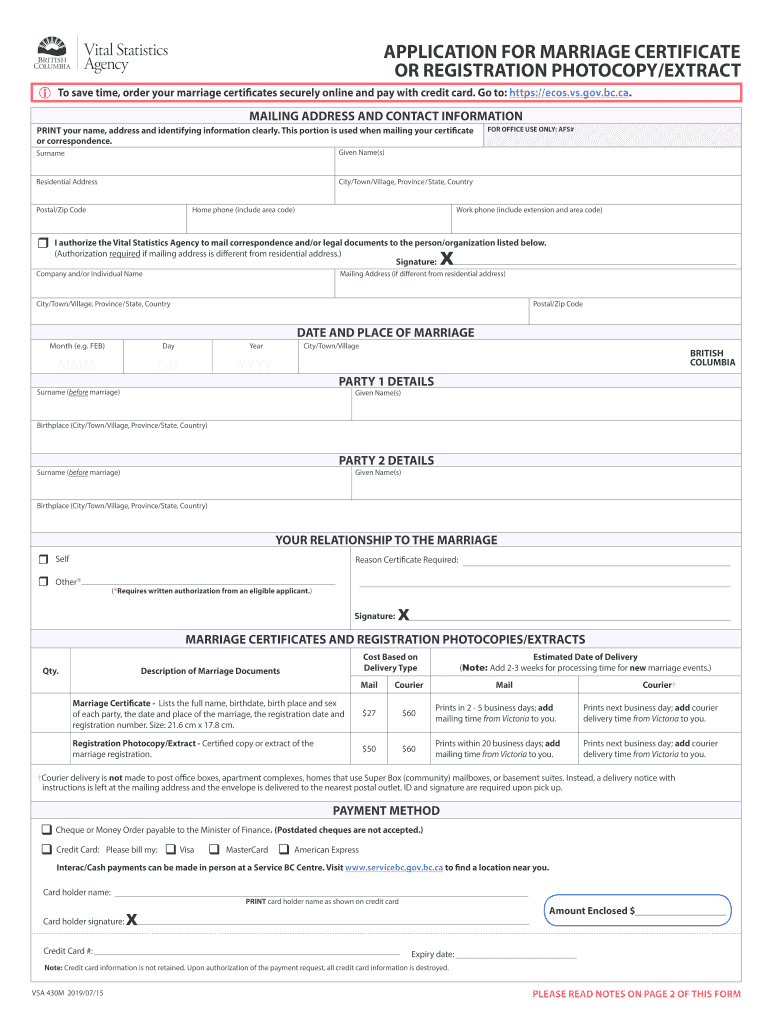
Kansas marriage license worksheet 2026

Get Form
vsa430m Preview on Page 1

Here's how it works

01. Edit your vsa430m online
Type text, add images, blackout confidential details, add comments, highlights and more.
02. Sign it in a few clicks
Draw your signature, type it, upload its image, or use your mobile device as a signature pad.
03. Share your form with others
Send missouri marriage license example via email, link, or fax. You can also download it, export it or print it out.

How to use or fill out kansas marriage license worksheet with our platform

Form edit decoration
9.5
Ease of Setup
DocHub User Ratings on G2
9.0
Ease of Use
DocHub User Ratings on G2
  1. Click ‘Get Form’ to open the kansas marriage license worksheet in the editor.
  2. Begin by filling in your surname and given name(s) in the designated fields. Ensure that all information is printed clearly for accuracy.
  3. Next, provide your residential address, including city, state, and postal code. This information is crucial for mailing your marriage certificate.
  4. Complete the contact information section by entering your work and home phone numbers, including area codes.
  5. In the 'Date and Place of Marriage' section, input the month, day, and year of your marriage along with the city where it took place.
  6. Fill out details for both parties involved in the marriage, including their surnames before marriage and birthplaces.
  7. Indicate your relationship to the marriage and provide a signature where required. If you need documents mailed to a different address, ensure you authorize this by signing.
  8. Finally, select your payment method and complete any necessary payment details before submitting your form.

Start using our platform today to fill out your kansas marriage license worksheet easily and for free!

See more kansas marriage license worksheet versions

We've got more versions of the kansas marriage license worksheet form. Select the right kansas marriage license worksheet version from the list and start editing it straight away!
Versions Form popularity Fillable & printable
2019 4.8 Satisfied (36 Votes)
2015 3.9 Satisfied (29 Votes)
2013 4 Satisfied (44 Votes)
be ready to get more

Complete this form in 5 minutes or less

Get form

Got questions?

We have answers to the most popular questions from our customers. If you can't find an answer to your question, please contact us.
Contact us

Microsoft Word doesn’t have signing tools to generate valid eSignatures and enforceable forms. Fortunately, DocHub is an online eSignature-compliant editor that supports different document formats, such as .doc files. Sign in to your account and upload the Word edition of your vsa 430m from your device and cloud, or URL - our editor will automatically turn it into an editable PDF. Make all essential alterations in your document and click Sign to generate your own legally-binding electronic signature. You will find four signing methods from which to choose.

Having a swift editing system like DocHub, you do not need anything but a web browser and connection to the internet to modify your kansas marriage license worksheet online quickly. Upload your file or find the appropriate form in DocHub’s catalog, open our editor with one click, and complete it digitally. To edit your forms at any time, sign up a free profile with DocHub.

A marriage license is valid for six (6) months from the date it is issued. You may choose any of the 105 counties in the State of Kansas to process your electronic marriage license. You may also get married anywhere within the State of Kansas with the license after it has been issued.
Essentially, a marriage license is an approval from the county clerk stating that you and your partner can legally marry within the state of Kansas. A marriage license is then signed by you, your partner, and the officiant following the wedding ceremony.
After vows are exchanged, the marriage license requires signatures from the couple, the officiant, and typically one or two witnesses. The importance of this step cannot be overstatedwithout these signatures, the marriage isnt legally recognized.

Security and compliance

At DocHub, your data security is our priority. We follow HIPAA, SOC2, GDPR, and other standards, so you can work on your documents with confidence.

Learn more
ccpa2
pci-dss
gdpr-compliance
hipaa
soc-compliance

People also ask

The license must be returned to the court that issued it to you. You must return it within 10 days of your marriage.
Who is Eligible to Get Married? docHubing the minimum age of consent, often 18 years old, or younger with parental permission. Not being closely related by blood to your intended spouse. Possessing the mental capacity to comprehend the marriage commitment and its implications. Being sober during the marriage vows.
What you need to apply an email address. ​these details for each person: full name, including first, middle, and last names. date of birth. gender. place of birth. Social Security number. current address. parents names. a way to pay for the marriage license online, such as a credit card, debit card, or electronic check.

Related links