Type text, add images, blackout confidential details, add comments, highlights and more.

02. Sign it in a few clicks
Draw your signature, type it, upload its image, or use your mobile device as a signature pad.

03. Share your form with others
Send uk documents driving via email, link, or fax. You can also download it, export it or print it out.

How to use or fill out vtg59 with our platform
Ease of Setup
DocHub User Ratings on G2
Ease of Use
DocHub User Ratings on G2
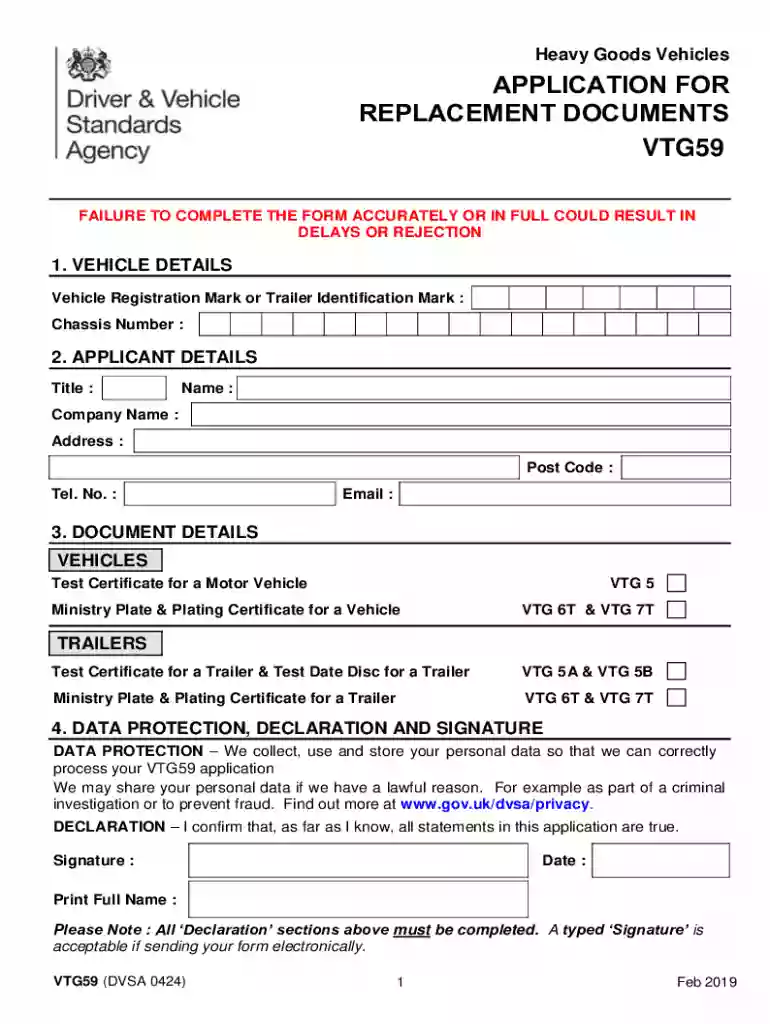
Click ‘Get Form’ to open the VTG59 application in the editor.
Begin by filling out the 'Vehicle Details' section. Enter the Vehicle Registration Mark or Trailer Identification Mark and the Chassis Number accurately.
Next, move to the 'Applicant Details' section. Provide your Title, Name, Company Name, Address, Post Code, Telephone Number, and Email address.
In the 'Document Details' section, select the appropriate documents you are applying for by checking the relevant boxes for vehicles or trailers.
Complete the 'Data Protection, Declaration and Signature' section. Ensure all statements are true and provide your signature and date. A typed signature is acceptable if submitting electronically.
Finally, fill out the 'Payment Details' section by selecting your payment method and providing any necessary information related to your chosen payment option.
Start using our platform today to complete your VTG59 form online for free!
Cookie consent notice
This site uses cookies to enhance site navigation and personalize your experience.
By using this site you agree to our use of cookies as described in our Privacy Notice.
You can modify your selections by visiting our Cookie and Advertising Notice.