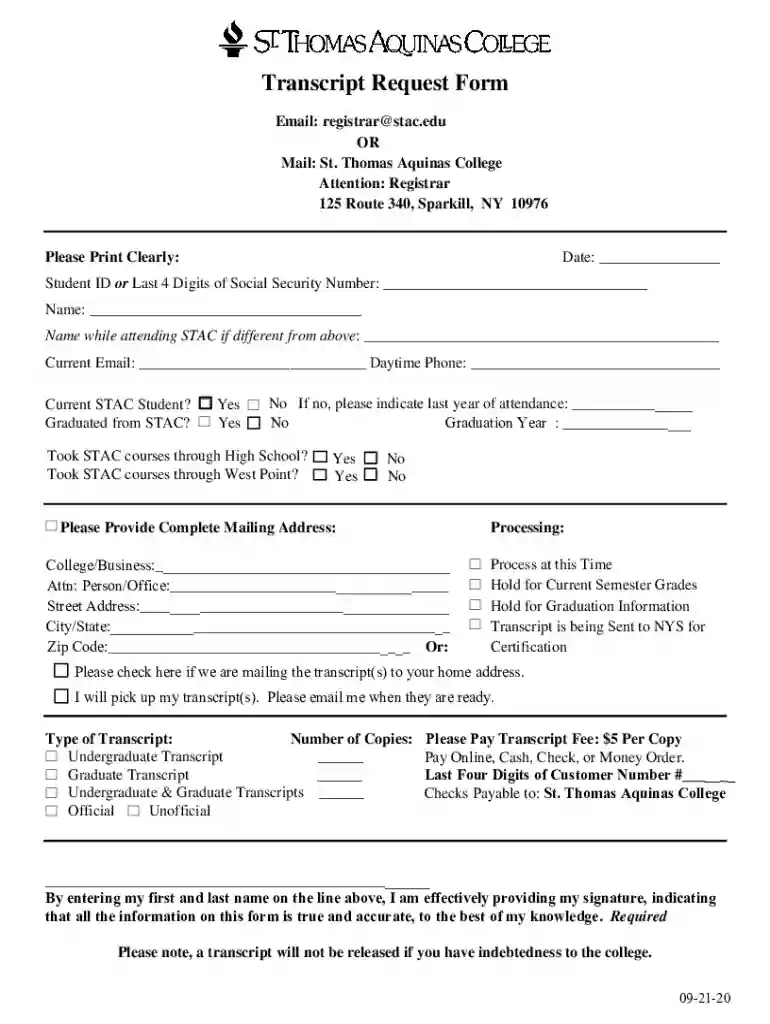
PDF Transcript Request Form - St Thomas Aquinas College 2026

Get Form
aquinas college transcript request Preview on Page 1

Here's how it works

01. Edit your aquinas college transcript request online
Type text, add images, blackout confidential details, add comments, highlights and more.

02. Sign it in a few clicks
Draw your signature, type it, upload its image, or use your mobile device as a signature pad.

03. Share your form with others
Send it via email, link, or fax. You can also download it, export it or print it out.

How to use or fill out PDF Transcript Request Form - St Thomas Aquinas College with DocHub

Form edit decoration
9.5
Ease of Setup
DocHub User Ratings on G2
9.0
Ease of Use
DocHub User Ratings on G2
  1. Click ‘Get Form’ to open the PDF Transcript Request Form in our editor.
  2. Begin by entering the date at the top of the form. This helps track your request.
  3. Fill in your Student ID or the last four digits of your Social Security Number for identification purposes.
  4. Provide your full name and, if applicable, your name while attending STAC. This ensures accurate processing.
  5. Enter your current email address and daytime phone number for communication regarding your request.
  6. Indicate whether you are a current student or if you graduated from STAC, including the graduation year if applicable.
  7. Complete the mailing address section carefully, ensuring all details are correct for delivery.
  8. Select how you would like to receive your transcript and specify the type and number of copies needed.
  9. Finally, provide payment information as required and sign by entering your name at the bottom of the form.

Start using our platform today to easily fill out and submit your Transcript Request Form!

See more PDF Transcript Request Form - St Thomas Aquinas College versions

We've got more versions of the PDF Transcript Request Form - St Thomas Aquinas College form. Select the right PDF Transcript Request Form - St Thomas Aquinas College version from the list and start editing it straight away!
Versions Form popularity Fillable & printable
2020 4.8 Satisfied (100 Votes)
2019 4.5 Satisfied (35 Votes)
be ready to get more

Complete this form in 5 minutes or less

Get form

Got questions?

We have answers to the most popular questions from our customers. If you can't find an answer to your question, please contact us.
Contact us
Send your transcript anywhere. We can send your transcript to any destination worldwide to a college, an employer, or yourself. And we can send it electronically or by mail. If your transcript is not available electronically, your school can prepare it themselves and get it to its destination.
St. Thomas official transcripts can be ordered through the Parchment St. Thomas Online Storefront. If you experience any issues using the Parchment website (i.e. login issues), please visit Parchment Support to report your issue or chat with an agent.
For Windows Users: Usually, this is under the Academic Records or Transcripts tab. Open the Print Dialog: Press Ctrl + P or click on your browsers menu and select Print. Select Destination: Under printing options, change the destination to Save as PDF.
Transcript ordering can currently be done by accessing your transcripts ordering account directly through Parchment. If you have questions regarding the status of your order with Parchment, you can docHub them at (847) 716-3005. Official Transcripts cost $5.00 each with an additional cost for paper mailing services.
Information for current students Log on to your Self-Service Banner, Select the Student tab Order Official Transcripts Request Official Transcript 8x. Wait to receive an email notification from MyCreds prompting you to create a MyCreds account and notifying you that your digital transcript is ready.

People also ask

You can order as many transcripts as you like in one online session using any major credit card. Each transcript costs $10.25. Please contact the STU Registrars office directly by email: registrarsoffice@stu.edu, or by phone: (305) 474-6950.
How To Apply For A Transcript Certificate? Contact your institution. Complete the transcript request form. Submit the transcript certificates to institutions. New school transfer. Application for the college admission. Placements. Mention relevant details. Describe the urgency of the transcript.
PDF transcripts can be delivered electronically and securely within minutes to recipients worldwide. Our transcript print fulfillment solution is the only one that uses a FISMA-certified1 and SOC2-compliant2 high-security facility.

Related links