Ukc entry form 2026

Get Form
ukc performance entry form Preview on Page 1

Here's how it works

01. Edit your ukc performance entry form online
Type text, add images, blackout confidential details, add comments, highlights and more.

02. Sign it in a few clicks
Draw your signature, type it, upload its image, or use your mobile device as a signature pad.

03. Share your form with others
Send official united kennel club fo135fbl via email, link, or fax. You can also download it, export it or print it out.

How to use or fill out the UKC Entry Form with Our Platform

Form edit decoration
9.5
Ease of Setup
DocHub User Ratings on G2
9.0
Ease of Use
DocHub User Ratings on G2
  1. Click ‘Get Form’ to open the UKC Entry Form in the editor.
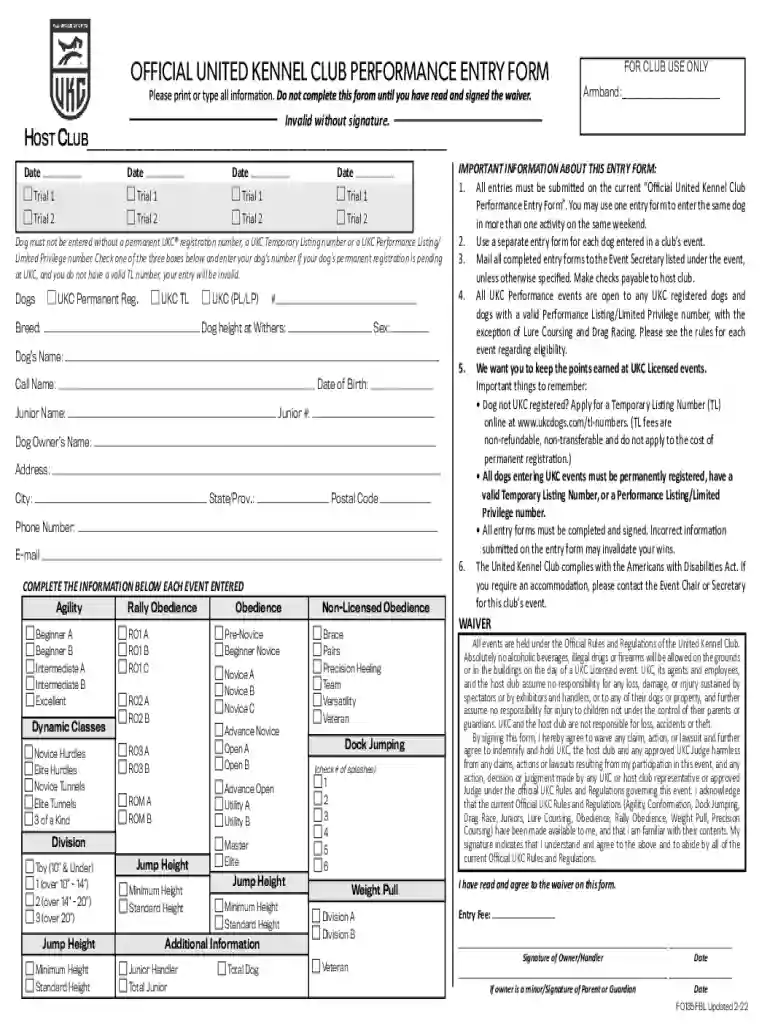
  2. Begin by filling in the 'Host Club' and 'Date' sections at the top of the form. Ensure you provide accurate information as this is crucial for event organization.
  3. Next, indicate your dog's registration status by checking one of the three boxes: UKC Permanent Registration, UKC Temporary Listing, or UKC Performance Listing. Enter your dog's number accordingly.
  4. Complete the dog’s details including breed, height at withers, sex, name, call name, and date of birth. This information is essential for proper identification during events.
  5. Fill out each event entered by selecting appropriate classes such as Agility or Obedience. Be sure to check all relevant boxes based on your dog's qualifications.
  6. Finally, review all entries for accuracy before signing at the bottom of the form. Remember that incorrect information may invalidate your entry.

Start using our platform today to streamline your UKC entry process for free!

See more ukc entry form versions

We've got more versions of the ukc entry form form. Select the right ukc entry form version from the list and start editing it straight away!
Versions Form popularity Fillable & printable
2022 4.8 Satisfied (211 Votes)
2021 4.3 Satisfied (20 Votes)
2020 4.3 Satisfied (38 Votes)
2018 4 Satisfied (27 Votes)
2016 4.4 Satisfied (46 Votes)
2015 4.4 Satisfied (31 Votes)
2014 4.8 Satisfied (41 Votes)
be ready to get more

Complete this form in 5 minutes or less

Get form

Got questions?

We have answers to the most popular questions from our customers. If you can't find an answer to your question, please contact us.
Contact us

Sure, you’ll find numerous apps for this on the web. However, if you need to eSign your ukc entry form without installing additional software, DocHub is the best choice you can make. This robust editor works on mobile devices just as on desktops. Open our editor in any internet browser, register or log in to your account, and start processing your paperwork.

If you edit your ukc performance entry with DocHub, you simply will not need to look for other applications or services to eSign it. An electronic signature is part of DocHub’s substantial editing toolset, which allows you to implement changes in your form without switching between platforms. Just complete your form, double-check the correctness of your information and place your electronic signature at the end to make it submission-ready within a few minutes.

Security and compliance

At DocHub, your data security is our priority. We follow HIPAA, SOC2, GDPR, and other standards, so you can work on your documents with confidence.

Learn more
ccpa2
pci-dss
gdpr-compliance
hipaa
soc-compliance
be ready to get more

Complete this form in 5 minutes or less

Get form