Application Adult 8 9 19 2026

Get Form
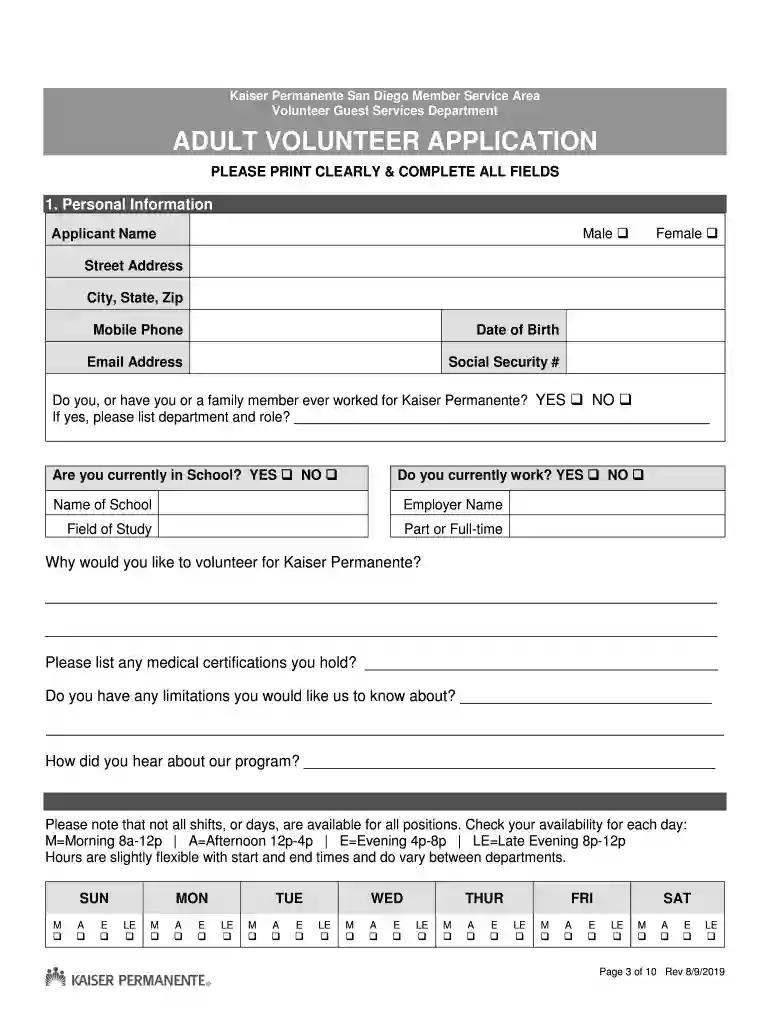
Application Adult 8 9 19 Preview on Page 1

Here's how it works

01. Edit your form online
Type text, add images, blackout confidential details, add comments, highlights and more.

02. Sign it in a few clicks
Draw your signature, type it, upload its image, or use your mobile device as a signature pad.

03. Share your form with others
Send it via email, link, or fax. You can also download it, export it or print it out.

How to use or fill out Application Adult 8 9 19 with our platform

Form edit decoration
9.5
Ease of Setup
DocHub User Ratings on G2
9.0
Ease of Use
DocHub User Ratings on G2
  1. Click ‘Get Form’ to open the Application Adult 8 9 19 in the editor.
  2. Begin by filling out your personal information in Section 1. Include your name, gender, address, phone number, date of birth, and email address. Ensure all fields are completed clearly.
  3. In Section 2, indicate your availability for volunteering by checking the appropriate boxes for each day and shift. This helps match you with suitable opportunities.
  4. Confirm your commitment in Section 3 by selecting 'YES' if you can commit to a year of service. If not, it’s best not to apply.
  5. Choose your preferred location and area of service in Section 4. Review the options carefully and select one location along with up to three areas of interest.
  6. Sign and date the application in Section 5 to affirm that all information is accurate and complete.
  7. Complete the Authorization for Background Check form attached on page 8, ensuring all previous addresses are listed accurately.
  8. Finally, provide emergency contact information in Section 7 before submitting your application via email or scanning it back into our platform.

Start filling out your Application Adult 8 9 19 today using our platform for free!

See more Application Adult 8 9 19 versions

We've got more versions of the Application Adult 8 9 19 form. Select the right Application Adult 8 9 19 version from the list and start editing it straight away!
Versions Form popularity Fillable & printable
2019 4.8 Satisfied (215 Votes)
be ready to get more

Complete this form in 5 minutes or less

Get form

Got questions?

We have answers to the most popular questions from our customers. If you can't find an answer to your question, please contact us.
Contact us
The California Department of Social Services (CDSS) is a state-supervised, county-administered system that provides oversight of programs that affect nearly 3 millions of Californias most vulnerable residentsfoster children and youth, children and families receiving aid through the California Work Opportunities and
The California Department of Social Services is one of 16 departments and offices in the California Health and Human Services Agency. The Department is comprised of more than 5,500 employees who are responsible for the oversight and administration of programs serving Californias most vulnerable residents.
The mission of the California Department of Social Services is to serve, protect, and support the people of California experiencing need in ways that empower wellbeing and disrupt systemic inequities.
A Department of Human Services (DHS) or Ministry of Human Services (MHS) is a national or subnational umbrella agency which is responsible for providing public assistance programs to the population they serve. Various aspects or alternate names include social security, social affairs, human resources and welfare.
The Community Care Licensing Divisions (CCLD) mission is to promote the health, safety, and quality of life of each person in community care through the administration of an effective collaborative regulatory enforcement system. This is accomplished by: Promoting strategies to increase voluntary compliance.

Security and compliance

At DocHub, your data security is our priority. We follow HIPAA, SOC2, GDPR, and other standards, so you can work on your documents with confidence.

Learn more
ccpa2
pci-dss
gdpr-compliance
hipaa
soc-compliance
be ready to get more

Complete this form in 5 minutes or less

Get form