National Catholic Society Of Foresters - Better Business Bureau 2026

Get Form
National Catholic Society Of Foresters - Better Business Bureau Preview on Page 1

Here's how it works

01. Edit your form online
Type text, add images, blackout confidential details, add comments, highlights and more.

02. Sign it in a few clicks
Draw your signature, type it, upload its image, or use your mobile device as a signature pad.

03. Share your form with others
Send it via email, link, or fax. You can also download it, export it or print it out.

How to use or fill out National Catholic Society Of Foresters - Better Business Bureau with DocHub

Form edit decoration
9.5
Ease of Setup
DocHub User Ratings on G2
9.0
Ease of Use
DocHub User Ratings on G2
  1. Click ‘Get Form’ to open it in the editor.
  2. Begin by entering your personal information in the designated fields, including your name and date of birth. Ensure accuracy as this information is crucial for processing.
  3. Proceed to the General Risk Questions section. Carefully read each question and select 'Yes' or 'No' as applicable. If you answer 'Yes', be prepared to provide additional details in the subsequent sections.
  4. Continue through the Medical Questions section, providing thorough responses about any medical conditions or treatments. This information is vital for assessing your insurability.
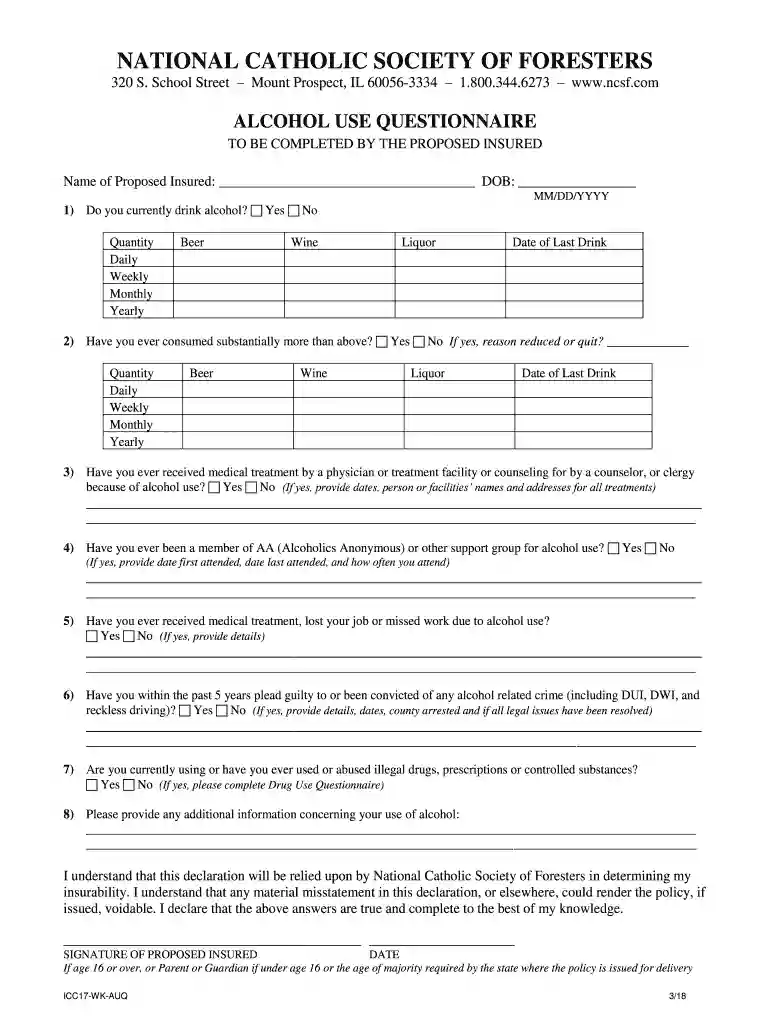
  5. Complete the Alcohol Use Questionnaire by detailing your alcohol consumption habits. Be honest, as this will impact your application.
  6. Review all entries for accuracy before submitting. Utilize our platform's editing features to make any necessary adjustments easily.

Start filling out your form today using our platform for a seamless experience!

See more National Catholic Society Of Foresters - Better Business Bureau versions

We've got more versions of the National Catholic Society Of Foresters - Better Business Bureau form. Select the right National Catholic Society Of Foresters - Better Business Bureau version from the list and start editing it straight away!
Versions Form popularity Fillable & printable
2018 4.8 Satisfied (50 Votes)
be ready to get more

Complete this form in 5 minutes or less

Get form

Got questions?

We have answers to the most popular questions from our customers. If you can't find an answer to your question, please contact us.
Contact us
BBB offers its national and local consumer services online and in person, helping people millions of times each year. BBB is a trusted source for the news media, and its messaging docHubes hundreds of millions more through stories in both traditional and social media.
To verify a companys legitimacy, start by checking official business registries or government databases. Review the companys website for contact details, physical address, and customer reviews. Use trusted third-party platforms to confirm certifications or licenses.
The BBB rating system uses an A+ through F letter-grade scale. The grades represent BBBs degree of confidence that the business is operating in good faith and will resolve customer concerns filed with BBB. BBBs ratings are explained on its Ratings Overview page.
The BBB consists of hundreds of local chapters across the United States and Canada that operate independently but work together through the umbrella organiza- tion called the Council of Better Business Bureaus (CBBB).
The Better Business Bureau (BBB) is a private organization that provides the public with information on businesses and charities. It also handles consumer complaints about firms. The nonprofit bureau has developed a rating system for businesses based on a scale of A+ to F.

Security and compliance

At DocHub, your data security is our priority. We follow HIPAA, SOC2, GDPR, and other standards, so you can work on your documents with confidence.

Learn more
ccpa2
pci-dss
gdpr-compliance
hipaa
soc-compliance

People also ask

The Better Business Bureau (BBB) is part of a private, nonprofit federation operating across the United States and Canada.

Related links