Electrical Permit Form Final 2019 xlsx-2026

Get Form
Electrical Permit Form Final 2019 xlsx Preview on Page 1

Here's how it works

01. Edit your form online
Type text, add images, blackout confidential details, add comments, highlights and more.

02. Sign it in a few clicks
Draw your signature, type it, upload its image, or use your mobile device as a signature pad.

03. Share your form with others
Send it via email, link, or fax. You can also download it, export it or print it out.

How to use or fill out Electrical Permit Form Final 2019 xlsx with our platform

Form edit decoration
9.5
Ease of Setup
DocHub User Ratings on G2
9.0
Ease of Use
DocHub User Ratings on G2
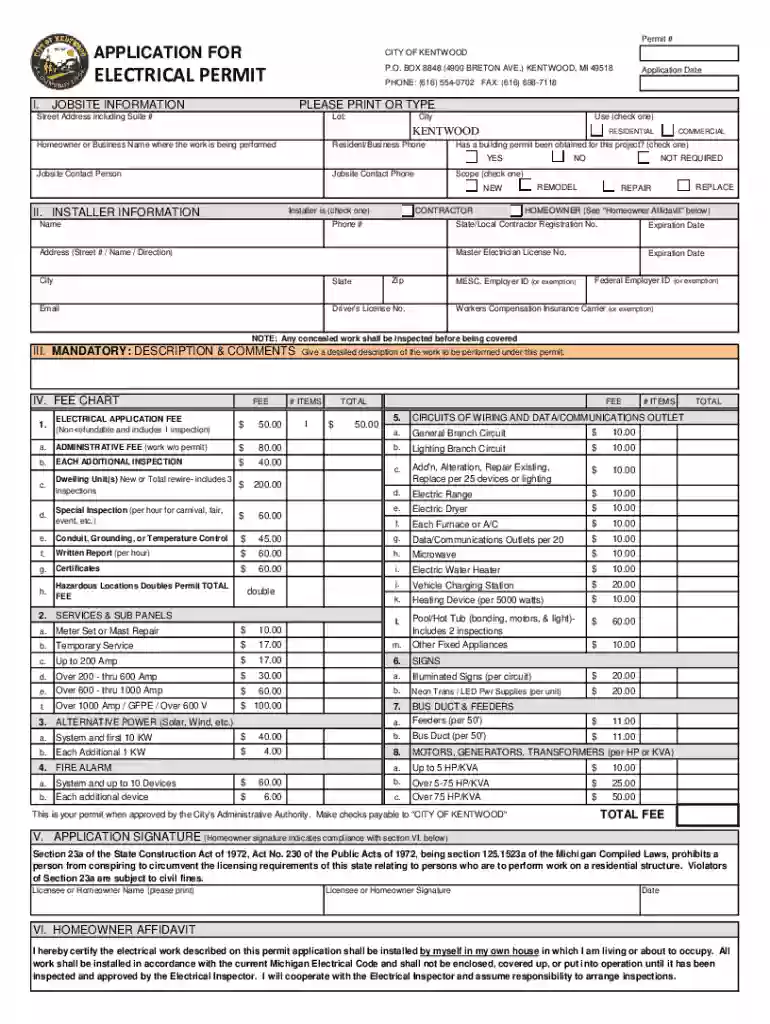
  1. Click ‘Get Form’ to open the Electrical Permit Form Final 2019 xlsx in the editor.
  2. Begin by filling out the 'Application Date' and 'Permit #' fields at the top of the form. Ensure that all information is accurate.
  3. In the 'Jobsite Information' section, provide the street address, city, and select whether it is a residential or commercial project. Include contact details for the job site.
  4. Complete the 'Installer Information' section by checking if you are a contractor or homeowner. Fill in your name, phone number, address, and any required license numbers.
  5. In the 'Mandatory: Description & Comments' section, describe the work to be performed clearly and concisely.
  6. Review the fee chart carefully and calculate your total fees based on your project specifics. Enter this amount in the designated field.
  7. Finally, sign and date the application in the 'Application Signature' section to confirm compliance with regulations.

Start using our platform today to fill out your Electrical Permit Form Final 2019 xlsx easily and for free!

See more Electrical Permit Form Final 2019 xlsx versions

We've got more versions of the Electrical Permit Form Final 2019 xlsx form. Select the right Electrical Permit Form Final 2019 xlsx version from the list and start editing it straight away!
Versions Form popularity Fillable & printable
2019 4.8 Satisfied (132 Votes)
be ready to get more

Complete this form in 5 minutes or less

Get form

Got questions?

We have answers to the most popular questions from our customers. If you can't find an answer to your question, please contact us.
Contact us
These projects are generally limited to low-voltage or simple tasks that dont pose docHub electrical hazards. It includes: Installing or replacing light bulbs, fixtures, and ceiling fans (provided you are not altering the electrical wiring). Installing a new electrical outlet or switch (same type and amperage).
Yes, a homeowner can perform their own electrical work, but there are important considerations to keep in mind: Local Regulations: Many jurisdictions require homeowners to obtain permits for electrical work and may have specific codes that must be followed. Its essential to check local laws and regulations.
First-time users will need to register for a new account. This account will be used to purchase and service permits, including printing your permit and requesting inspections. If you do not wish to create a CORE account, call 615-741-7170 to request an inspection.
The fallout from taking jobs without the appropriate electrical license ranges from steep fines to jail time.
If you dont obtain a building permit when required, several consequences can arise: Fines and Penalties: You may be subject to fines from local authorities for not following building regulations. Stop Work Orders: Authorities can issue a stop work order, halting all construction until the proper permits are obtained.

Security and compliance

At DocHub, your data security is our priority. We follow HIPAA, SOC2, GDPR, and other standards, so you can work on your documents with confidence.

Learn more
ccpa2
pci-dss
gdpr-compliance
hipaa
soc-compliance