




Here's how it works



How to use or fill out party rental invoice template with our platform

- Click ‘Get Form’ to open the party rental invoice template in the editor.
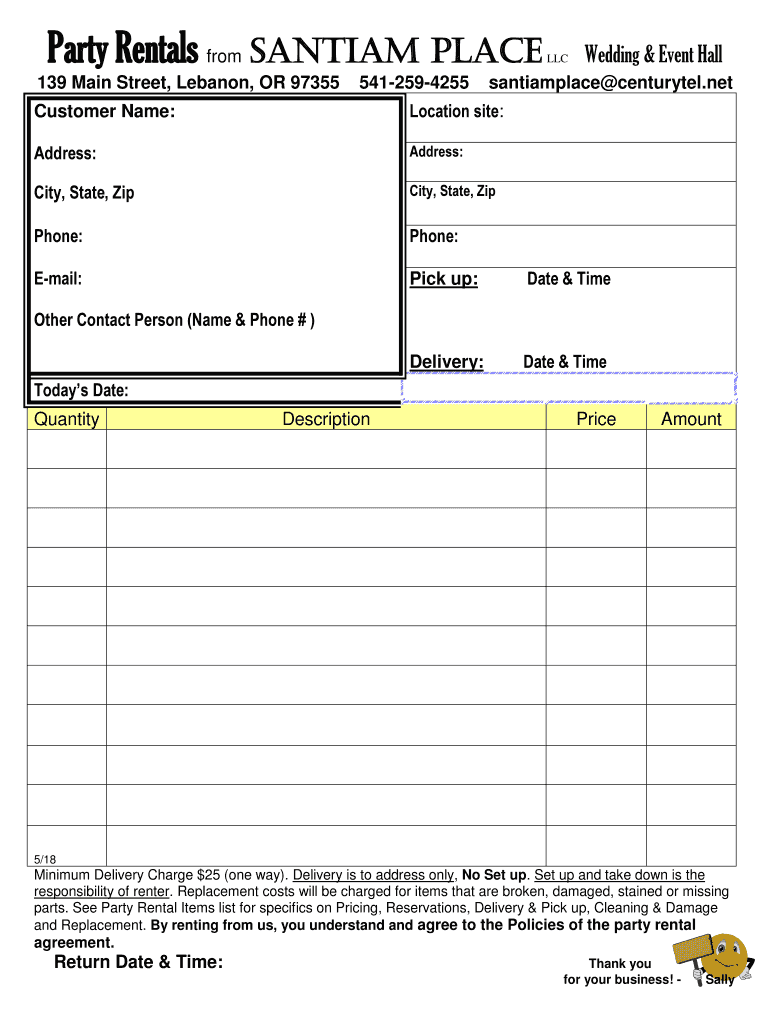
- Begin by entering the customer name and location site in the designated fields. This information is crucial for identifying the rental agreement.
- Fill in the address, city, state, and zip code for both the customer and the delivery location. Accurate details ensure smooth communication and logistics.
- Input the customer's phone number and email address to facilitate contact regarding the rental.
- Specify pick-up and delivery dates and times. This section is vital for scheduling your rental service effectively.
- List any additional contact persons along with their phone numbers if necessary, ensuring all parties are informed.
- Detail the quantity, description, price, and amount for each item being rented. Be sure to refer to the Party Rental Items list for accurate pricing.
- Review all entries for accuracy before finalizing your document. Ensure you understand and agree to the policies outlined in the rental agreement.
Start using our platform today to streamline your party rental invoicing process for free!
It's free
See more party rental invoice template versions
Got questions?
What do I need to sign my party rental invoice template electronically?
Electronic document approval demands a software solution that complies with data security and eSignature laws. DocHub is a perfect tool for that, as it fulfills all the aforementioned requirements. Whatever method you prefer to sign your party rental invoice template in DocHub, your eSignature will be legally binding and court-admissible.
How to manage my party rental invoice template from Gmail?
In case your go-to electronic mail service is Gmail, it is simple to integrate your DocHub editor in your work. Edit your party rental invoice template with DocHub instruments and attach it to your drafts in Gmail. See how straightforward it is to exchange documents and work together with a swift PDF editing solution at hand.
Security and compliance
At DocHub, your data security is our priority. We follow HIPAA, SOC2, GDPR, and other standards, so you can work on your documents with confidence.
Learn more




