Cde form b1 8 2026

Get Form
cde form b1 8 Preview on Page 1

Here's how it works

01. Edit your cde form b1 8 online
Type text, add images, blackout confidential details, add comments, highlights and more.

02. Sign it in a few clicks
Draw your signature, type it, upload its image, or use your mobile device as a signature pad.

03. Share your form with others
Send cde form via email, link, or fax. You can also download it, export it or print it out.

How to use or fill out cde form b1 8 with our platform

Form edit decoration
9.5
Ease of Setup
DocHub User Ratings on G2
9.0
Ease of Use
DocHub User Ratings on G2
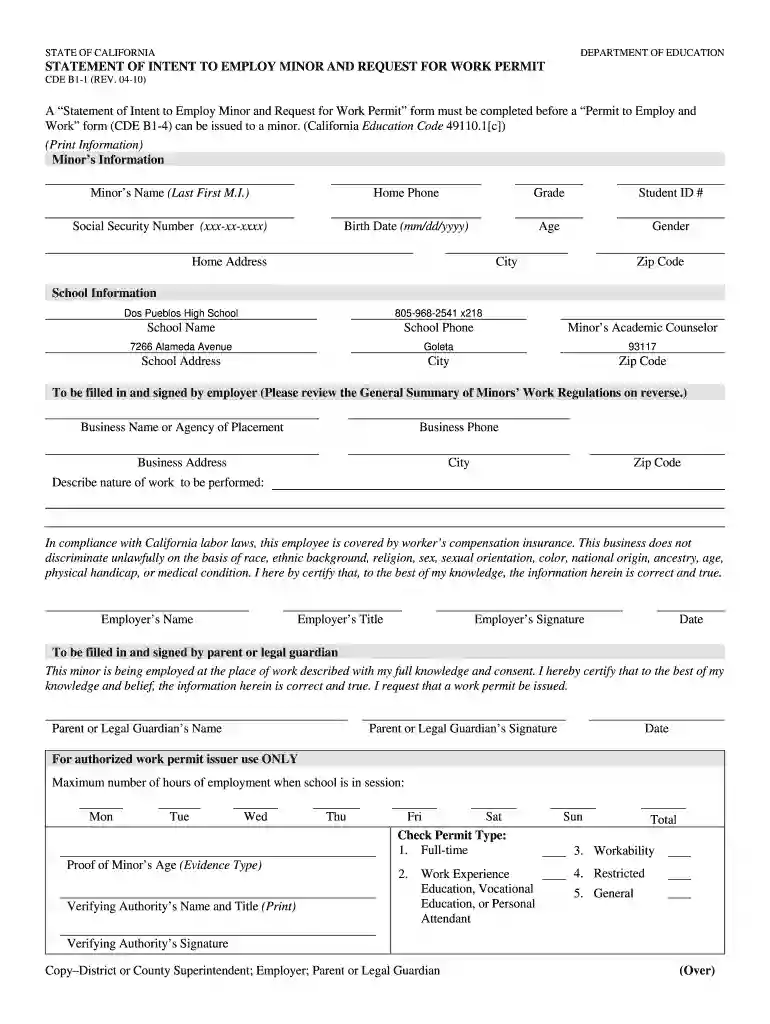
  1. Click ‘Get Form’ to open the cde form b1 8 in the editor.
  2. Begin by entering the minor’s information. Fill in the fields for the minor's name, home phone, grade, student ID number, social security number, birth date, age, gender, and home address.
  3. Next, provide the school information. Enter the school name, phone number, address, city, and zip code. Don’t forget to include the name of the minor’s academic counselor.
  4. In the employer section, input the business name or agency of placement along with its phone number and address. Describe the nature of work to be performed clearly.
  5. Ensure that both employer and parent/legal guardian sections are filled out completely. This includes signatures and dates for verification.
  6. Finally, review all entered information for accuracy before submitting your completed form through our platform.

Start using our platform today to fill out your cde form b1 8 easily and for free!

See more cde form b1 8 versions

We've got more versions of the cde form b1 8 form. Select the right cde form b1 8 version from the list and start editing it straight away!
Versions Form popularity Fillable & printable
2010 4.8 Satisfied (274 Votes)
be ready to get more

Complete this form in 5 minutes or less

Get form

Got questions?

We have answers to the most popular questions from our customers. If you can't find an answer to your question, please contact us.
Contact us
The principal of a private school (including Home Schools) may issue, or designate another administrator in the school to issue work permits to pupils who attend the school by self-docHubing a working knowledge of child labor laws and all laws pertaining to the issuance of work permits.
The FLSA states that minors under 16 may not work more than eight hours per day and 40 hours per week when school is not in session, and they may not work more than 3 hours per day and 18 hours per week when school is in session. It also has laws around the nightly hours that minors under 16 can work.
If you have not already started the EAD application process, you can begin here by creating a USCIS account online and filing Form-I-765. We will mail your work permit to the address you provided in your application if your application is approved.
A school aged employee cannot work more than 12 hours/week (during a school week). A school aged employee cannot work more than 8 hours/day (on a non-school day); A school aged employee cannot work more than 38 hours/week (during a non-school week). A school aged employee cannot work more than 1 shift per day.
Children can only start full-time work once theyve docHubed the minimum school leaving age - they can then work up to a maximum of 40 hours a week. Once someone docHubes 16, you may need to pay them through PAYE .

Security and compliance

At DocHub, your data security is our priority. We follow HIPAA, SOC2, GDPR, and other standards, so you can work on your documents with confidence.

Learn more
ccpa2
pci-dss
gdpr-compliance
hipaa
soc-compliance

People also ask

In most cases it is a two-step process, the minor along with the parent/guardian and employer fill out the B1-1 form and submit to the school local to the minors address. The school district reviews the B1-1 form and issues the B1-4 (Work Permit).

Related links