




01. Edit your ccp 211 online
Type text, add images, blackout confidential details, add comments, highlights and more.

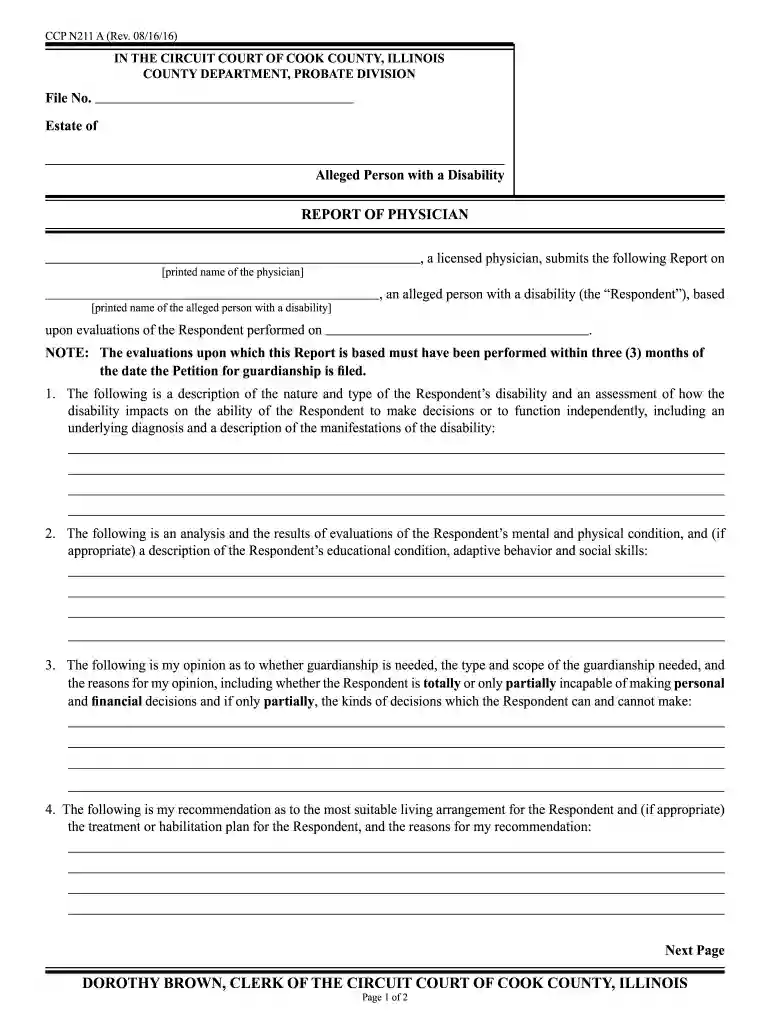
Type text, add images, blackout confidential details, add comments, highlights and more.

Draw your signature, type it, upload its image, or use your mobile device as a signature pad.

Send ccp211 via email, link, or fax. You can also download it, export it or print it out.

Start using our platform today to fill out your ccp 211 form easily and for free!
We've got more versions of the ccp 211 form. Select the right ccp 211 version from the list and start editing it straight away!
| Versions | Form popularity | Fillable & printable |
|---|---|---|
| 2016 | 4.8 Satisfied (165 Votes) |
eSignatures are a great alternative to traditional signing, as they save time, effort, and money people spend on printing, scanning, and paper delivery. You can electronically sign your ccp 211 form pdf utilizing a reliable and powerful online document management tool like DocHub. It complies with main eSignature policies (ESIGN and UETA), so all documents approved there are legally binding and have the same validity as physically signed ones.
You can easily edit and complete your ccp 211 form pdf on any iOS gadget. Open an internet browser of your liking, go to the DocHub website, authorize or create a new account, add your file for editing, and make your required adjustments. Our service is mobile-friendly, so utilizing its features on your smartphone will be a no-brainer, even on the first try.
At DocHub, your data security is our priority. We follow HIPAA, SOC2, GDPR, and other standards, so you can work on your documents with confidence.
Some server components return messages that are not described in this publication. Some of the message might include: Operating system. Database manager.Read more
It is MANDITORY that all students submit their CCP Completed Ticket Form to their clinical instructor on the first day. pdf, 211K). Download Notification ofRead more
The following is a list of forms typically used in a guardianship case (Cook County form designations are noted):. Report CCP-211 form an opinion as toRead more


