Type text, add images, blackout confidential details, add comments, highlights and more.
02. Sign it in a few clicks
Draw your signature, type it, upload its image, or use your mobile device as a signature pad.
03. Share your form with others
Send af3821 via email, link, or fax. You can also download it, export it or print it out.
How to use or fill out form online with our platform
Ease of Setup
DocHub User Ratings on G2
Ease of Use
DocHub User Ratings on G2
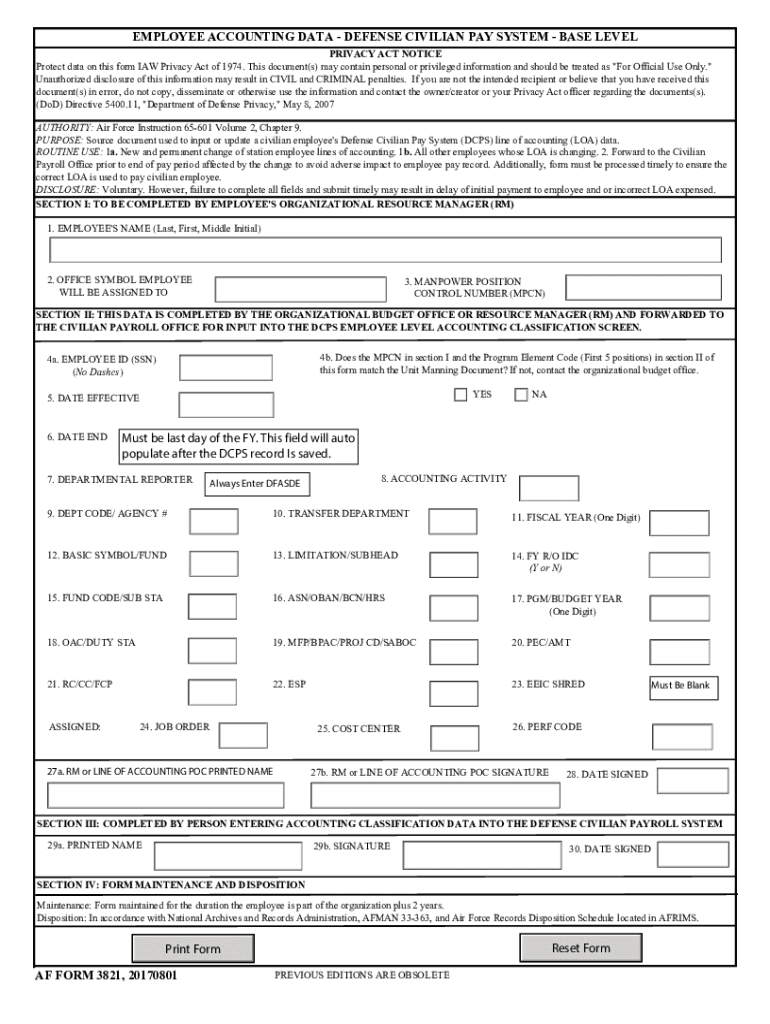
Click ‘Get Form’ to open the EMPLOYEE ACCOUNTING DATA form in the editor.
Begin by filling out Section I, which requires your name, office symbol, and manpower position control number. Ensure accuracy as this information is crucial for payroll processing.
Proceed to Section II. Here, input your employee ID without dashes and confirm that the MPCN matches the Unit Manning Document. If there are discrepancies, contact your organizational budget office.
Complete the remaining fields in Section II, including effective dates and departmental reporter details. Note that some fields may auto-populate based on previous entries.
In Section III, ensure that the person entering accounting classification data fills in their printed name, signature, and date signed accurately.
Finally, review all sections for completeness before submitting. Use the ‘Reset Form’ option if you need to start over or ‘Print Form’ to keep a physical copy.
Start filling out your form online for free today!
Fill out Employee Accounting Data Form online It's free
We've got more versions of the Employee Accounting Data Form form. Select the right Employee Accounting Data Form version from the list and start editing it straight away!
Cookie consent notice
This site uses cookies to enhance site navigation and personalize your experience.
By using this site you agree to our use of cookies as described in our Privacy Notice.
You can modify your selections by visiting our Cookie and Advertising Notice.