Hospitalization Consent Form docx 2026

Get Form
Hospitalization Consent Form docx Preview on Page 1

Here's how it works

01. Edit your form online
Type text, add images, blackout confidential details, add comments, highlights and more.
02. Sign it in a few clicks
Draw your signature, type it, upload its image, or use your mobile device as a signature pad.
03. Share your form with others
Send it via email, link, or fax. You can also download it, export it or print it out.

How to use or fill out Hospitalization Consent Form docx with our platform

Form edit decoration
9.5
Ease of Setup
DocHub User Ratings on G2
9.0
Ease of Use
DocHub User Ratings on G2
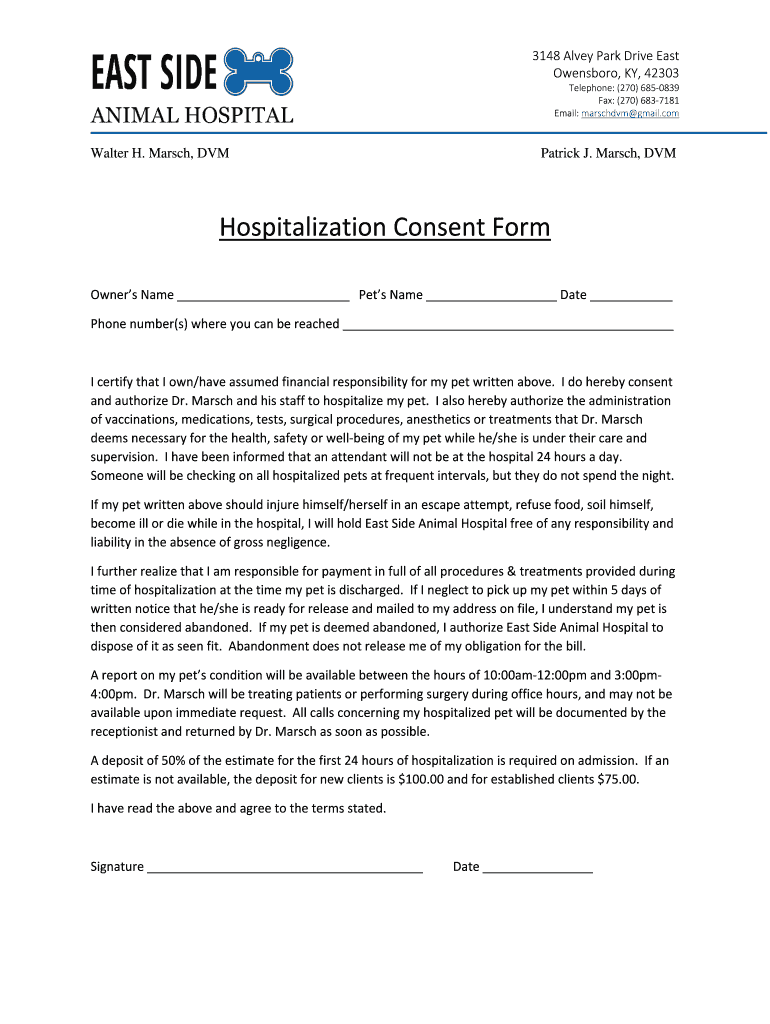
  1. Click ‘Get Form’ to open the Hospitalization Consent Form in the editor.
  2. Begin by entering your name in the 'Owner’s Name' field, followed by your pet's name in the 'Pet’s Name' section.
  3. Provide a contact number where you can be reached during your pet's hospitalization in the designated phone number field.
  4. Read through the consent statement carefully. This section outlines your responsibilities and authorizations regarding your pet's care.
  5. Sign and date the form at the bottom to confirm your agreement with the terms stated.

Start using our platform today for free to complete your Hospitalization Consent Form effortlessly!

See more Hospitalization Consent Form docx versions

We've got more versions of the Hospitalization Consent Form docx form. Select the right Hospitalization Consent Form docx version from the list and start editing it straight away!
Versions Form popularity Fillable & printable
2015 4.8 Satisfied (90 Votes)
be ready to get more

Complete this form in 5 minutes or less

Get form

Got questions?

We have answers to the most popular questions from our customers. If you can't find an answer to your question, please contact us.
Contact us
Write directly to the reader, as though you are explaining the facts in person. Informed consent language should be written in the second person (you), not in the first person (I). Minimize passive voice to the extent possible.
Consent form 1 is for adults and those patients having anaesthetic Consent form 2 is for paediatrics Consent form 3 is for procedures without sedation Consent form 4 should be used when the patients lack capacity and should be completed by the professional doing the procedure.
Drafting tips for preparing consent forms: Use words familiar to the non-medical reader. If possible, keep words to 3 syllables or fewer. Write short, simple, and direct sentences. Keep paragraphs short and limited to one idea. Use active verbs.
I acknowledge that I have been informed of my/ the patients health status, the range of diagnostic procedures and treatments generally available to myself / the patient, the benefits, risks, surgical approximate costs and consequences generally associated with each option, my / the patients right to refuse health

Security and compliance

At DocHub, your data security is our priority. We follow HIPAA, SOC2, GDPR, and other standards, so you can work on your documents with confidence.

Learn more
ccpa2
pci-dss
gdpr-compliance
hipaa
soc-compliance
be ready to get more

Complete this form in 5 minutes or less

Get form