Get the free DOT SP 10656 Shipment approval form - KDHE 2026

Get Form
dot sp 10656 Preview on Page 1

Here's how it works

01. Edit your dot sp 10656 online
Type text, add images, blackout confidential details, add comments, highlights and more.

02. Sign it in a few clicks
Draw your signature, type it, upload its image, or use your mobile device as a signature pad.

03. Share your form with others
Send it via email, link, or fax. You can also download it, export it or print it out.

How to use or fill out Get the free DOT SP 10656 Shipment approval form - KDHE with our platform

Form edit decoration
9.5
Ease of Setup
DocHub User Ratings on G2
9.0
Ease of Use
DocHub User Ratings on G2
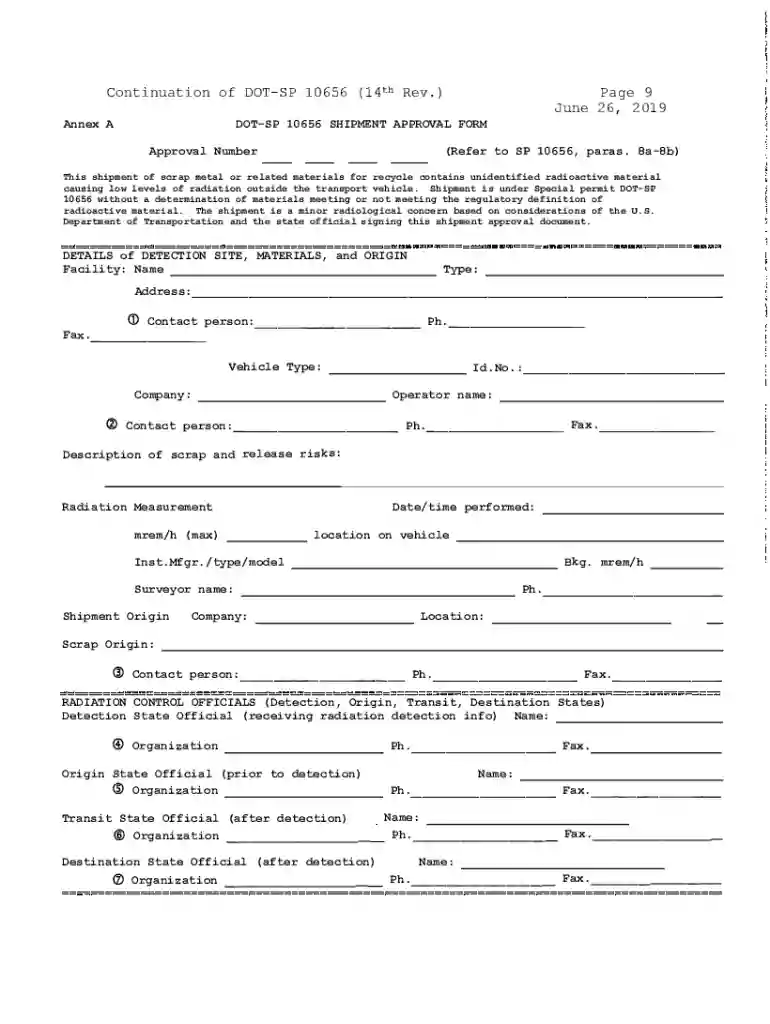
  1. Click ‘Get Form’ to open the DOT SP 10656 Shipment Approval Form in the editor.
  2. Begin by entering the Approval Number at the top of the form, as referenced in SP 10656, paragraphs Ba-Sb.
  3. Fill in the details of the detection site, including Facility Name, Type, and Contact Person information. Ensure you provide accurate phone and fax numbers.
  4. Specify the Vehicle Type (Highway or Rail) and include its ID number along with your company’s address.
  5. Describe the scrap materials and any associated release risks in the designated section to ensure clarity on what is being shipped.
  6. Record radiation measurements, including maximum mrem/h levels and background readings. Include date/time performed and location on vehicle.
  7. Complete sections for Radiation Control Officials by providing names, organizations, phone numbers, and fax details for officials from detection, origin, transit, and destination states.

Start using our platform today to fill out your DOT SP 10656 Shipment Approval Form quickly and efficiently!

See more Get the free DOT SP 10656 Shipment approval form - KDHE versions

We've got more versions of the Get the free DOT SP 10656 Shipment approval form - KDHE form. Select the right Get the free DOT SP 10656 Shipment approval form - KDHE version from the list and start editing it straight away!
Versions Form popularity Fillable & printable
2019 4.8 Satisfied (174 Votes)
2007 4 Satisfied (45 Votes)
be ready to get more

Complete this form in 5 minutes or less

Get form

Got questions?

We have answers to the most popular questions from our customers. If you can't find an answer to your question, please contact us.
Contact us

Sure, and it’s really easy! DocHub is a web-based PDF editor with advanced document management capabilities that allow you quickly modify your forms, fill out empty fields and add new ones for others to fill out, and create eSignatures in several ways. Import your Get the free DOT SP 10656 Shipment approval form - KDHE, give information as required, and choose how you want to eSign your document - by typing your name, drawing your signature, uploading its picture, or using a QR code.

As a comprehensive document editing service, DocHub is available on mobile devices. Open DocHub in your choice of mobile browser and use our smart mobile-friendly toolset to complete your Get the free DOT SP 10656 Shipment approval form - KDHE.

The special permit may be issued to a person who offers for transportation or transports hazardous materials in packagings or a manufacturer or requalifier of packagings for use in the transportation in commerce of hazardous materials.
Even though vehicles being transported by motor vehicle are subject only to 49 CFR 173.220 of the HMRs, they meet the definition of Hazardous material in 49 CFR 171.8 because Vehicle, flammable gas powered and Vehicle, flammable liquid powered are designated as hazardous in 49 CFR 172.101 [UN 3166].

Security and compliance

At DocHub, your data security is our priority. We follow HIPAA, SOC2, GDPR, and other standards, so you can work on your documents with confidence.

Learn more
ccpa2
pci-dss
gdpr-compliance
hipaa
soc-compliance
be ready to get more

Complete this form in 5 minutes or less

Get form